



One-Click system reinstallation script for VPS 中文
- One-click reinstallation to Linux: Supports 19 common distributions.
- One-click reinstallation to Windows: Uses the official original ISO instead of custom images. The script can automatically fetch the ISO link and installs public cloud drivers like
VirtIO. - Supports reinstallation in any direction, i.e.,
Linux to Linux,Linux to Windows,Windows to Windows,Windows to Linux - Automatically configures IP and intelligently sets it as static or dynamic. Supports
/32,/128,gateway outside subnet,IPv6 only,IPv4/IPv6 on different NIC - Specially optimized for low-spec servers, requires less memory than the official netboot
- Uses partition table ID to identify hard drives throughout the process, ensuring no wrong disk is written
- Supports BIOS and EFI boot, and ARM Server
- No homemades image included, all resources are obtained in real-time from mirror sites
If this helped you, you can buy me a milk tea.



- Download
- Feature 1. One-click reinstallation to Linux
- Feature 2. One-click DD Raw image to hard disk
- Feature 3. One-click reboot to Alpine Live OS in-memory system
- Feature 4. One-click reboot to netboot.xyz
- Feature 5. One-click reinstallation to Windows
The original system can be any system listed in the table.
The system requirements for the target system are as follows:
| System | Version | Memory | Disk |
|---|---|---|---|
| 3.19, 3.20, 3.21, 3.22 | 256 MB | 1 GB | |
| 9, 10, 11, 12, 13 | 256 MB | 1 ~ 1.5 GB ^ | |
| Rolling | 256 MB | 1 ~ 1.5 GB ^ | |
 Ubuntu Ubuntu | 16.04 LTS - 24.04 LTS, 25.10 | 512 MB * | 2 GB |
 Anolis Anolis | 7, 8, 23 | 512 MB * | 5 GB |
 Rocky Rocky  Oracle Oracle | 8, 9, 10 | 512 MB * | 5 GB |
| 8, 9, Stream 23 | 512 MB * | 5 GB | |
 CentOS Stream CentOS Stream | 9, 10 | 512 MB * | 5 GB |
| 42, 43 | 512 MB * | 5 GB | |
| 20.03 LTS - 24.03 LTS, 25.09 | 512 MB * | 5 GB | |
 openSUSE openSUSE | Leap 15.6, 16.0, Tumbleweed (Rolling) | 512 MB * | 5 GB |
 NixOS NixOS | 25.05 | 512 MB | 5 GB |
 Arch Arch | Rolling | 512 MB | 5 GB |
 Gentoo Gentoo | Rolling | 512 MB | 5 GB |
 AOSC OS AOSC OS | Rolling | 512 MB | 5 GB |
| Beta | 512 MB | 8 GB | |
 Windows (DD) Windows (DD) | Any | 512 MB | Depends on image |
| Windows (ISO) | Vista, 7, 8.x (Server 2008 - 2012 R2) | 512 MB | 25 GB |
| Windows (ISO) | 10, 11 (Server 2016 - 2025) | 1 GB | 25 GB |
* Indicates installation using cloud images, not traditional network installation.
^ Indicates requiring either 256 MB memory + 1.5 GB disk, or 512 MB memory + 1 GB disk
[!WARNING]
In theory it also supports dedicated servers and PCs
but if you can use IPMI or a USB drive, this script is not recommended.
[!WARNING]
❌ This script does not support OpenVZ or LXC virtual machines.
Please use https://github.com/LloydAsp/OsMutation instead.
 Linux)
For server outside China:
curl -O https://raw.githubusercontent.com/bin456789/reinstall/main/reinstall.sh || wget -O ${_##*/} $_
For server inside China:
curl -O https://cnb.cool/bin456789/reinstall/-/git/raw/main/reinstall.sh || wget -O ${_##*/} $_
[!IMPORTANT] Before proceeding, please disable the 'Real-time protection' feature in
Windows Defender. This feature may preventcertutilfrom downloading any files.
Resolving Script Download Issues on Windows 7
Due to lack of support for TLS 1.2, SHA-256, or outdated root certificates, Windows Vista, 7, and Server 2008 (R2) may not be able to download scripts automatically. Manual downloading is required, as follows:
Use Internet Explorer (enable TLS 1.2 in IE's advanced settings first) to download, or use Remote Desktop to save the following two files into the same directory:
To use, run the downloaded reinstall.bat.
For server outside China:
certutil -urlcache -f -split https://raw.githubusercontent.com/bin456789/reinstall/main/reinstall.bat
For server inside China:
certutil -urlcache -f -split https://cnb.cool/bin456789/reinstall/-/git/raw/main/reinstall.bat
All features can be used on both Linux and Windows.
- on Linux, run
bash reinstall.sh ... - on Windows, first run
cmd, then run.\reinstall.bat ...- If the link in the parameter contains special characters, it should be enclosed in
"", not''.
- If the link in the parameter contains special characters, it should be enclosed in
[!CAUTION]
This feature will erase the entire hard disk of the current system (including other partitions)!
Data is priceless — please think twice before proceeding!
- Username
root. The script prompts for a password. If left blank, a random one is generated. - When installing the latest version, the version number does not need to be specified.
- Maximizes disk space usage: no boot partition (except for Fedora) and no swap partition.
- Automatically selects different optimized kernels based on machine type, such as
CloudorHWEkernels. - When installing Red Hat, you must provide the
qcow2image link obtained from https://access.redhat.com/downloads/content/rhel. You can also install other RHEL-based OS, such asAlibaba Cloud LinuxandTencentOS Server. - After reinstallation, if you need to change the SSH port or switch to key-based login, make sure to also modify the files inside
/etc/ssh/sshd_config.d/.
bash reinstall.sh anolis      7|8|23
                  rocky       8|9|10
                  oracle      8|9|10
                  almalinux   8|9|10
                  opencloudos 8|9|23
                  centos      9|10
                  fedora      42|43
                  nixos       25.05
                  debian      9|10|11|12|13
                  alpine      3.19|3.20|3.21|3.22
                  opensuse    15.6|16.0|tumbleweed
                  openeuler   20.03|22.03|24.03|25.09
                  ubuntu      16.04|18.04|20.04|22.04|24.04|25.10 [--minimal]
                  kali
                  arch
                  gentoo
                  aosc
                  fnos
                  redhat      --img="http://access.cdn.redhat.com/xxx.qcow2"
--password PASSWORDSet the password--ssh-key KEYSet up SSH login public key, formatted as follows. When using public key, password is empty.--ssh-port PORTChange the SSH port (for log observation during installation and for the new system)--web-port PORTChange the Web port (for log observation during installation only)--frpc-toml PATHAdd frpc for intranet tunneling. Parameter can be local filepath or HTTP URL--hold 1Reboot only into install environment, without running installer, only for SSH connect to test network connection.--hold 2Prevent reboot after installation completes, allowing SSH login to modify system content; the system is mounted at/targetfor Debian/Kali and/osfor other distros.
[!TIP]
Can monitor the progress through various methods (SSH, HTTP 80 port, VNC from server provider, serial console).
Even if errors occur during the installation process, SSH is available for manual recovery.
If the target system is not Debian/Kali, run
/trans.sh alpinecan automatically recover to Alpine Linux.
Experimental Features
Install Debian using a cloud image
- Suitable for machines with slower CPUs
bash reinstall.sh debian --ci
Install CentOS, AlmaLinux, Rocky, Fedora using ISO
- Only supports machines with more than 2G of memory and dynamic IP.
- Password is
123@@@, and the SSH port is22; modifying them using parameters is not supported.
bash reinstall.sh centos --installer
Install Ubuntu using ISO
- Only supports machines with more than 1G of memory and dynamic IP.
- Password is
123@@@, and the SSH port is22; modifying them using parameters is not supported.
bash reinstall.sh ubuntu --installer
[!CAUTION]
This feature will erase the entire hard disk of the current system (including other partitions)!
Data is priceless — please think twice before proceeding!
- Supports
rawand fixed-sizevhdimage formats. Either uncompressed or compressed as.gz,.xz,.zst,.tar,.tar.gz,.tar.xz,.tar.zst. - When deploy a Windows image, the system disk will be automatically expanded, and machines with a static IP will have their IP configured, and may take a few minutes after the first boot for the configuration to take effect.
- When deploy a Linux image, will NOT modify any contents of the image.
bash reinstall.sh dd --img "https://example.com/xxx.xz"
--allow-pingConfigure Windows Firewall to Allow Ping Responses (DD Windows only)--rdp-port PORTChange RDP port (DD Windows only)--ssh-port PORTChange SSH port (for log observation during installation)--web-port PORTChange Web port (for log observation during installation)--frpc-toml PATHAdd frpc for intranet tunneling (DD Windows only). Parameter can be local filepath or HTTP URL--hold 1Reboot only into install environment, without running installer, only for SSH connect to test network connection.--hold 2Prevent reboot after the DD process finishes. For SSH login to modify system content. The Windows system will be mounted at/os, but Linux systems will NOT be automatically mounted.
[!TIP]
Can monitor the progress through various methods (SSH, HTTP 80 port, VNC from server provider, serial console).
Even if errors occur during the installation process, SSH is available for manual recovery.
Or Run
/trans.sh alpineto automatically recover to Alpine Linux.
- You can use SSH to backup/restore disk, manually perform DD operations, partition modifications, manual Alpine installation, and other operations.
- Username
root. The script prompts for a password. If left blank, a random one is generated.
[!TIP]
Although the script being run is
reinstall, this feature does not delete any data or perform an automatic reinstallation; manual user operation is required.
If the user does not damage the original system during manual operation, rebooting will return to the original system.
bash reinstall.sh alpine --hold 1
--password PASSWORDSet password--ssh-port PORTChange SSH port--ssh-key KEYSet up SSH login public key, formatted as follows. When using public key, password is empty.--frpc-toml PATHAdd frpc for intranet tunneling. Parameter can be local filepath or HTTP URL
 netboot.xyz
- Can manually install more systems using vendor backend VNC.
[!TIP]
Although the script being run is
reinstall, this feature does not delete any data or perform an automatic reinstallation; manual user operation is required.
If the user does not damage the original system during manual operation, rebooting will return to the original system.
bash reinstall.sh netboot.xyz
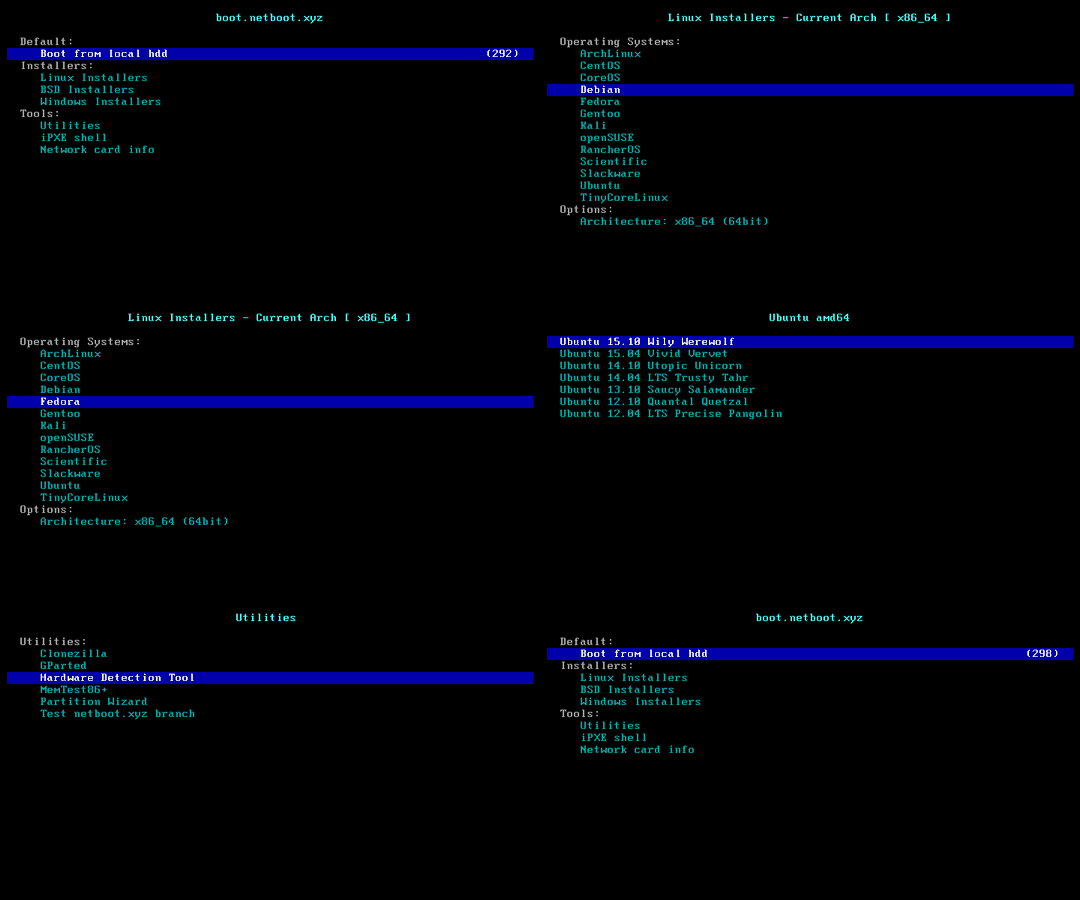
[!CAUTION]
This feature will erase the entire hard disk of the current system (including other partitions)!
Data is priceless — please think twice before proceeding!
- Username
administrator. The script prompts for a password. If left blank, a random one is generated. - If remote login fails, try using the username
.\administrator. - The machine with a static IP will automatically configure the IP. It may take a few minutes to take effect on the first boot.
- Supports ISO images in any language.
- Supports bypassing Windows 11 hardware requirements.
- Windows (Vista ~ 11)
- Windows Server (2008 ~ 2025)
- Windows Server Essentials *
- Windows Server (Semi) Annual Channel *
- Hyper-V Server *
- Azure Local (Azure Stack HCI) *
- The script will search for ISOs from https://massgrave.dev/genuine-installation-media, a site that collects official ISOs.
- Systems marked with * do not support automatic ISO searching.
bash reinstall.sh windows \
     --image-name "Windows 11 Enterprise LTSC 2024" \
     --lang zh-cn
Supported languages
ar-sa
bg-bg
cs-cz
da-dk
de-de
el-gr
en-gb
en-us
es-es
es-mx
et-ee
fi-fi
fr-ca
fr-fr
he-il
hr-hr
hu-hu
it-it
ja-jp
ko-kr
lt-lt
lv-lv
nb-no
nl-nl
pl-pl
pt-pt
pt-br
ro-ro
ru-ru
sk-sk
sl-si
sr-latn-rs
sv-se
th-th
tr-tr
uk-ua
zh-cn
zh-hk
zh-tw
- If you don't know the
--image-name, you can enter any value. After rebooting, connect via SSH and re-enter the correct value based on the error messages.
bash reinstall.sh windows \
     --image-name "Windows 11 Enterprise LTSC 2024 Evaluation" \
     --iso "https://go.microsoft.com/fwlink/?linkid=2289029"
or Magnet Link
bash reinstall.sh windows \
     --image-name "Windows 11 Enterprise LTSC 2024" \
     --iso "magnet:?xt=urn:btih:7352bd2db48c3381dffa783763dc75aa4a6f1cff"
The following website provides ISO links.
- General
- https://msdl.gravesoft.dev
- https://massgrave.dev/genuine-installation-media
- https://next.itellyou.cn
- https://www.xitongku.com
- https://www.microsoft.com/software-download/windows10 (Need to open it with a non-Windows User-Agent)
- https://www.microsoft.com/software-download/windows11
- https://www.microsoft.com/software-download/windows11arm64
- Evaluation
- https://www.microsoft.com/evalcenter/download-windows-11-enterprise
- https://www.microsoft.com/evalcenter/download-windows-11-iot-enterprise-ltsc-eval
- https://www.microsoft.com/evalcenter/download-windows-server-2012-r2
- https://www.microsoft.com/evalcenter/download-windows-server-2016
- https://www.microsoft.com/evalcenter/download-windows-server-2019
- https://www.microsoft.com/evalcenter/download-windows-server-2022
- https://www.microsoft.com/evalcenter/download-windows-server-2025
- Insider Preview
--password PASSWORDSet Password--allow-pingConfigure Windows Firewall to Allow Ping Responses--rdp-port PORTChange RDP port--ssh-port PORTChange SSH port (for log observation during installation only)--web-port PORTChange Web port (for log observation during installation only)--add-driver INF_OR_DIRAdd additional driver, specifying .inf path, or the folder contains .inf file.- The driver must be downloaded to current system first.
- This parameter can be set multiple times to add different driver.
--frpc-toml PATHAdd frpc for intranet tunneling. Parameter can be local filepath or HTTP URL--hold 1Reboot only into install environment, without running installer, only for SSH connect to test network connection.--hold 2Allow SSH connections for modifyingboot.wim,install.wimor other contents before rebooting into the official Windows installation program, with the disk mounted at/os.
The following drivers will automatic download and install as needed, without the need for manual addition
- VirtIO (Community, Alibaba Cloud, Tencent Cloud, GCP)
- XEN (
Community(unsigned), Citrix, AWS) - AWS (ENA Network Adapter, NVME Storage Controller)
- GCP (gVNIC Network Adapter, GGA Display Adapter)
- Azure (MANA Network Adapter)
- Intel (VMD Storage Controller, Network Adapter: 7, 8, 8.1, 10, 11, 2008 R2, 2012, 2012 R2, 2016, 2019, 2022, 2025)
An ISO usually contains multiple system editions, such as Home and Pro. Therefore, you need to use --image-name to specify the system edition (image name) to install, case-insensitive.
You can use tools like DISM, DISM++, or Wimlib to query the image names included in the ISO.
Commonly used image names include:
Windows 7 Ultimate
Windows 11 Pro
Windows 11 Enterprise LTSC 2024
Windows Server 2025 SERVERDATACENTER
How to Use DISM++ to Query the Image Names Included in the ISO
Open File menu > Open Image File, select the iso to be installed to get the image name (full system name), and all available image names are installable.
[!WARNING] Vista (Server 2008) and 32-bit systems may lack drivers.
[!WARNING]
For Windows 7 (Server 2008 R2) installation:
EFI-boot machines must enable CSM.
On Hyper-V (Azure), select Generation 1 VM. https://learn.microsoft.com/windows-server/virtualization/hyper-v/plan/should-i-create-a-generation-1-or-2-virtual-machine-in-hyper-v
[!WARNING]
In the Chinese version of Windows 10 LTSC 2021 ISO
zh-cn_windows_10_enterprise_ltsc_2021_x64_dvd_033b7312.iso, thewsappxprocess may indefinitely consume CPU resources.The solution is to update the system patches or manually install the
VCLibslibrary https://www.google.com/search?q=ltsc+wsappx.
[!WARNING]
When installing Windows ISOs released in
May 2022or later on GCP, the system may repeatedly reboot during the Windows installation (PE) stage. You can resolve this issue using one of the following two methods:
Add the
--force-boot-mode biosparameter. The script will install Windows inBIOS boot + MBR partition tablemode.(Optional) After installation, you can convert it to
EFI boot + GPT partition tableusing the commandMBR2GPT /convert /allowFullOS.Create a custom RAW image and install it via DD.
Most ARM machines support installing latest Windows 11.
During the installation process, you might encounter a black screen, and the serial console may display ConvertPages: failed to find range, but neither issue affects the installation.
| Compatibility | Cloud Provider | Instance Type | Issues |
|---|---|---|---|
| ✔️ | Azure | B2pts_v2 | |
| ✔️ | Alibaba Cloud | g6r, c6r | |
| ✔️ | Alibaba Cloud | g8y, c8y, r8y | There is a chance of hanging at the boot logo during restart; forced reboot will resolve it. |
| ✔️ | AWS | T4g | |
| ✔️ | Scaleway | COPARM1 | |
| ✔️ | Gcore | ||
| ❔ | Oracle Cloud | A1.Flex | Installation success is not guaranteed; newer instances are more likely to succeed. Manual loading of GPU drivers is required after installation. |
| ❌ | Google Cloud | t2a | Missing network card drivers |
Loading Graphics Driver on Oracle Cloud
Log in to the server using Remote Desktop, open Device Manager, locate the graphics card, select "Update Driver," and choose Red Hat VirtIO GPU DOD controller from the list. There's no need to download the drivers in advance.
--ssh-key "ssh-rsa ..."--ssh-key "ssh-ed25519 ..."--ssh-key "ecdsa-sha2-nistp256/384/521 ..."--ssh-key http://path/to/public_key--ssh-key github:your_username--ssh-key gitlab:your_username--ssh-key /path/to/public_key--ssh-key C:\path\to\public_key
According to the Law of Bug Conservation, fixing old bugs often introduces new ones.
If a new bug occurs, try using an older version to see if it works.
Go to https://github.com/bin456789/reinstall/commits/main and find the old version’s commit_id on the right side.
commit_id=xxxxxxx
curl -O https://raw.githubusercontent.com/bin456789/reinstall/$commit_id/reinstall.sh || wget -O ${_##*/} $_
sed -i "/^confhome.*main$/s/main/$commit_id/" reinstall.sh
bash reinstall.sh ...
- Fork this repository.
- Modify the
confhomeandconfhome_cnat the beginning ofreinstall.shandreinstall.bat. - Make changes to the other code.
Thanks to the following businesses for providing free servers.
