


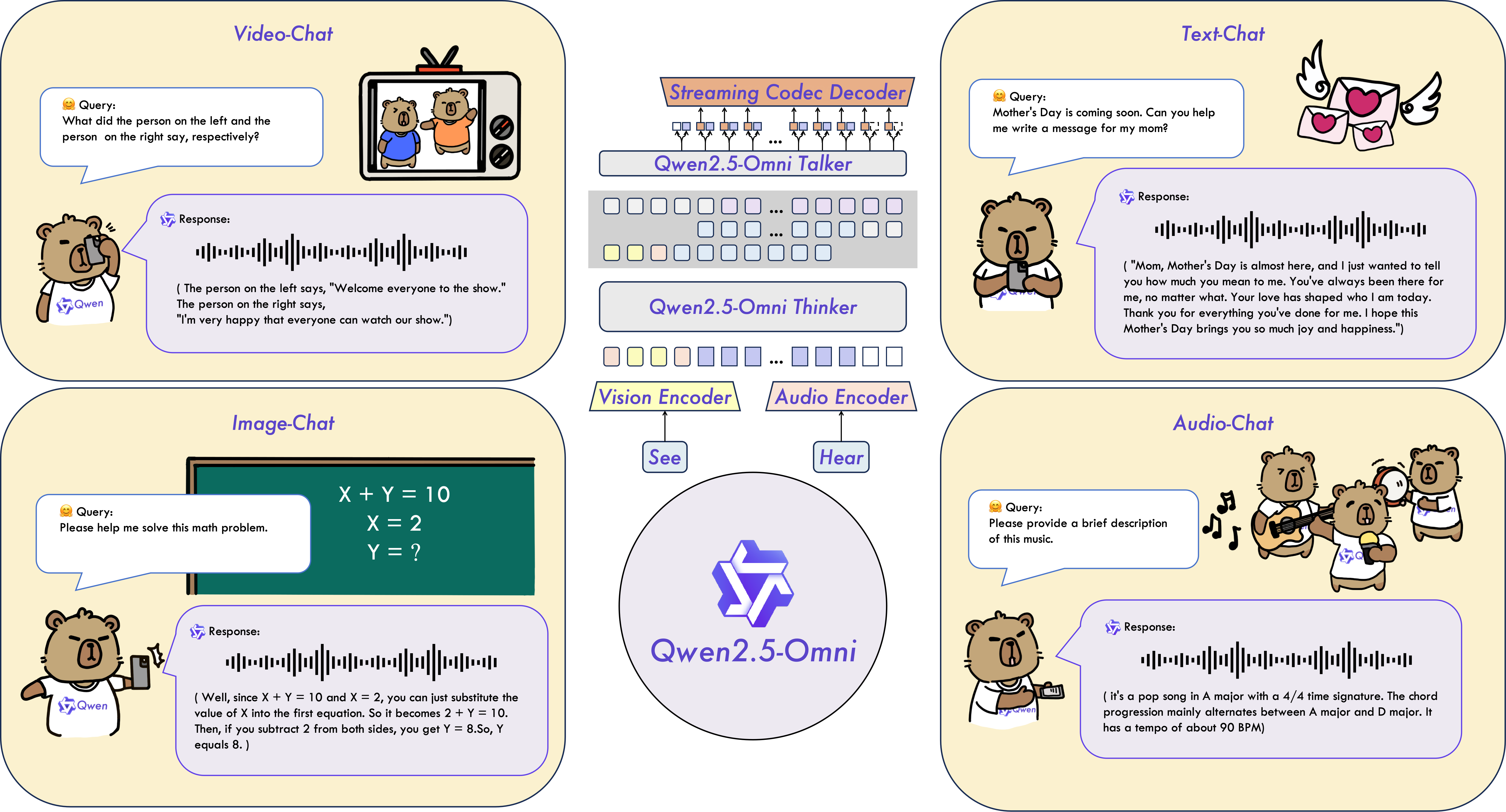
Qwen2.5-Omni is an end-to-end multimodal model designed to perceive diverse modalities, including text, images, audio, and video, while simultaneously generating text and natural speech responses in a streaming manner.
-
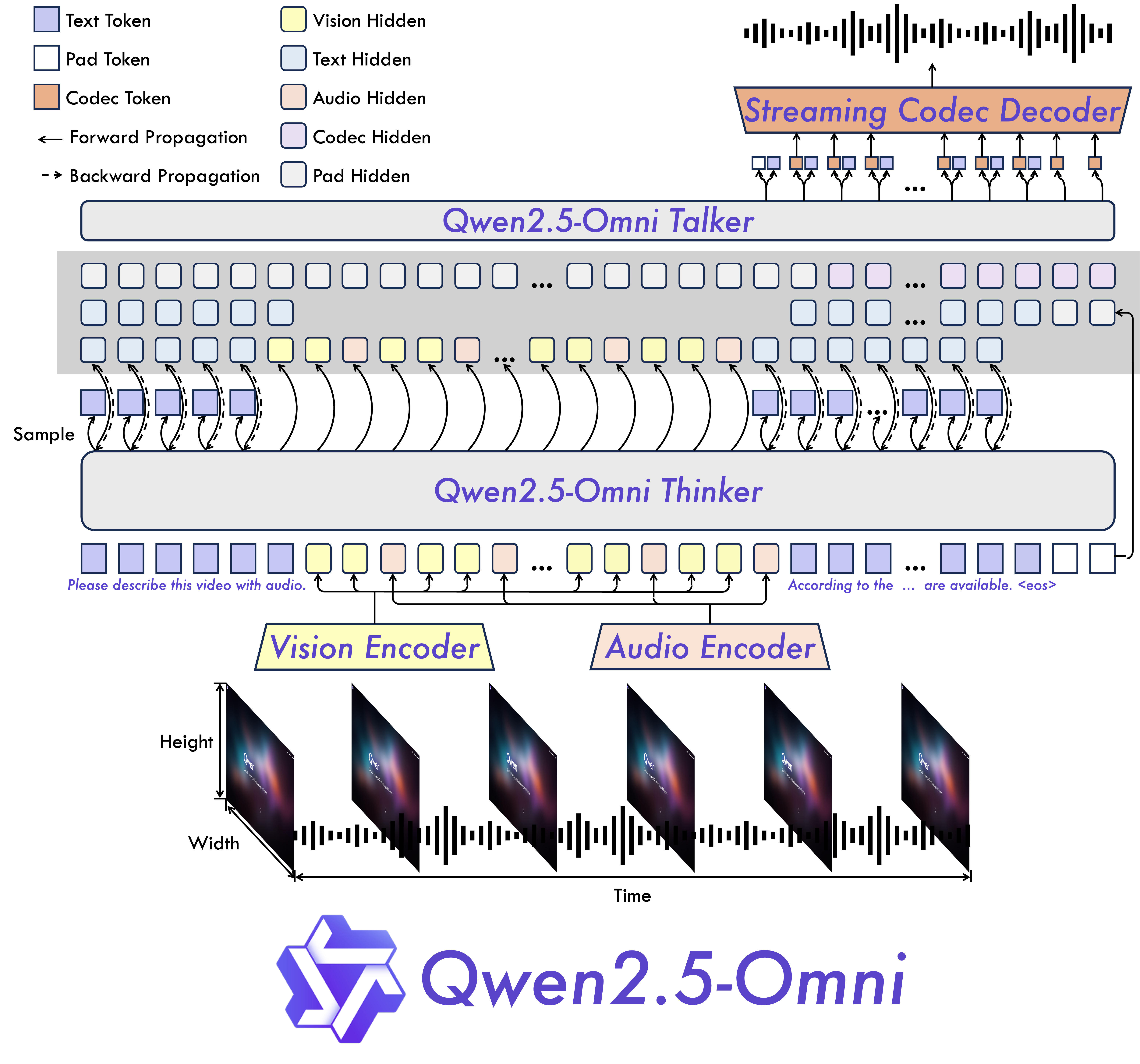
Omni and Novel Architecture: We propose Thinker-Talker architecture, an end-to-end multimodal model designed to perceive diverse modalities, including text, images, audio, and video, while simultaneously generating text and natural speech responses in a streaming manner. We prpose a novel position embedding, named TMRoPE (Time-aligned Multimodal RoPE), to synchronize the timestamps of video inputs with audio.
-
Real-Time Voice and Video Chat: Architecture Designed for fully real-time interactions, supporting chunked input and immediate output.
-
Natural and Robust Speech Generation: Surpassing many existing streaming and non-streaming alternatives, demonstrating superior robustness and naturalness in speech generation.
-
Strong Performance Across Modalities: Exhibiting exceptional performance across all modalities when benchmarked against similarly sized single-modality models. Qwen2.5-Omni outperforms the similarly sized Qwen2-Audio in audio capabilities and achieves comparable performance to Qwen2.5-VL-7B.
-
Excellent End-to-End Speech Instruction Following: Qwen2.5-Omni shows performance in end-to-end speech instruction following that rivals its effectiveness with text inputs, evidenced by benchmarks such as MMLU and GSM8K.

We conducted a comprehensive evaluation of Qwen2.5-Omni, which demonstrates strong performance across all modalities when compared to similarly sized single-modality models and closed-source models like Qwen2.5-VL-7B, Qwen2-Audio, and Gemini-1.5-pro. In tasks requiring the integration of multiple modalities, such as OmniBench, Qwen2.5-Omni achieves state-of-the-art performance. Furthermore, in single-modality tasks, it excels in areas including speech recognition (Common Voice), translation (CoVoST2), audio understanding (MMAU), image reasoning (MMMU, MMStar), video understanding (MVBench), and speech generation (Seed-tts-eval and subjective naturalness).
Multimodality -> Text
| Datasets | Model | Performance |
|---|---|---|
| OmniBench Speech | Sound Event | Music | Avg | Gemini-1.5-Pro | 42.67%|42.26%|46.23%|42.91% |
| MIO-Instruct | 36.96%|33.58%|11.32%|33.80% | |
| AnyGPT (7B) | 17.77%|20.75%|13.21%|18.04% | |
| video-SALMONN | 34.11%|31.70%|56.60%|35.64% | |
| UnifiedIO2-xlarge | 39.56%|36.98%|29.25%|38.00% | |
| UnifiedIO2-xxlarge | 34.24%|36.98%|24.53%|33.98% | |
| MiniCPM-o | -|-|-|40.50% | |
| Baichuan-Omni-1.5 | -|-|-|42.90% | |
| Qwen2.5-Omni-7B | 55.25%|60.00%|52.83%|56.13% |
Audio -> Text
| Datasets | Model | Performance |
|---|---|---|
| ASR | ||
| Librispeech dev-clean | dev other | test-clean | test-other | SALMONN | -|-|2.1|4.9 |
| SpeechVerse | -|-|2.1|4.4 | |
| Whisper-large-v3 | -|-|1.8|3.6 | |
| Llama-3-8B | -|-|-|3.4 | |
| Llama-3-70B | -|-|-|3.1 | |
| Seed-ASR-Multilingual | -|-|1.6|2.8 | |
| MiniCPM-o | -|-|1.7|- | |
| MinMo | -|-|1.7|3.9 | |
| Qwen-Audio | 1.8|4.0|2.0|4.2 | |
| Qwen2-Audio | 1.3|3.4|1.6|3.6 | |
| Qwen2.5-Omni-7B | 1.6|3.5|1.8|3.4 | |
| Common Voice 15 en | zh | yue | fr | Whisper-large-v3 | 9.3|12.8|10.9|10.8 |
| MinMo | 7.9|6.3|6.4|8.5 | |
| Qwen2-Audio | 8.6|6.9|5.9|9.6 | |
| Qwen2.5-Omni-7B | 7.6|5.2|7.3|7.5 | |
| Fleurs zh | en | Whisper-large-v3 | 7.7|4.1 |
| Seed-ASR-Multilingual | -|3.4 | |
| Megrez-3B-Omni | 10.8|- | |
| MiniCPM-o | 4.4|- | |
| MinMo | 3.0|3.8 | |
| Qwen2-Audio | 7.5|- | |
| Qwen2.5-Omni-7B | 3.0|4.1 | |
| Wenetspeech test-net | test-meeting | Seed-ASR-Chinese | 4.7|5.7 |
| Megrez-3B-Omni | -|16.4 | |
| MiniCPM-o | 6.9|- | |
| MinMo | 6.8|7.4 | |
| Qwen2.5-Omni-7B | 5.9|7.7 | |
| Voxpopuli-V1.0-en | Llama-3-8B | 6.2 |
| Llama-3-70B | 5.7 | |
| Qwen2.5-Omni-7B | 5.8 | |
| S2TT | ||
| CoVoST2 en-de | de-en | en-zh | zh-en | SALMONN | 18.6|-|33.1|- |
| SpeechLLaMA | -|27.1|-|12.3 | |
| BLSP | 14.1|-|-|- | |
| MiniCPM-o | -|-|48.2|27.2 | |
| MinMo | -|39.9|46.7|26.0 | |
| Qwen-Audio | 25.1|33.9|41.5|15.7 | |
| Qwen2-Audio | 29.9|35.2|45.2|24.4 | |
| Qwen2.5-Omni-7B | 30.2|37.7|41.4|29.4 | |
| SER | ||
| Meld | WavLM-large | 0.542 |
| MiniCPM-o | 0.524 | |
| Qwen-Audio | 0.557 | |
| Qwen2-Audio | 0.553 | |
| Qwen2.5-Omni-7B | 0.570 | |
| VSC | ||
| VocalSound | CLAP | 0.495 |
| Pengi | 0.604 | |
| Qwen-Audio | 0.929 | |
| Qwen2-Audio | 0.939 | |
| Qwen2.5-Omni-7B | 0.939 | |
| Music | ||
| GiantSteps Tempo | Llark-7B | 0.86 |
| Qwen2.5-Omni-7B | 0.88 | |
| MusicCaps | LP-MusicCaps | 0.291|0.149|0.089|0.061|0.129|0.130 |
| Qwen2.5-Omni-7B | 0.328|0.162|0.090|0.055|0.127|0.225 | |
| Audio Reasoning | ||
| MMAU Sound | Music | Speech | Avg | Gemini-Pro-V1.5 | 56.75|49.40|58.55|54.90 |
| Qwen2-Audio | 54.95|50.98|42.04|49.20 | |
| Qwen2.5-Omni-7B | 67.87|69.16|59.76|65.60 | |
| Voice Chatting | ||
| VoiceBench AlpacaEval | CommonEval | SD-QA | MMSU | Ultravox-v0.4.1-LLaMA-3.1-8B | 4.55|3.90|53.35|47.17 |
| MERaLiON | 4.50|3.77|55.06|34.95 | |
| Megrez-3B-Omni | 3.50|2.95|25.95|27.03 | |
| Lyra-Base | 3.85|3.50|38.25|49.74 | |
| MiniCPM-o | 4.42|4.15|50.72|54.78 | |
| Baichuan-Omni-1.5 | 4.50|4.05|43.40|57.25 | |
| Qwen2-Audio | 3.74|3.43|35.71|35.72 | |
| Qwen2.5-Omni-7B | 4.49|3.93|55.71|61.32 | |
| VoiceBench OpenBookQA | IFEval | AdvBench | Avg | Ultravox-v0.4.1-LLaMA-3.1-8B | 65.27|66.88|98.46|71.45 |
| MERaLiON | 27.23|62.93|94.81|62.91 | |
| Megrez-3B-Omni | 28.35|25.71|87.69|46.25 | |
| Lyra-Base | 72.75|36.28|59.62|57.66 | |
| MiniCPM-o | 78.02|49.25|97.69|71.69 | |
| Baichuan-Omni-1.5 | 74.51|54.54|97.31|71.14 | |
| Qwen2-Audio | 49.45|26.33|96.73|55.35 | |
| Qwen2.5-Omni-7B | 81.10|52.87|99.42|74.12 | |
Image -> Text
| Dataset | Qwen2.5-Omni-7B | Other Best | Qwen2.5-VL-7B | GPT-4o-mini |
|---|---|---|---|---|
| MMMUval | 59.2 | 53.9 | 58.6 | 60.0 |
| MMMU-Prooverall | 36.6 | - | 38.3 | 37.6 |
| MathVistatestmini | 67.9 | 71.9 | 68.2 | 52.5 |
| MathVisionfull | 25.0 | 23.1 | 25.1 | - |
| MMBench-V1.1-ENtest | 81.8 | 80.5 | 82.6 | 76.0 |
| MMVetturbo | 66.8 | 67.5 | 67.1 | 66.9 |
| MMStar | 64.0 | 64.0 | 63.9 | 54.8 |
| MMEsum | 2340 | 2372 | 2347 | 2003 |
| MuirBench | 59.2 | - | 59.2 | - |
| CRPErelation | 76.5 | - | 76.4 | - |
| RealWorldQAavg | 70.3 | 71.9 | 68.5 | - |
| MME-RealWorlden | 61.6 | - | 57.4 | - |
| MM-MT-Bench | 6.0 | - | 6.3 | - |
| AI2D | 83.2 | 85.8 | 83.9 | - |
| TextVQAval | 84.4 | 83.2 | 84.9 | - |
| DocVQAtest | 95.2 | 93.5 | 95.7 | - |
| ChartQAtest Avg | 85.3 | 84.9 | 87.3 | - |
| OCRBench_V2en | 57.8 | - | 56.3 | - |
| Dataset | Qwen2.5-Omni-7B | Qwen2.5-VL-7B | Grounding DINO | Gemini 1.5 Pro |
|---|---|---|---|---|
| Refcocoval | 90.5 | 90.0 | 90.6 | 73.2 |
| RefcocotextA | 93.5 | 92.5 | 93.2 | 72.9 |
| RefcocotextB | 86.6 | 85.4 | 88.2 | 74.6 |
| Refcoco+val | 85.4 | 84.2 | 88.2 | 62.5 |
| Refcoco+textA | 91.0 | 89.1 | 89.0 | 63.9 |
| Refcoco+textB | 79.3 | 76.9 | 75.9 | 65.0 |
| Refcocog+val | 87.4 | 87.2 | 86.1 | 75.2 |
| Refcocog+test | 87.9 | 87.2 | 87.0 | 76.2 |
| ODinW | 42.4 | 37.3 | 55.0 | 36.7 |
| PointGrounding | 66.5 | 67.3 | - | - |
Video(without audio) -> Text
| Dataset | Qwen2.5-Omni-7B | Other Best | Qwen2.5-VL-7B | GPT-4o-mini |
|---|---|---|---|---|
| Video-MMEw/o sub | 64.3 | 63.9 | 65.1 | 64.8 |
| Video-MMEw sub | 72.4 | 67.9 | 71.6 | - |
| MVBench | 70.3 | 67.2 | 69.6 | - |
| EgoSchematest | 68.6 | 63.2 | 65.0 | - |
Zero-shot Speech Generation
| Datasets | Model | Performance |
|---|---|---|
| Content Consistency | ||
| SEED test-zh | test-en | test-hard | Seed-TTS_ICL | 1.11 | 2.24 | 7.58 |
| Seed-TTS_RL | 1.00 | 1.94 | 6.42 | |
| MaskGCT | 2.27 | 2.62 | 10.27 | |
| E2_TTS | 1.97 | 2.19 | - | |
| F5-TTS | 1.56 | 1.83 | 8.67 | |
| CosyVoice 2 | 1.45 | 2.57 | 6.83 | |
| CosyVoice 2-S | 1.45 | 2.38 | 8.08 | |
| Qwen2.5-Omni-7B_ICL | 1.70 | 2.72 | 7.97 | |
| Qwen2.5-Omni-7B_RL | 1.42 | 2.32 | 6.54 | |
| Speaker Similarity | ||
| SEED test-zh | test-en | test-hard | Seed-TTS_ICL | 0.796 | 0.762 | 0.776 |
| Seed-TTS_RL | 0.801 | 0.766 | 0.782 | |
| MaskGCT | 0.774 | 0.714 | 0.748 | |
| E2_TTS | 0.730 | 0.710 | - | |
| F5-TTS | 0.741 | 0.647 | 0.713 | |
| CosyVoice 2 | 0.748 | 0.652 | 0.724 | |
| CosyVoice 2-S | 0.753 | 0.654 | 0.732 | |
| Qwen2.5-Omni-7B_ICL | 0.752 | 0.632 | 0.747 | |
| Qwen2.5-Omni-7B_RL | 0.754 | 0.641 | 0.752 | |
Text -> Text
| Dataset | Qwen2.5-Omni-7B | Qwen2.5-7B | Qwen2-7B | Llama3.1-8B | Gemma2-9B |
|---|---|---|---|---|---|
| MMLU-Pro | 47.0 | 56.3 | 44.1 | 48.3 | 52.1 |
| MMLU-redux | 71.0 | 75.4 | 67.3 | 67.2 | 72.8 |
| LiveBench0831 | 29.6 | 35.9 | 29.2 | 26.7 | 30.6 |
| GPQA | 30.8 | 36.4 | 34.3 | 32.8 | 32.8 |
| MATH | 71.5 | 75.5 | 52.9 | 51.9 | 44.3 |
| GSM8K | 88.7 | 91.6 | 85.7 | 84.5 | 76.7 |
| HumanEval | 78.7 | 84.8 | 79.9 | 72.6 | 68.9 |
| MBPP | 73.2 | 79.2 | 67.2 | 69.6 | 74.9 |
| MultiPL-E | 65.8 | 70.4 | 59.1 | 50.7 | 53.4 |
| LiveCodeBench2305-2409 | 24.6 | 28.7 | 23.9 | 8.3 | 18.9 |
Below, we provide simple examples to show how to use Qwen2.5-Omni with 🤗 Transformers. The codes of Qwen2.5-Omni on Hugging Face Transformers are in pull request stage and not merged into the main branch yet. Therefore, you may need to build from source to use it with command:
pip uninstall transformers
pip install git+https://github.com/huggingface/transformers@3a1ead0aabed473eafe527915eea8c197d424356
pip install accelerate
or you might encounter the following error:
KeyError: 'qwen2_5_omni'
We offer a toolkit to help you handle various types of audio and visual input more conveniently, as if you were using an API. This includes base64, URLs, and interleaved audio, images and videos. You can install it using the following command and make sure your system has ffmpeg installed:
# It's highly recommended to use `[decord]` feature for faster video loading.
pip install qwen-omni-utils[decord]
If you are not using Linux, you might not be able to install decord from PyPI. In that case, you can use pip install qwen-omni-utils which will fall back to using torchvision for video processing. However, you can still install decord from source to get decord used when loading video.
Here we show a code snippet to show you how to use the chat model with transformers and qwen_omni_utils:
import soundfile as sf

from transformers import Qwen2_5OmniModel, Qwen2_5OmniProcessor
from qwen_omni_utils import process_mm_info

# default: Load the model on the available device(s)
model = Qwen2_5OmniModel.from_pretrained("Qwen/Qwen2.5-Omni-7B", torch_dtype="auto", device_map="auto")

# We recommend enabling flash_attention_2 for better acceleration and memory saving.
# model = Qwen2_5OmniModel.from_pretrained(
#     "Qwen/Qwen2.5-Omni-7B",
#     torch_dtype="auto",
#     device_map="auto",
#     attn_implementation="flash_attention_2",
# )

processor = Qwen2_5OmniProcessor.from_pretrained("Qwen/Qwen2.5-Omni-7B")

conversation = [
    {
        "role": "system",
        "content": "You are Qwen, a virtual human developed by the Qwen Team, Alibaba Group, capable of perceiving auditory and visual inputs, as well as generating text and speech.",
    },
    {
        "role": "user",
        "content": [
            {"type": "video", "video": "https://qianwen-res.oss-cn-beijing.aliyuncs.com/Qwen2.5-Omni/draw.mp4"},
        ],
    },
]

# Preparation for inference
text = processor.apply_chat_template(conversation, add_generation_prompt=True, tokenize=False)
audios, images, videos = process_mm_info(conversation, use_audio_in_video=True)
inputs = processor(text=text, audios=audios, images=images, videos=videos, return_tensors="pt", padding=True)
inputs = inputs.to(model.device).to(model.dtype)

# Inference: Generation of the output text and audio
text_ids, audio = model.generate(**inputs, use_audio_in_video=True)

text = processor.batch_decode(text_ids, skip_special_tokens=True, clean_up_tokenization_spaces=False)
print(text)
sf.write(
    "output.wav",
    audio.reshape(-1).detach().cpu().numpy(),
    samplerate=24000,
)
Minimum GPU memory requirements
| Precision | 15(s) Video | 30(s) Video | 60(s) Video |
|---|---|---|---|
| FP32 | 93.56 GB | Not Recommend | Not Recommend |
| BF16 | 31.11 GB | 41.85 GB | 60.19 GB |
Note: The table above presents the theoretical minimum memory requirements for inference with transformers and BF16 is test with attn_implementation="flash_attention_2"; however, in practice, the actual memory usage is typically at least 1.2 times higher. For more information, see the linked resource here.
Video ULR resource usage
Video URL compatibility largely depends on the third-party library version. The details are in the table below. Change the backend by FORCE_QWENVL_VIDEO_READER=torchvision or FORCE_QWENVL_VIDEO_READER=decord if you prefer not to use the default one.
| Backend | HTTP | HTTPS |
|---|---|---|
| torchvision >= 0.19.0 | ✅ | ✅ |
| torchvision < 0.19.0 | ❌ | ❌ |
| decord | ✅ | ❌ |
Batch inference
The model can batch inputs composed of mixed samples of various types such as text, images, audio and videos as input when return_audio=False is set. Here is an example.
# Sample messages for batch inference

# Conversation with video only
conversation1 = [
    {
        "role": "system",
        "content": "You are Qwen, a virtual human developed by the Qwen Team, Alibaba Group, capable of perceiving auditory and visual inputs, as well as generating text and speech.",
    },
    {
        "role": "user",
        "content": [
            {"type": "video", "video": "/path/to/video.mp4"},
        ]
    }
]

# Conversation with audio only
conversation2 = [
    {
        "role": "system",
        "content": "You are Qwen, a virtual human developed by the Qwen Team, Alibaba Group, capable of perceiving auditory and visual inputs, as well as generating text and speech.",
    },
    {
        "role": "user",
        "content": [
            {"type": "audio", "audio": "/path/to/audio.wav"},
        ]
    }
]

# Conversation with pure text
conversation3 = [
    {
        "role": "system",
        "content": "You are Qwen, a virtual human developed by the Qwen Team, Alibaba Group, capable of perceiving auditory and visual inputs, as well as generating text and speech.",
    },
    {
        "role": "user",
        "content": "who are you?"
    }
]


# Conversation with mixed media
conversation4 = [
    {
        "role": "system",
        "content": "You are Qwen, a virtual human developed by the Qwen Team, Alibaba Group, capable of perceiving auditory and visual inputs, as well as generating text and speech.",
    },
    {
        "role": "user",
        "content": [
            {"type": "image", "image": "/path/to/image.jpg"},
            {"type": "video", "video": "/path/to/video.mp4"},
            {"type": "audio", "audio": "/path/to/audio.wav"},
            {"type": "text", "text": "What are the elements can you see and hear in these medias?"},
        ],
    }
]

# Combine messages for batch processing
conversations = [conversation1, conversation2, conversation3, conversation4]

# Preparation for batch inference
text = processor.apply_chat_template(conversations, add_generation_prompt=True, tokenize=False)
audios, images, videos = process_mm_info(conversations, use_audio_in_video=True)

inputs = processor(text=text, audios=audios, images=images, videos=videos, return_tensors="pt", padding=True)
inputs = inputs.to(model.device).to(model.dtype)

# Batch Inference
text_ids = model.generate(**inputs, use_audio_in_video=True, return_audio=False)
text = processor.batch_decode(text_ids, skip_special_tokens=True, clean_up_tokenization_spaces=False)
print(text)
If users need audio output, the system prompt must be set as "You are Qwen, a virtual human developed by the Qwen Team, Alibaba Group, capable of perceiving auditory and visual inputs, as well as generating text and speech.", otherwise the audio output may not work as expected.
{
    "role": "system",
    "content": "You are Qwen, a virtual human developed by the Qwen Team, Alibaba Group, capable of perceiving auditory and visual inputs, as well as generating text and speech.",
}
In the process of multimodal interaction, the videos provided by users are often accompanied by audio (such as questions about the content in the video, or sounds generated by certain events in the video). This information is conducive to the model providing a better interactive experience. So we provide the following options for users to decide whether to use audio in video.
# first place, in data preprocessing
audios, images, videos = process_mm_info(conversations, use_audio_in_video=True)
# second place, in model inference
text_ids, audio = model.generate(**inputs, use_audio_in_video=True)
It is worth noting that during a multi-round conversation, the use_audio_in_video parameter in these two places must be set to the same, otherwise unexpected results will occur.
The model supports both text and audio outputs, if users do not need audio outputs, they can set enable_audio_output=False in the from_pretrained function. This option will save about ~2GB of GPU memory but the return_audio option for generate function will only allow to be set at False.
model = Qwen2_5OmniModel.from_pretrained(
    "Qwen/Qwen2.5-Omni-7B",
    torch_dtype="auto",
    device_map="auto",
    enable_audio_output=False,
)
In order to obtain a flexible experience, we recommend that users set enable_audio_output at True when initializing the model through from_pretrained function, and then decide whether to return audio when generate function is called. When return_audio is set to False, the model will only return text outputs to get text responses faster.
model = Qwen2_5OmniModel.from_pretrained(
    "Qwen/Qwen2.5-Omni-7B",
    torch_dtype="auto",
    device_map="auto",
    enable_audio_output=True,
)
...
text_ids = model.generate(**inputs, return_audio=False)
Qwen2.5-Omni supports the ability to change the voice of the output audio. The "Qwen/Qwen2.5-Omni-7B" checkpoint support two voice types as follow:
| Voice Type | Gender | Description |
|---|---|---|
| Chelsie | Female | A honeyed, velvety voice that carries a gentle warmth and luminous clarity. |
| Ethan | Male | A bright, upbeat voice with infectious energy and a warm, approachable vibe. |
Users can use the spk parameter of generate function to specify the voice type. By defalut, if spk is not specified, the default voice type is Chelsie.
text_ids, audio = model.generate(**inputs, spk="Chelsie")
text_ids, audio = model.generate(**inputs, spk="Ethan")
First, make sure to install the latest version of Flash Attention 2:
pip install -U flash-attn --no-build-isolation
Also, you should have hardware that is compatible with FlashAttention 2. Read more about it in the official documentation of the flash attention repository. FlashAttention-2 can only be used when a model is loaded in torch.float16 or torch.bfloat16.
To load and run a model using FlashAttention-2, add attn_implementation="flash_attention_2" when loading the model:
from transformers import Qwen2_5OmniModel

model = Qwen2_5OmniModel.from_pretrained(
    "Qwen/Qwen2.5-Omni-7B",
    device_map="auto",
    torch_dtype=torch.bfloat16,
    attn_implementation="flash_attention_2",
)
