

😊 Welcome!


V1.0:
| Name | Storage Space | Hugging Face | Model Scope | Description |
|---|---|---|---|---|
| Wan2.1-Fun-1.3B-InP | 19.0 GB | 🤗Link | 😄Link | Wan2.1-Fun-1.3B text-to-video weights, trained at multiple resolutions, supporting start and end frame prediction. |
| Wan2.1-Fun-14B-InP | 47.0 GB | 🤗Link | 😄Link | Wan2.1-Fun-14B text-to-video weights, trained at multiple resolutions, supporting start and end frame prediction. |
| Wan2.1-Fun-1.3B-Control | 19.0 GB | 🤗Link | 😄Link | Wan2.1-Fun-1.3B video control weights, supporting various control conditions such as Canny, Depth, Pose, MLSD, etc., and trajectory control. Supports multi-resolution (512, 768, 1024) video prediction at 81 frames, trained at 16 frames per second, with multilingual prediction support. |
| Wan2.1-Fun-14B-Control | 47.0 GB | 🤗Link | 😄Link | Wan2.1-Fun-14B video control weights, supporting various control conditions such as Canny, Depth, Pose, MLSD, etc., and trajectory control. Supports multi-resolution (512, 768, 1024) video prediction at 81 frames, trained at 16 frames per second, with multilingual prediction support. |
DSW has free GPU time, which can be applied once by a user and is valid for 3 months after applying.
Aliyun provide free GPU time in Freetier, get it and use in Aliyun PAI-DSW to start CogVideoX-Fun within 5min!

Our ComfyUI is as follows, please refer to ComfyUI README for details.
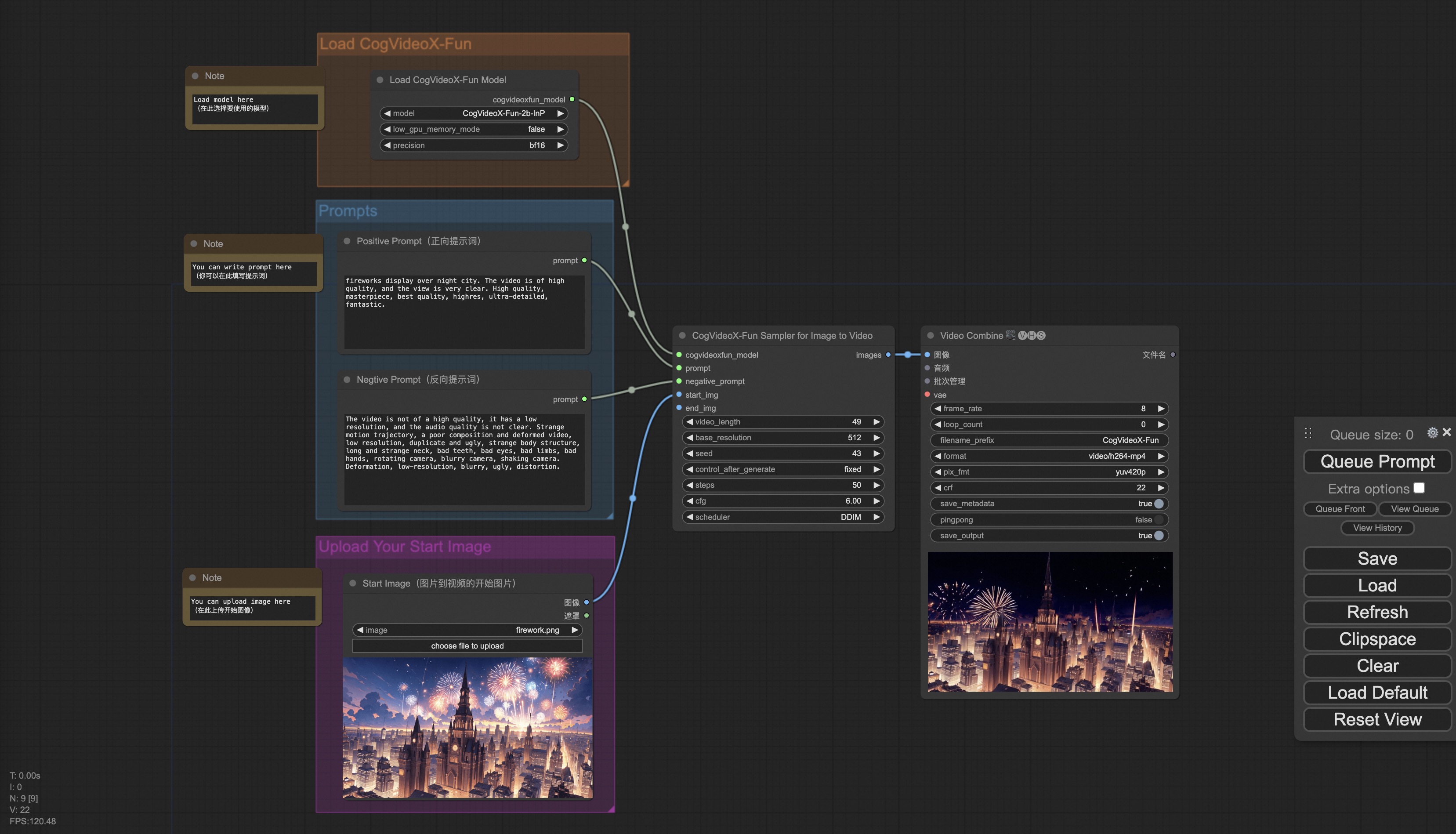
If you are using docker, please make sure that the graphics card driver and CUDA environment have been installed correctly in your machine.
Then execute the following commands in this way:
# pull image
docker pull mybigpai-public-registry.cn-beijing.cr.aliyuncs.com/easycv/torch_cuda:cogvideox_fun

# enter image
docker run -it -p 7860:7860 --network host --gpus all --security-opt seccomp:unconfined --shm-size 200g mybigpai-public-registry.cn-beijing.cr.aliyuncs.com/easycv/torch_cuda:cogvideox_fun

# clone code
git clone https://github.com/aigc-apps/CogVideoX-Fun.git

# enter CogVideoX-Fun's dir
cd CogVideoX-Fun

# download weights
mkdir models/Diffusion_Transformer
mkdir models/Personalized_Model

# Please use the hugginface link or modelscope link to download the model.
# CogVideoX-Fun
# https://huggingface.co/alibaba-pai/CogVideoX-Fun-V1.1-5b-InP
# https://modelscope.cn/models/PAI/CogVideoX-Fun-V1.1-5b-InP

# Wan
# https://huggingface.co/alibaba-pai/Wan2.1-Fun-14B-InP
# https://modelscope.cn/models/PAI/Wan2.1-Fun-14B-InP
We have verified this repo execution on the following environment:
The detailed of Windows:
- OS: Windows 10
- python: python3.10 & python3.11
- pytorch: torch2.2.0
- CUDA: 11.8 & 12.1
- CUDNN: 8+
- GPU: Nvidia-3060 12G & Nvidia-3090 24G
The detailed of Linux:
- OS: Ubuntu 20.04, CentOS
- python: python3.10 & python3.11
- pytorch: torch2.2.0
- CUDA: 11.8 & 12.1
- CUDNN: 8+
- GPU:Nvidia-V100 16G & Nvidia-A10 24G & Nvidia-A100 40G & Nvidia-A100 80G
We need about 60GB available on disk (for saving weights), please check!
We'd better place the weights along the specified path:
📦 models/
├── 📂 Diffusion_Transformer/
│   ├── 📂 CogVideoX-Fun-V1.1-2b-InP/
│   ├── 📂 CogVideoX-Fun-V1.1-5b-InP/
│   ├── 📂 Wan2.1-Fun-14B-InP
│   └── 📂 Wan2.1-Fun-1.3B-InP/
├── 📂 Personalized_Model/
│   └── your trained trainformer model / your trained lora model (for UI load)
Since Wan2.1 has a very large number of parameters, we need to consider memory optimization strategies to adapt to consumer-grade GPUs. We provide GPU_memory_mode for each prediction file, allowing you to choose between model_cpu_offload, model_cpu_offload_and_qfloat8, and sequential_cpu_offload. This solution is also applicable to CogVideoX-Fun generation.
model_cpu_offload: The entire model is moved to the CPU after use, saving some GPU memory.model_cpu_offload_and_qfloat8: The entire model is moved to the CPU after use, and the transformer model is quantized to float8, saving more GPU memory.sequential_cpu_offload: Each layer of the model is moved to the CPU after use. It is slower but saves a significant amount of GPU memory.
qfloat8 may slightly reduce model performance but saves more GPU memory. If you have sufficient GPU memory, it is recommended to use model_cpu_offload.
For details, refer to ComfyUI README.
- Step 1: Download the corresponding weights and place them in the
modelsfolder. - Step 2: Use different files for prediction based on the weights and prediction goals. This library currently supports CogVideoX-Fun, Wan2.1, and Wan2.1-Fun. Different models are distinguished by folder names under the
examplesfolder, and their supported features vary. Use them accordingly. Below is an example using CogVideoX-Fun:- Text-to-Video:
- Modify
prompt,neg_prompt,guidance_scale, andseedin the fileexamples/cogvideox_fun/predict_t2v.py. - Run the file
examples/cogvideox_fun/predict_t2v.pyand wait for the results. The generated videos will be saved in the foldersamples/cogvideox-fun-videos.
- Modify
- Image-to-Video:
- Modify
validation_image_start,validation_image_end,prompt,neg_prompt,guidance_scale, andseedin the fileexamples/cogvideox_fun/predict_i2v.py. validation_image_startis the starting image of the video, andvalidation_image_endis the ending image of the video.- Run the file
examples/cogvideox_fun/predict_i2v.pyand wait for the results. The generated videos will be saved in the foldersamples/cogvideox-fun-videos_i2v.
- Modify
- Video-to-Video:
- Modify
validation_video,validation_image_end,prompt,neg_prompt,guidance_scale, andseedin the fileexamples/cogvideox_fun/predict_v2v.py. validation_videois the reference video for video-to-video generation. You can use the following demo video: Demo Video.- Run the file
examples/cogvideox_fun/predict_v2v.pyand wait for the results. The generated videos will be saved in the foldersamples/cogvideox-fun-videos_v2v.
- Modify
- Controlled Video Generation (Canny, Pose, Depth, etc.):
- Modify
control_video,validation_image_end,prompt,neg_prompt,guidance_scale, andseedin the fileexamples/cogvideox_fun/predict_v2v_control.py. control_videois the control video extracted using operators such as Canny, Pose, or Depth. You can use the following demo video: Demo Video.- Run the file
examples/cogvideox_fun/predict_v2v_control.pyand wait for the results. The generated videos will be saved in the foldersamples/cogvideox-fun-videos_v2v_control.
- Modify
- Text-to-Video:
- Step 3: If you want to integrate other backbones or Loras trained by yourself, modify
lora_pathand relevant paths inexamples/{model_name}/predict_t2v.pyorexamples/{model_name}/predict_i2v.pyas needed.
The web UI supports text-to-video, image-to-video, video-to-video, and controlled video generation (Canny, Pose, Depth, etc.). This library currently supports CogVideoX-Fun, Wan2.1, and Wan2.1-Fun. Different models are distinguished by folder names under the examples folder, and their supported features vary. Use them accordingly. Below is an example using CogVideoX-Fun:
- Step 1: Download the corresponding weights and place them in the
modelsfolder. - Step 2: Run the file
examples/cogvideox_fun/app.pyto access the Gradio interface. - Step 3: Select the generation model on the page, fill in
prompt,neg_prompt,guidance_scale, andseed, click "Generate," and wait for the results. The generated videos will be saved in thesamplefolder.
- CogVideo: https://github.com/THUDM/CogVideo/
- EasyAnimate: https://github.com/aigc-apps/EasyAnimate
- Wan2.1: https://github.com/Wan-Video/Wan2.1/
This project is licensed under the Apache License (Version 2.0).
