(简体中文|English)












安装 | 快速开始 | 教程文档 | 模型列表 | AIStudio 课程 | NAACL2022 论文 | Gitee
PaddleSpeech 是基于飞桨 PaddlePaddle 的语音方向的开源模型库,用于语音和音频中的各种关键任务的开发,包含大量基于深度学习前沿和有影响力的模型,一些典型的应用示例如下:
PaddleSpeech 荣获 NAACL2022 Best Demo Award, 请访问 Arxiv 论文。
| 输入音频 | 识别结果 |
|---|---|
 | I knocked at the door on the ancient side of the building. |
|
| 我认为跑步最重要的就是给我带来了身体健康。 |
| 输入音频 | 翻译结果 |
|---|---|
|
| 我 在 这栋 建筑 的 古老 门上 敲门。 |
| 输入文本 | 合成音频 |
|---|---|
| Life was like a box of chocolates, you never know what you're gonna get. |
|
| 早上好,今天是2020/10/29,最低温度是-3°C。 |
|
| 季姬寂,集鸡,鸡即棘鸡。棘鸡饥叽,季姬及箕稷济鸡。鸡既济,跻姬笈,季姬忌,急咭鸡,鸡急,继圾几,季姬急,即籍箕击鸡,箕疾击几伎,伎即齑,鸡叽集几基,季姬急极屐击鸡,鸡既殛,季姬激,即记《季姬击鸡记》。 |
|
| 大家好,我是 parrot 虚拟老师,我们来读一首诗,我与春风皆过客,I and the spring breeze are passing by,你携秋水揽星河,you take the autumn water to take the galaxy。 |
|
| 宜家唔系事必要你讲,但系你所讲嘅说话将会变成呈堂证供。 |
|
| 各个国家有各个国家嘅国歌 |
|
更多合成音频,可以参考 PaddleSpeech 语音合成音频示例。
| 输入文本 | 输出文本 |
|---|---|
| 今天的天气真不错啊你下午有空吗我想约你一起去吃饭 | 今天的天气真不错啊!你下午有空吗?我想约你一起去吃饭。 |
本项目采用了易用、高效、灵活以及可扩展的实现,旨在为工业应用、学术研究提供更好的支持,实现的功能包含训练、推断以及测试模块,以及部署过程,主要包括
- 📦 易用性: 安装门槛低,可使用 CLI 快速开始。
- 🏆 对标 SoTA: 提供了高速、轻量级模型,且借鉴了最前沿的技术。
- 🏆 流式 ASR 和 TTS 系统:工业级的端到端流式识别、流式合成系统。
- 💯 基于规则的中文前端: 我们的前端包含文本正则化和字音转换(G2P)。此外,我们使用自定义语言规则来适应中文语境。
- 多种工业界以及学术界主流功能支持:
- 🛎️ 典型音频任务: 本工具包提供了音频任务如音频分类、语音翻译、自动语音识别、文本转语音、语音合成、声纹识别、KWS等任务的实现。
- 🔬 主流模型及数据集: 本工具包实现了参与整条语音任务流水线的各个模块,并且采用了主流数据集如 LibriSpeech、LJSpeech、AIShell、CSMSC,详情请见 模型列表。
- 🧩 级联模型应用: 作为传统语音任务的扩展,我们结合了自然语言处理、计算机视觉等任务,实现更接近实际需求的产业级应用。
- 👑 2023.05.31: 新增 WavLM ASR-en, 基于WavLM的英语识别微调,使用LibriSpeech数据集
- 🎉 2023.05.18: 新增 Squeezeformer, 使用Squeezeformer进行训练,使用Aishell数据集
- 👑 2023.05.04: 新增 HuBERT ASR-en, 基于HuBERT的英语识别微调,使用LibriSpeech数据集
- ⚡ 2023.04.28: 修正 0-d tensor, 配合PaddlePaddle2.5升级修改了0-d tensor的问题。
- 👑 2023.04.25: 新增 U2 conformer 的 AMP 训练.
- 👑 2023.04.06: 新增 srt格式字幕生成功能。
- 🔥 2023.03.14: 新增基于 Opencpop 数据集的 SVS (歌唱合成) 示例,包含 DiffSinger、PWGAN 和 HiFiGAN,效果持续优化中。
- 👑 2023.03.09: 新增 Wav2vec2ASR-zh。
- 🎉 2023.03.07: 新增 TTS ARM Linux C++ 部署示例 (包含 C++ 中文文本前端模块)。
- 🔥 2023.03.03: 新增声音转换模型 StarGANv2-VC 合成流程。
- 🎉 2023.02.16: 新增粤语语音合成。
- 🔥 2023.01.10: 新增中英混合 ASR CLI 和 Demos。
- 👑 2023.01.06: 新增 ASR 中英混合 tal_cs 训练推理流程。
- 🎉 2022.12.02: 新增端到端韵律预测全流程 (包含在声学模型中使用韵律标签)。
- 🎉 2022.11.30: 新增 TTS Android 部署示例。
- 🤗 2022.11.28: PP-TTS and PP-ASR 示例可在 AIStudio 和飞桨官网体验!
- 👑 2022.11.18: 新增 Whisper CLI 和 Demos, 支持多种语言的识别与翻译。
- 🔥 2022.11.18: 新增 Wav2vec2 CLI 和 Demos, 支持 ASR 和特征提取。
- 🎉 2022.11.17: TTS 新增高质量男性音色。
- 🔥 2022.11.07: 新增 U2/U2++ 高性能流式 ASR C++ 部署。
- 👑 2022.11.01: 中英文混合 TTS 新增 Adversarial Loss 模块。
- 🔥 2022.10.26: TTS 新增韵律预测功能。
- 🎉 2022.10.21: TTS 中文文本前端新增 SSML 功能。
- 👑 2022.10.11: 新增 Wav2vec2ASR-en, 在 LibriSpeech 上针对 ASR 任务对 wav2vec2.0 的 finetuning。
- 🔥 2022.09.26: 新增 Voice Cloning, TTS finetune 和 ERNIE-SAT 到 PaddleSpeech 网页应用。
- ⚡ 2022.09.09: 新增基于 ECAPA-TDNN 声纹模型的 AISHELL-3 Voice Cloning 示例。
- ⚡ 2022.08.25: 发布 TTS finetune 示例。
- 🔥 2022.08.22: 新增 ERNIE-SAT 模型: ERNIE-SAT-vctk、ERNIE-SAT-aishell3、ERNIE-SAT-zh_en。
- 🔥 2022.08.15: 将 g2pW 引入 TTS 中文文本前端。
- 🔥 2022.08.09: 发布中英文混合 TTS。
- ⚡ 2022.08.03: TTS CLI 新增 ONNXRuntime 推理方式。
- 🎉 2022.07.18: 发布 VITS 模型: VITS-csmsc、VITS-aishell3、VITS-VC。
- 🎉 2022.06.22: 所有 TTS 模型支持了 ONNX 格式。
- 🍀 2022.06.17: 新增 PaddleSpeech 网页应用。
- 👑 2022.05.13: PaddleSpeech 发布 PP-ASR 流式语音识别系统、PP-TTS 流式语音合成系统、PP-VPR 全链路声纹识别系统
- 👏🏻 2022.05.06: PaddleSpeech Streaming Server 上线!覆盖了语音识别(标点恢复、时间戳)和语音合成。
- 👏🏻 2022.05.06: PaddleSpeech Server 上线!覆盖了声音分类、语音识别、语音合成、声纹识别,标点恢复。
- 👏🏻 2022.03.28: PaddleSpeech CLI 覆盖声音分类、语音识别、语音翻译(英译中)、语音合成和声纹验证。
- 👏🏻 2021.12.10: PaddleSpeech CLI 支持语音分类, 语音识别, 语音翻译(英译中)和语音合成。
- 3 日直播课链接: 深度解读 【一句话语音合成】【小样本语音合成】【定制化语音识别】语音交互技术
- 20G 学习大礼包:视频课程、前沿论文与学习资料
微信扫描二维码关注公众号,点击“马上报名”填写问卷加入官方交流群,获得更高效的问题答疑,与各行各业开发者充分交流,期待您的加入。

我们强烈建议用户在 Linux 环境下,3.8 以上版本的 python 上安装 PaddleSpeech。
- gcc >= 4.8.5
- paddlepaddle
- python >= 3.8
- linux(推荐), mac, windows
PaddleSpeech 依赖于 paddlepaddle,安装可以参考 paddlepaddle 官网,根据自己机器的情况进行选择。这里给出 cpu 版本示例,其它版本大家可以根据自己机器的情况进行安装。
pip install paddlepaddle -i https://mirror.baidu.com/pypi/simple
你也可以安装指定版本的paddlepaddle,或者安装 develop 版本。
# 安装2.4.1版本. 注意:2.4.1只是一个示例,请按照对paddlepaddle的最小依赖进行选择。
pip install paddlepaddle==2.4.1 -i https://mirror.baidu.com/pypi/simple
# 安装 develop 版本
pip install paddlepaddle==0.0.0 -f https://www.paddlepaddle.org.cn/whl/linux/cpu-mkl/develop.html
PaddleSpeech 快速安装方式有两种,一种是 pip 安装,一种是源码编译(推荐)。
pip install pytest-runner
pip install paddlespeech
git clone https://github.com/PaddlePaddle/PaddleSpeech.git
cd PaddleSpeech
pip install pytest-runner
pip install .
# 如果需要在可编辑模式下安装,需要使用 --use-pep517,命令如下
# pip install -e . --use-pep517
更多关于安装问题,如 conda 环境,librosa 依赖的系统库,gcc 环境问题,kaldi 安装等,可以参考这篇安装文档,如安装上遇到问题可以在 #2150 上留言以及查找相关问题
安装完成后,开发者可以通过命令行或者 Python 快速开始,命令行模式下改变 --input 可以尝试用自己的音频或文本测试,支持 16k wav 格式音频。
你也可以在 aistudio 中快速体验 👉🏻一键预测,快速上手 Speech 开发任务。
测试音频示例下载
wget -c https://paddlespeech.cdn.bcebos.com/PaddleAudio/zh.wav
wget -c https://paddlespeech.cdn.bcebos.com/PaddleAudio/en.wav
(点击可展开)开源中文语音识别
命令行一键体验
paddlespeech asr --lang zh --input zh.wav
Python API 一键预测
>>> from paddlespeech.cli.asr.infer import ASRExecutor
>>> asr = ASRExecutor()
>>> result = asr(audio_file="zh.wav")
>>> print(result)
我认为跑步最重要的就是给我带来了身体健康
开源中文语音合成
输出 24k 采样率wav格式音频
命令行一键体验
paddlespeech tts --input "你好,欢迎使用百度飞桨深度学习框架!" --output output.wav
Python API 一键预测
>>> from paddlespeech.cli.tts.infer import TTSExecutor
>>> tts = TTSExecutor()
>>> tts(text="今天天气十分不错。", output="output.wav")
- 语音合成的 web demo 已经集成进了 Huggingface Spaces. 请参考: TTS Demo
适配多场景的开放领域声音分类工具
基于 AudioSet 数据集 527 个类别的声音分类模型
命令行一键体验
paddlespeech cls --input zh.wav
python API 一键预测
>>> from paddlespeech.cli.cls.infer import CLSExecutor
>>> cls = CLSExecutor()
>>> result = cls(audio_file="zh.wav")
>>> print(result)
Speech 0.9027186632156372
工业级声纹提取工具
命令行一键体验
paddlespeech vector --task spk --input zh.wav
Python API 一键预测
>>> from paddlespeech.cli.vector import VectorExecutor
>>> vec = VectorExecutor()
>>> result = vec(audio_file="zh.wav")
>>> print(result) # 187维向量
[ -0.19083306   9.474295   -14.122263    -2.0916545    0.04848729
   4.9295826    1.4780062    0.3733844   10.695862     3.2697146
  -4.48199     -0.6617882   -9.170393   -11.1568775   -1.2358263 ...]
一键恢复文本标点,可与ASR模型配合使用
命令行一键体验
paddlespeech text --task punc --input 今天的天气真不错啊你下午有空吗我想约你一起去吃饭
Python API 一键预测
>>> from paddlespeech.cli.text.infer import TextExecutor
>>> text_punc = TextExecutor()
>>> result = text_punc(text="今天的天气真不错啊你下午有空吗我想约你一起去吃饭")
今天的天气真不错啊!你下午有空吗?我想约你一起去吃饭。
端到端英译中语音翻译工具
使用预编译的 kaldi 相关工具,只支持在 Ubuntu 系统中体验
命令行一键体验
paddlespeech st --input en.wav
python API 一键预测
>>> from paddlespeech.cli.st.infer import STExecutor
>>> st = STExecutor()
>>> result = st(audio_file="en.wav")
['我 在 这栋 建筑 的 古老 门上 敲门 。']
安装完成后,开发者可以通过命令行一键启动语音识别,语音合成,音频分类等多种服务。
你可以在 AI Studio 中快速体验:SpeechServer 一键部署
启动服务
paddlespeech_server start --config_file ./demos/speech_server/conf/application.yaml
访问语音识别服务
paddlespeech_client asr --server_ip 127.0.0.1 --port 8090 --input input_16k.wav
访问语音合成服务
paddlespeech_client tts --server_ip 127.0.0.1 --port 8090 --input "您好,欢迎使用百度飞桨语音合成服务。" --output output.wav
访问音频分类服务
paddlespeech_client cls --server_ip 127.0.0.1 --port 8090 --input input.wav
更多服务相关的命令行使用信息,请参考 demos
启动流式 ASR 服务
paddlespeech_server start --config_file ./demos/streaming_asr_server/conf/application.yaml
访问流式 ASR 服务
paddlespeech_client asr_online --server_ip 127.0.0.1 --port 8090 --input input_16k.wav
启动流式 TTS 服务
paddlespeech_server start --config_file ./demos/streaming_tts_server/conf/tts_online_application.yaml
访问流式 TTS 服务
paddlespeech_client tts_online --server_ip 127.0.0.1 --port 8092 --protocol http --input "您好,欢迎使用百度飞桨语音合成服务。" --output output.wav
PaddleSpeech 支持很多主流的模型,并提供了预训练模型,详情请见模型列表。
PaddleSpeech 的 语音转文本 包含语音识别声学模型、语音识别语言模型和语音翻译, 详情如下:
| 语音转文本模块类型 | 数据集 | 模型类型 | 脚本 |
|---|---|---|---|
| 语音识别 | Aishell | DeepSpeech2 RNN + Conv based Models | deepspeech2-aishell |
| Transformer based Attention Models | u2.transformer.conformer-aishell | ||
| Librispeech | Transformer based Attention Models | deepspeech2-librispeech / transformer.conformer.u2-librispeech / transformer.conformer.u2-kaldi-librispeech | |
| TIMIT | Unified Streaming & Non-streaming Two-pass | u2-timit | |
| 对齐 | THCHS30 | MFA | mfa-thchs30 |
| 语言模型 | Ngram 语言模型 | kenlm | |
| 语音翻译(英译中) | TED En-Zh | Transformer + ASR MTL | transformer-ted |
| FAT + Transformer + ASR MTL | fat-st-ted | ||
PaddleSpeech 的 语音合成 主要包含三个模块:文本前端、声学模型和声码器。声学模型和声码器模型如下:
| 语音合成模块类型 | 模型类型 | 数据集 | 脚本 |
|---|---|---|---|
| 文本前端 | tn / g2p | ||
| 声学模型 | Tacotron2 | LJSpeech / CSMSC | tacotron2-ljspeech / tacotron2-csmsc |
| Transformer TTS | LJSpeech | transformer-ljspeech | |
| SpeedySpeech | CSMSC | speedyspeech-csmsc | |
| FastSpeech2 | LJSpeech / VCTK / CSMSC / AISHELL-3 / ZH_EN / finetune | fastspeech2-ljspeech / fastspeech2-vctk / fastspeech2-csmsc / fastspeech2-aishell3 / fastspeech2-zh_en / fastspeech2-finetune | |
| ERNIE-SAT | VCTK / AISHELL-3 / ZH_EN | ERNIE-SAT-vctk / ERNIE-SAT-aishell3 / ERNIE-SAT-zh_en | |
| DiffSinger | Opencpop | DiffSinger-opencpop | |
| 声码器 | WaveFlow | LJSpeech | waveflow-ljspeech |
| Parallel WaveGAN | LJSpeech / VCTK / CSMSC / AISHELL-3 / Opencpop | PWGAN-ljspeech / PWGAN-vctk / PWGAN-csmsc / PWGAN-aishell3 / PWGAN-opencpop | |
| Multi Band MelGAN | CSMSC | Multi Band MelGAN-csmsc | |
| Style MelGAN | CSMSC | Style MelGAN-csmsc | |
| HiFiGAN | LJSpeech / VCTK / CSMSC / AISHELL-3 / Opencpop | HiFiGAN-ljspeech / HiFiGAN-vctk / HiFiGAN-csmsc / HiFiGAN-aishell3 / HiFiGAN-opencpop | |
| WaveRNN | CSMSC | WaveRNN-csmsc | |
| 声音克隆 | GE2E | Librispeech, etc. | GE2E |
| SV2TTS (GE2E + Tacotron2) | AISHELL-3 | VC0 | |
| SV2TTS (GE2E + FastSpeech2) | AISHELL-3 | VC1 | |
| SV2TTS (ECAPA-TDNN + FastSpeech2) | AISHELL-3 | VC2 | |
| GE2E + VITS | AISHELL-3 | VITS-VC | |
| 端到端 | VITS | CSMSC / AISHELL-3 | VITS-csmsc / VITS-aishell3 |
声音分类
| 任务 | 数据集 | 模型类型 | 脚本 |
|---|---|---|---|
| 声音分类 | ESC-50 | PANN | pann-esc50 |
语音唤醒
| 任务 | 数据集 | 模型类型 | 脚本 |
|---|---|---|---|
| 语音唤醒 | hey-snips | MDTC | mdtc-hey-snips |
声纹识别
| 任务 | 数据集 | 模型类型 | 脚本 |
|---|---|---|---|
| 声纹识别 | VoxCeleb1/2 | ECAPA-TDNN | ecapa-tdnn-voxceleb12 |
说话人日志
| 任务 | 数据集 | 模型类型 | 脚本 |
|---|---|---|---|
| 说话人日志 | AMI | ECAPA-TDNN + AHC / SC | ecapa-tdnn-ami |
标点恢复
| 任务 | 数据集 | 模型类型 | 脚本 |
|---|---|---|---|
| 标点恢复 | IWLST2012_zh | Ernie Linear | iwslt2012-punc0 |
对于 PaddleSpeech 的所关注的任务,以下指南有助于帮助开发者快速入门,了解语音相关核心思想。
语音合成模块最初被称为 Parakeet,现在与此仓库合并。如果您对该任务的学术研究感兴趣,请参阅 TTS 研究概述。此外,模型介绍 是了解语音合成流程的一个很好的指南。
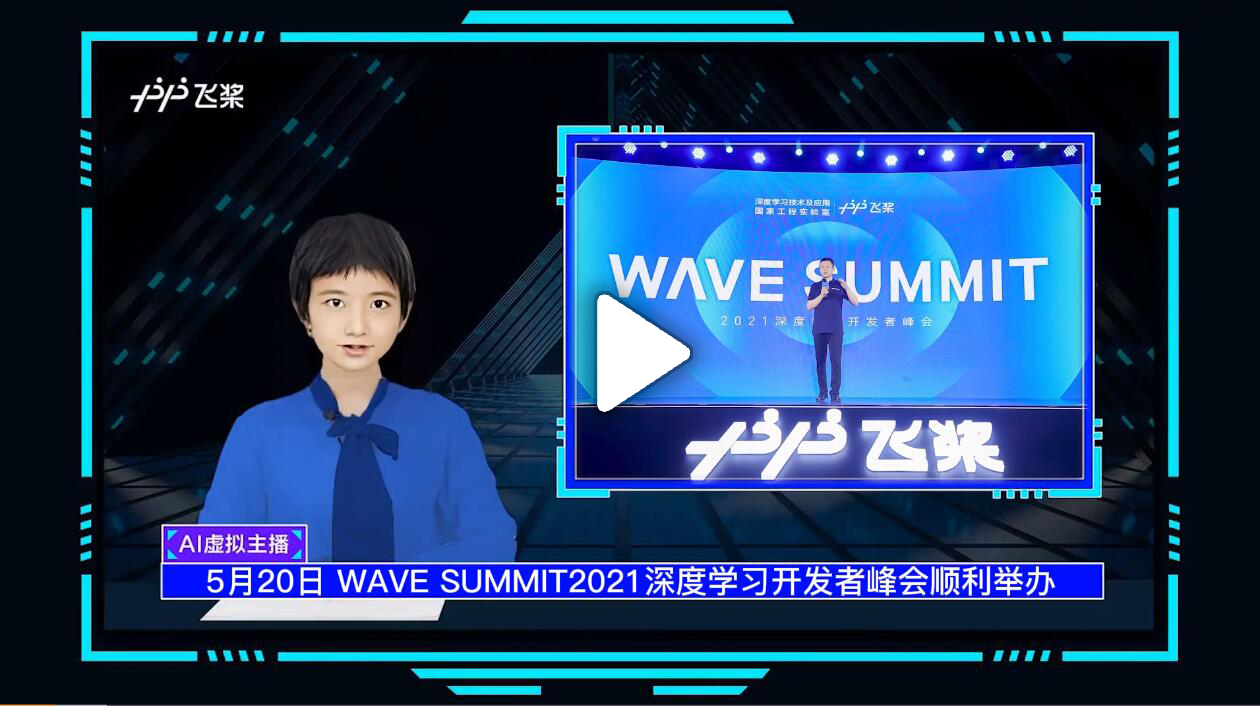
- PaddleBoBo: 使用 PaddleSpeech 的语音合成模块生成虚拟人的声音。
-
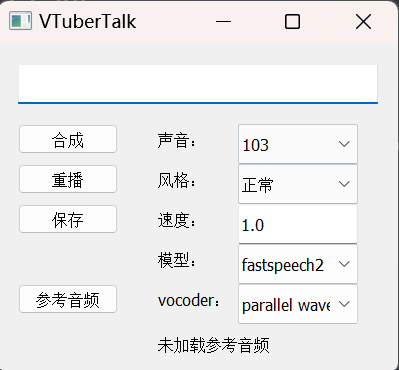
VTuberTalk: 使用 PaddleSpeech 的语音合成和语音识别从视频中克隆人声。
要引用 PaddleSpeech 进行研究,请使用以下格式进行引用。
@InProceedings{pmlr-v162-bai22d,
  title = {{A}$^3${T}: Alignment-Aware Acoustic and Text Pretraining for Speech Synthesis and Editing},
  author = {Bai, He and Zheng, Renjie and Chen, Junkun and Ma, Mingbo and Li, Xintong and Huang, Liang},
  booktitle = {Proceedings of the 39th International Conference on Machine Learning},
  pages = {1399--1411},
  year = {2022},
  volume = {162},
  series = {Proceedings of Machine Learning Research},
  month = {17--23 Jul},
  publisher = {PMLR},
  pdf = {https://proceedings.mlr.press/v162/bai22d/bai22d.pdf},
  url = {https://proceedings.mlr.press/v162/bai22d.html},
}

@inproceedings{zhang2022paddlespeech,
    title = {PaddleSpeech: An Easy-to-Use All-in-One Speech Toolkit},
    author = {Hui Zhang, Tian Yuan, Junkun Chen, Xintong Li, Renjie Zheng, Yuxin Huang, Xiaojie Chen, Enlei Gong, Zeyu Chen, Xiaoguang Hu, dianhai yu, Yanjun Ma, Liang Huang},
    booktitle = {Proceedings of the 2022 Conference of the North American Chapter of the Association for Computational Linguistics: Human Language Technologies: Demonstrations},
    year = {2022},
    publisher = {Association for Computational Linguistics},
}

@inproceedings{zheng2021fused,
  title={Fused acoustic and text encoding for multimodal bilingual pretraining and speech translation},
  author={Zheng, Renjie and Chen, Junkun and Ma, Mingbo and Huang, Liang},
  booktitle={International Conference on Machine Learning},
  pages={12736--12746},
  year={2021},
  organization={PMLR}
}
热烈欢迎您在 Discussions 中提交问题,并在 Issues 中指出发现的 bug。此外,我们非常希望您参与到 PaddleSpeech 的开发中!


- 非常感谢 HighCWu 新增 VITS-aishell3 和 VITS-VC 代码示例。
- 非常感谢 david-95 修复 TTS 句尾多标点符号出错的问题,贡献补充多条程序和数据。为 TTS 中文文本前端新增 SSML 功能。
- 非常感谢 BarryKCL 基于 G2PW 对 TTS 中文文本前端的优化。
- 非常感谢 yeyupiaoling/PPASR/PaddlePaddle-DeepSpeech/VoiceprintRecognition-PaddlePaddle/AudioClassification-PaddlePaddle 多年来的关注和建议,以及在诸多问题上的帮助。
- 非常感谢 mymagicpower 采用PaddleSpeech 对 ASR 的短语音及长语音进行 Java 实现。
- 非常感谢 JiehangXie/PaddleBoBo 采用 PaddleSpeech 语音合成功能实现 Virtual Uploader(VUP)/Virtual YouTuber(VTuber) 虚拟主播。
- 非常感谢 745165806/PaddleSpeechTask 贡献标点重建相关模型。
- 非常感谢 kslz 补充中文文档。
- 非常感谢 awmmmm 提供 fastspeech2 aishell3 conformer 预训练模型。
- 非常感谢 phecda-xu/PaddleDubbing 基于 PaddleSpeech 的 TTS 模型搭建带 GUI 操作界面的配音工具。
- 非常感谢 jerryuhoo/VTuberTalk 基于 PaddleSpeech 的 TTS GUI 界面和基于 ASR 制作数据集的相关代码。
- 非常感谢 vpegasus/xuesebot 基于 PaddleSpeech 的 ASR 与 TTS 设计的可听、说对话机器人。
- 非常感谢 chenkui164/FastASR 对 PaddleSpeech 的 ASR 进行 C++ 推理实现。
- 非常感谢 heyudage/VoiceTyping 基于 PaddleSpeech 的 ASR 流式服务实现的实时语音输入法工具。
- 非常感谢 EscaticZheng/ps3.9wheel-install 对PaddleSpeech在Windows下的安装提供了无需Visua Studio,基于python3.9的预编译依赖安装包。
- 非常感谢 chinobing/FastAPI-PaddleSpeech-Audio-To-Text 利用 FastAPI 实现 PaddleSpeech 语音转文字,文件上传、分割、转换进度显示、后台更新任务并以 csv 格式输出。
- 非常感谢 MistEO/Pallas-Bot 基于 PaddleSpeech TTS 的 QQ Bot 项目。
此外,PaddleSpeech 依赖于许多开源存储库。有关更多信息,请参阅 references。
PaddleSpeech 在 Apache-2.0 许可 下提供。