




A high-performance, highly available multi-channel message service built with Go. Supports SMS (Aliyun, Tencent Cloud, Zrwinfo), Email, WeChatWork, DingTalk and more. Features an intelligent rule engine for automatic retry and provider switching on failures, combined with provider callback processing to ensure reliable message delivery. Includes enterprise-grade features such as async queue processing, circuit breaker, rate limiting, quota management, and a comprehensive admin dashboard.
- Multi-Channel Support - SMS, Email, WeChatWork, DingTalk, Webhook
- Multiple SMS Providers - Aliyun, Tencent Cloud, Zrwinfo with automatic failover
- Async Processing - Redis Stream based message queue with worker pool
- High Availability - Circuit breaker pattern, smooth weighted round-robin load balancing
- Rule Engine - Flexible failure handling rules with customizable actions
- Provider Auto-Switching - Automatically switch to alternative providers on failure
- Callback Processing - Handle provider status callbacks with webhook notifications
- Enterprise Ready - Rate limiting, quota management, retry with exponential backoff
- Flexible Delivery - Single, batch, and scheduled message sending
- Secure API - HMAC-SHA256 signature authentication
- Admin Dashboard - Vue.js + Ant Design based management UI
- Template Engine - Reusable message templates with variable substitution
| Channel | Provider | Features |
|---|---|---|
| SMS | Aliyun SMS | Domestic & International |
| SMS | Tencent Cloud SMS | Domestic & International |
| SMS | Zrwinfo | Domestic |
| SMTP | Standard SMTP protocol | |
| IM | WeChatWork | Application messages |
| IM | DingTalk | Robot messages |
┌─────────────────────────────────────────────────────────────────┐
│                        HTTP API Layer                           │
│              (Authentication / Rate Limit / Quota)              │
├─────────────────────────────────────────────────────────────────┤
│                      Message Service                            │
│                (Create Task → Push to Queue)                    │
├─────────────────────────────────────────────────────────────────┤
│                      Redis Stream Queue                         │
├─────────────────────────────────────────────────────────────────┤
│                       Worker Pool (N)                           │
│              (Consume → Process → Send → Update)                │
├─────────────────────────────────────────────────────────────────┤
│                     Channel Selector                            │
│            (Smooth Weighted Round-Robin / Failover)             │
├─────────────────────────────────────────────────────────────────┤
│                        Rule Engine                              │
│         (Failure Handling / Retry / Switch Provider)            │
├─────────────────────────────────────────────────────────────────┤
│                    Provider Senders                             │
│        (Aliyun / Tencent / Zrwinfo / SMTP / WeChatWork)         │
├─────────────────────────────────────────────────────────────────┤
│                   Callback Processing                           │
│          (Status Callbacks / Webhook Notifications)             │
├─────────────────────────────────────────────────────────────────┤
│                        Rule Engine                              │
│         (Failure Handling / Retry / Switch Provider)            │
└─────────────────────────────────────────────────────────────────┘
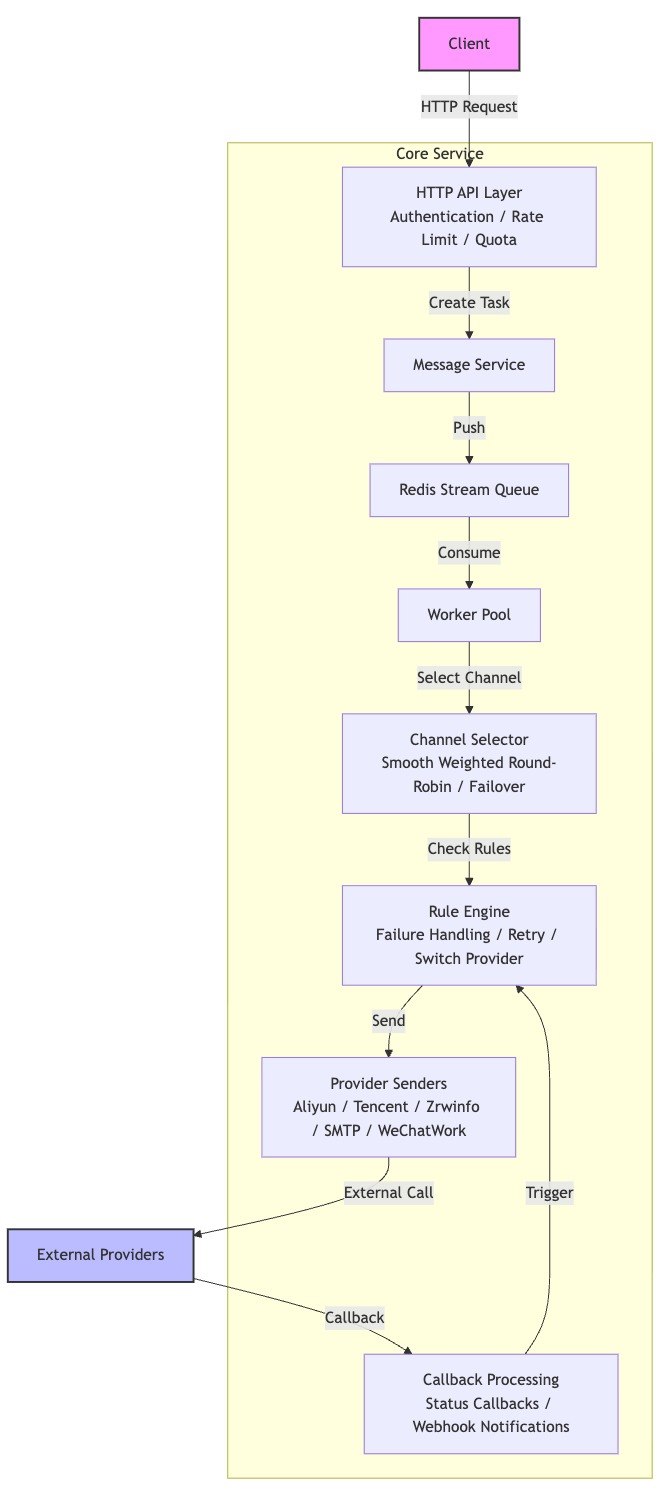
- Go 1.21+
- MySQL 5.7+ or PostgreSQL
- Redis 5.0+
git clone https://cnb.cool/mliev/push/message-push
cd message-push

# Copy and edit configuration
cp config.yaml.example config.yaml
Edit config.yaml:
database:
  host: localhost
  port: 3306
  username: root
  password: your_password
  database: push_service

redis:
  host: localhost
  port: 6379
# Development
go run main.go

# Or build and run
make build
./bin/push-service
The service will start on http://localhost:8080
# Health check
curl http://localhost:8080/health

# Expected response
{
  "code": 0,
  "message": "success",
  "data": {
    "status": "UP",
    "services": {
      "database": {"status": "UP"},
      "redis": {"status": "UP"}
    }
  }
}
All API requests require HMAC-SHA256 signature:
Signature = HMAC-SHA256(app_secret, "app_key={app_key}×tamp={timestamp}")
Headers:
X-App-Key: Your application keyX-Timestamp: Unix timestampX-Signature: Generated signature
curl -X POST http://localhost:8080/api/v1/messages \
  -H "Content-Type: application/json" \
  -H "X-App-Key: your_app_key" \
  -H "X-Timestamp: 1700000000" \
  -H "X-Signature: your_signature" \
  -d '{
    "channel_type": "sms",
    "receiver": "13800138000",
    "template_code": "verify_code",
    "template_params": {
      "code": "123456"
    }
  }'
curl -X POST http://localhost:8080/api/v1/messages/batch \
  -H "Content-Type: application/json" \
  -H "X-App-Key: your_app_key" \
  -H "X-Timestamp: 1700000000" \
  -H "X-Signature: your_signature" \
  -d '{
    "channel_type": "sms",
    "receivers": ["13800138000", "13800138001"],
    "template_code": "promotion",
    "template_params": {
      "activity": "Black Friday"
    }
  }'
curl http://localhost:8080/api/v1/messages/{task_id} \
  -H "X-App-Key: your_app_key" \
  -H "X-Timestamp: 1700000000" \
  -H "X-Signature: your_signature"
For complete API documentation, see API Guide.
The Rule Engine provides intelligent failure handling with customizable rules:
| Scene | Description |
|---|---|
send_failure | Triggered when message sending fails |
callback_failure | Triggered when provider callback reports failure |
| Action | Description |
|---|---|
retry | Retry with configurable delay and exponential backoff |
switch_provider | Switch to an alternative provider and retry |
fail | Mark the task as failed immediately |
alert | Send alert notification via webhook |
Rules can be configured with multiple matching conditions:
- Provider Code - Match specific provider (e.g.,
aliyun,tencent) - Message Type - Match message type (e.g.,
sms,email) - Error Code - Match specific error codes (supports comma-separated list)
- Error Keyword - Fuzzy match on error message content
{
  "name": "Retry on network timeout",
  "scene": "send_failure",
  "provider_code": "",
  "message_type": "sms",
  "error_keyword": "timeout,network",
  "action": "retry",
  "action_config": {
    "max_retry": 3,
    "delay_seconds": 5,
    "backoff_rate": 2
  },
  "priority": 100
}
# Server settings
server:
  mode: release          # debug, release, test
  addr: ":8080"

# Database
database:
  host: localhost
  port: 3306
  username: root
  password: password
  database: push_service
  max_open_conns: 100
  max_idle_conns: 10

# Redis (message queue)
redis:
  host: localhost
  port: 6379
  password: ""
  db: 0
  pool_size: 10

# JWT (admin authentication)
jwt:
  secret: your-secret-key
  expire_hours: 24

# Rate limiting
rate_limit:
  requests_per_minute: 100
  burst: 10
message-push/
├── main.go                 # Entry point
├── cmd/
│   ├── migrate/           # Database migration tool
│   └── run.go             # Server bootstrap
├── config/
│   ├── config.go          # Configuration loader
│   ├── assembly.go        # Dependency injection
│   └── autoload/          # Auto-loaded configs
├── app/
│   ├── controller/        # HTTP handlers
│   │   └── admin/         # Admin API handlers
│   ├── service/           # Business logic
│   ├── dao/               # Data access layer
│   ├── model/             # Database models
│   ├── dto/               # Data transfer objects
│   ├── middleware/        # HTTP middlewares
│   ├── sender/            # Message senders
│   ├── queue/             # Redis queue (producer/consumer)
│   ├── worker/            # Worker pool
│   ├── selector/          # Channel selector
│   ├── circuit/           # Circuit breaker
│   └── helper/            # Utilities
├── admin-webui/           # Vue.js admin dashboard
├── docs/                  # Documentation
└── deploy/                # Deployment configs
# docker-compose.yml
services:
  mliev-push:
    container_name: mliev-push
    image: docker.cnb.cool/mliev/open/mliev-push:develop
    restart: always
    ports:
      - "8080:8080"
    volumes:
      - "./config/:/app/config/"
docker compose up -d
kubectl apply -f deploy/kubernetes/
For production deployment guide, see Production Deployment.
- Quick Start Guide
- API Guide
- API Integration
- Installation Guide
- Production Deployment
- Project Specification
| Language | Repository | Description |
|---|---|---|
| Go | push-go | Go SDK with context support and comprehensive error handling |
| PHP | push-php | PHP SDK with PSR-18 HTTP client support |
| Component | Technology |
|---|---|
| Language | Go 1.21+ |
| Web Framework | Gin v1.10 |
| ORM | GORM v1.25 |
| Database | MySQL / PostgreSQL |
| Cache & Queue | Redis |
| Configuration | Viper |
| Logging | Zap |
| Admin UI | Vue.js + Ant Design Vue |
- Fork the repository
- Create your feature branch (
git checkout -b feature/amazing-feature) - Commit your changes (
git commit -m 'Add amazing feature') - Push to the branch (
git push origin feature/amazing-feature) - Open a Pull Request
| QQ Group | |
|---|---|
 |  |
| Group: 1021660914 | Scan to join |
Copyright © 2025 Hefei Muleiwu(Mliev) Information Technology Co., Ltd. All Rights Reserved.
This software is provided under a proprietary license. Free for commercial and non-commercial use with restrictions. You must retain copyright notices and "Powered by" marks. Redistribution of derivative works is prohibited.
See the LICENSE file for complete terms.
