

English | 简体中文







🧰 Automatically obtain the domain name and resolution list of the DNS provider, and automatically obtain the certificate information for each domain name resolution.。🧰

When we maintain the website, we may occasionally make some relatively simple mistakes, such as forgetting to replace the domain name certificate and making the website inaccessible. However, when we remembered and replaced the certificate, the website became inaccessible because some parsing was missed. These are painful mistakes.
This project aims to enable you to easily grasp the certificate information for each domain name resolution, so that when changing certificates, you will not miss any resolution.
Supports multiple DNS providers, and supports single provider multi account management, while also supporting custom configuration files to obtain certificate information.
You can download the binary directly from the Release release page, then change the configuration file and run it directly.
The default port listening is 21798 . Why choose this port? Because the dashboard ID corresponding to the project in Grafana is 21798。
You can also choose to use Docker deployment. Configure config.yaml locally when deploying, and then override the default in the container by mounting (-v ./config.yaml:/app/config.yaml) when running. Just configure it.
Image Address :
- Abroad:
eryajf/cloud_dns_exporter - Domestic:
registry.cn-hangzhou.aliyuncs.com/eryajf/cloud_dns_exporter
The current application also provides the -v parameter, which is used to print the currently used version information.
This project provides a docker-compose.yml configuration file for quick experience. Before starting, please configure your DNS service provider's AK/SK related information in 'docker-compose.yml' and ensure that your docker-compose version is not lower than 2.23.0。
Then execute the following command in the directory where docker-compose.yml is located:
docker-compose up -d
docker-compose.yml Three containers are defined in the document, namely:
cloud_dns_exporter: Used to obtain domain name and resolution/certificate informationgrafana: Used to display domain name and resolution/certificate informationprometheus: Used for persistent storage of domain names and resolution/certificate information
After starting with docker - compose.yml, access Grafana through http://localhost:3000 and log in using the default username and password admin/admin.
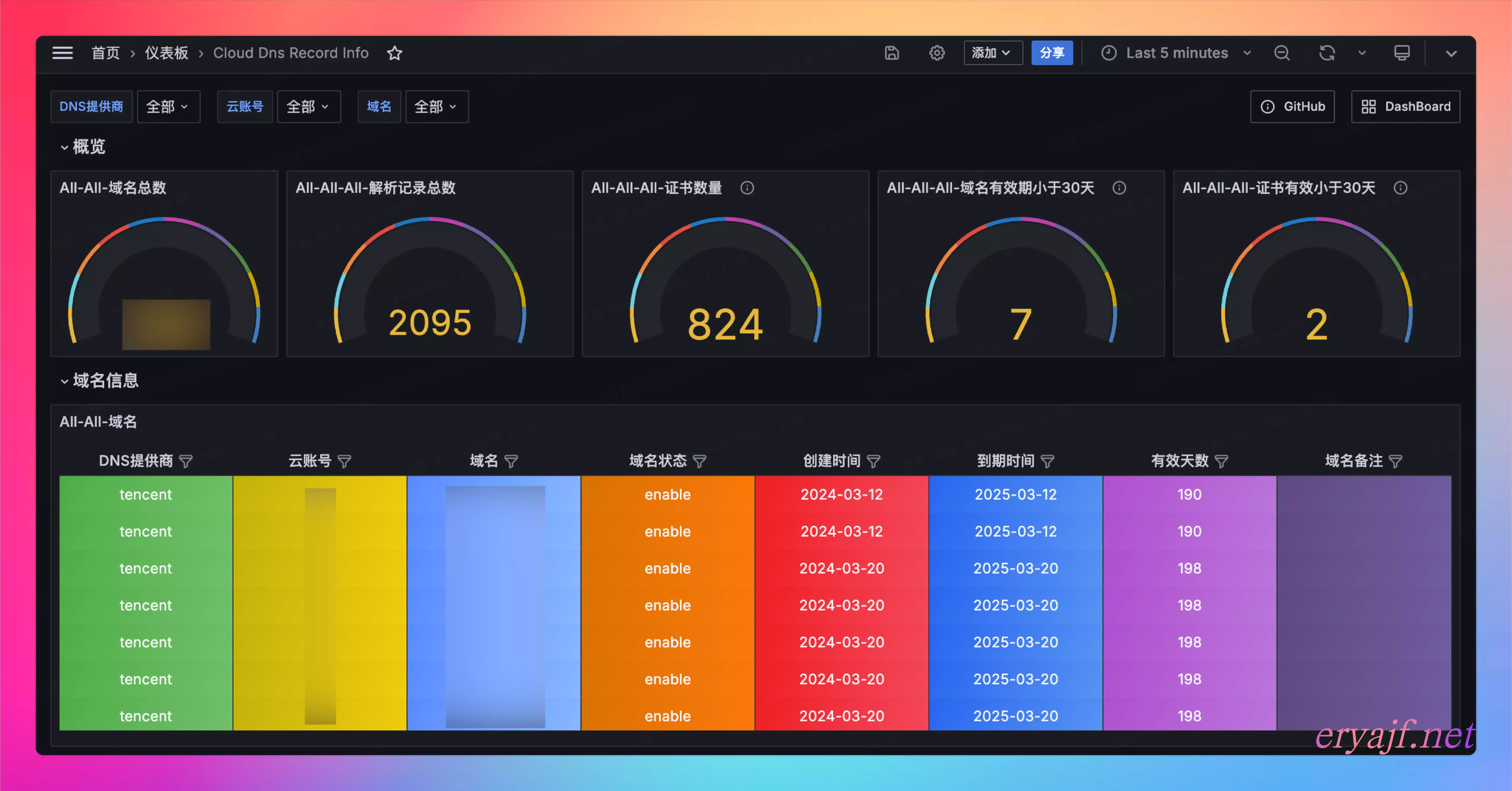
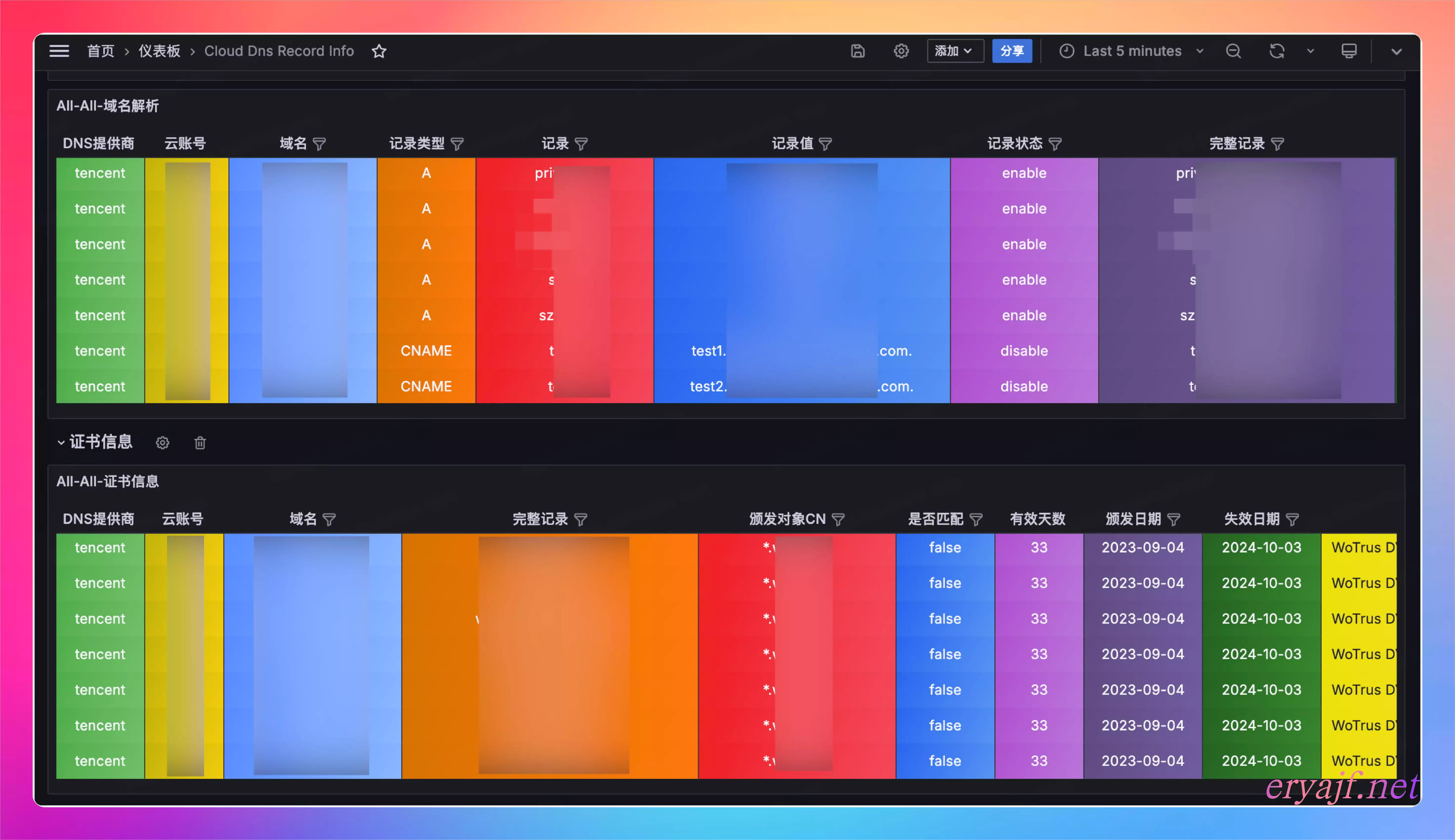
Add a Prometheus type data source to Grafana with the address http://prometheus:9090, and then save it. Then import Grafana Dashboard 21798, select the prometheus data source just added as the data source, and you can see the UI display effect.
- In order to improve the efficiency when requesting indicator data, the project is designed to cache the data in advance through scheduled tasks. By default, the domain name and resolution record information is 30s/time, and the certificate information is obtained once every morning. If you want to get it again, just restart the application.
- Obtaining the certificate information of the parsing records will be limited by different network access scenarios, so please deploy this program in a place where all parsing records can be accessed as much as possible.
- Many domain name certificates may not match the domain name. This is because the certificate information corresponding to 443 monitored by the load service is obtained. You can choose to ignore or process it according to your own situation.
- Because domain name registration and resolution management may not be under the same cloud account, there may be cases where the domain name creation time and expiration time labels in the
domain_listindicator are empty.
If you find that the certificate is obtained incorrectly or incorrectly, please submit an issue for communication.
The indicators provided by this project include the following:
| NAME | Description |
|---|---|
build_info | Build Information |
domain_list | Domain Name List |
record_list | Domain name resolution record list |
record_cert_info | Parse record certificate information list |
Indicator label description:
<!-- Build Information -->
build_info{
    version="version number",
    git_commit="git commit number",
    go_version="go version",
    os_arch="system architecture",
    build_time="build time"} 1
<!-- Domain Name List -->
domain_list{
    cloud_provider="DNS Provider",
    cloud_name="cloud name",
    domain_id="domain id",
    domain_name="domain name",
    domain_remark="domain remark",
    domain_status="domain status",
    create_data="Domain name creation date",
    expiry_date="Domain expiration date"} 99 (This value is the number of days until the domain name expires)

<!-- Domain Name Record List -->
record_list{
    cloud_provider="DNS Provider",
    cloud_name="cloud name",
    domain_name="domain name",
    record_id="record id",
    record_type="record type",
    record_name="record name",
    record_value="record value",
    record_ttl="record ttl",
    record_weight="record weight",
    record_status="record status",
    record_remark="record remark",
    update_time="update time",
    full_record="full record"} 0

<!-- Domain name record certificate information -->
record_cert_info{
    cloud_provider="DNS Provider",
    cloud_name="cloud name",
    domain_name="domain name",
    record_id="record id",
    full_record="full record",
    subject_common_name="subject common name",
    subject_organization="subject organization",
    subject_organizational_unit="subject organizational unit",
    issuer_common_name="issuer common name",
    issuer_organization="issuer organization",
    issuer_organizational_unit="issuer organizational unit",
    created_date="created date",
    expiry_date="expiry date",
    cert_matched="cert matched",
    error_msg="error msg"} 30 (This value is the number of days from the expiration of the recorded certificate)
- Custom Records
- Tencent DnsPod
- Aliyun Dns
- Godaddy
- DNSLA
- Amazon Route53
- Cloudflare
Project corresponding Grafana Dashboard ID: 21798
Overview and Domain Name List:
List of Analysis Records and Certificate Details:
- If you think the project is good, please make a small gesture ⭐️star⭐️!
- If you have other ideas or needs, please feel free to communicate in the issue!
- New DNS service providers are especially welcome to contribute. The scenarios I encountered are not comprehensive and everyone needs to work together to improve the project. I've put a lot of effort into making it very easy to extend the project with a new module, so go ahead and do it.
If you think this project is helpful to you, you can treat the author to a cup of coffee ☕️
| Alipay | |
|---|---|
 |  |
