

NodeSource N|Solid & Node.js Binary Distributions



This repository contains the instructions to install the NodeSource N|solid and Node.js Binary Distributions via .rpm and .deb as well as their setup and support scripts.
If you're looking for more information on NodeSource's low-impact Node.js performance monitoring platform, Learn more here.
We'd like to inform you of important changes to our distribution repository nodesource/distributions.
What's New:
- Package Changes: DEB and RPM packages are now available under the
nodistrocodename. We no longer package the installer coupled to specific versions. This means you can install Node.js on almost any distro that meets the minimum requirements. - Installation Scripts: Back by popular demand, the installation scripts have returned and are better than ever. See the installation instructions below for details on how to use them.
- RPM Package Signing Key: The key used to sign RPM packages has changed. We now sign packages using SHA256, providing better support to the community.
- Questions and concerns: To resolve questions and discuss concerns about this update we've opened this discussion space New distribution's packages
Looking for the previous Documentation README.md
- Debian and Ubuntu based distributions (deb)
- Enterprise Linux based distributions (rpm)
- Nodejs Release Calendar
- FAQ
- Authors and Contributors
- License
NodeSource will continue to maintain the following architectures and may add additional ones in the future.
- amd64 (64-bit)
- armhf (ARM 32-bit hard-float, ARMv7 and up: arm-linux-gnueabihf)
- arm64 (ARM 64-bit, ARMv8 and up: aarch64-linux-gnu)
| Distro Name | Node 18x | Node 20x | Node 21x | Node 22x | Node 23x | Node 24x |
|---|---|---|---|---|---|---|
| Ubuntu Bionic ^18.04 | ❌ | ❌ | ❌ | ❌ | ❌ | ❌ |
| Ubuntu Focal ^20.04 | ✅ | ✅ | ✅ | ✅ | ✅ | ✅ |
| Ubuntu Jammy ^22.04 | ✅ | ✅ | ✅ | ✅ | ✅ | ✅ |
| Ubuntu Noble ^24.04 | ✅ | ✅ | ✅ | ✅ | ✅ | ✅ |
| Distro Name | Node 18x | Node 20x | Node 21x | Node 22x | Node 23x | Node 24x |
|---|---|---|---|---|---|---|
| Debian 8 Jessie | ❌ | ❌ | ❌ | ❌ | ❌ | ❌ |
| Debian 9 Stretch | ❌ | ❌ | ❌ | ❌ | ❌ | ❌ |
| Debian 10 Buster | ✅ | ✅ | ✅ | ✅ | ✅ | ✅ |
| Debian 11 Bullseye | ✅ | ✅ | ✅ | ✅ | ✅ | ✅ |
| Debian 12 Bookworm | ✅ | ✅ | ✅ | ✅ | ✅ | ✅ |
NOTE
If you are looking to run Node.js in a non-supported Linux version contact NodeSource to get enterprise support for your specific needs.
Node.js 23.x:
Before you begin, ensure that curl is installed on your system. If curl is not installed, you can install it using the following command:
sudo apt-get install -y curl
-
Download the setup script:
curl -fsSL https://deb.nodesource.com/setup_23.x -o nodesource_setup.sh -
Run the setup script with sudo:
sudo -E bash nodesource_setup.sh -
Install Node.js:
sudo apt-get install -y nodejs -
Verify the installation:
node -v
Before you begin, ensure that curl is installed on your system. If curl is not installed, you can install it using the following command:
apt-get install -y curl
-
Download the setup script:
curl -fsSL https://deb.nodesource.com/setup_23.x -o nodesource_setup.sh -
Run the setup script with sudo:
bash nodesource_setup.sh -
Install Node.js:
apt-get install -y nodejs -
Verify the installation:
node -v
Node.js v22.x:
Before you begin, ensure that curl is installed on your system. If curl is not installed, you can install it using the following command:
sudo apt-get install -y curl
-
Download the setup script:
curl -fsSL https://deb.nodesource.com/setup_22.x -o nodesource_setup.sh -
Run the setup script with sudo:
sudo -E bash nodesource_setup.sh -
Install N|Solid or Node.js:
N|Solid
Install N|Solid:
sudo apt-get install -y nsolidVerify the installation:
nsolid -vNode.js
Install Node.js:
sudo apt-get install -y nodejsVerify the installation:
node -v
Before you begin, ensure that curl is installed on your system. If curl is not installed, you can install it using the following command:
apt-get install -y curl
-
Download the setup script:
curl -fsSL https://deb.nodesource.com/setup_22.x -o nodesource_setup.sh -
Run the setup script with sudo:
bash nodesource_setup.sh -
Install N|Solid or Node.js:
N|Solid
Install N|Solid:
apt-get install -y nsolidVerify the installation:
nsolid -vNode.js
Install Node.js:
apt-get install -y nodejsVerify the installation:
node -v
Node.js v20.x:
Before you begin, ensure that curl is installed on your system. If curl is not installed, you can install it using the following command:
sudo apt-get install -y curl
-
Download the setup script:
curl -fsSL https://deb.nodesource.com/setup_20.x -o nodesource_setup.sh -
Run the setup script with sudo:
sudo -E bash nodesource_setup.sh -
Install N|Solid or Node.js:
N|Solid
Install N|Solid:
sudo apt-get install -y nsolidVerify the installation:
nsolid -vNode.js
Install Node.js:
sudo apt-get install -y nodejsVerify the installation:
node -v
Before you begin, ensure that curl is installed on your system. If curl is not installed, you can install it using the following command:
apt-get install -y curl
-
Download the setup script:
curl -fsSL https://deb.nodesource.com/setup_20.x -o nodesource_setup.sh -
Run the setup script with sudo:
bash nodesource_setup.sh -
Install N|Solid or Node.js:
N|Solid
Install N|Solid:
apt-get install -y nsolidVerify the installation:
nsolid -vNode.js
Install Node.js:
apt-get install -y nodejsVerify the installation:
node -v
Node.js v18.x:
Before you begin, ensure that curl is installed on your system. If curl is not installed, you can install it using the following command:
sudo apt-get install -y curl
-
Download the setup script:
curl -fsSL https://deb.nodesource.com/setup_18.x -o nodesource_setup.sh -
Run the setup script with sudo:
sudo -E bash nodesource_setup.sh -
Install N|Solid or Node.js:
N|Solid
Install N|Solid:
sudo apt-get install -y nsolidVerify the installation:
nsolid -vNode.js
Install Node.js:
sudo apt-get install -y nodejsVerify the installation:
node -v
Before you begin, ensure that curl is installed on your system. If curl is not installed, you can install it using the following command:
apt-get install -y curl
-
Download the setup script:
curl -fsSL https://deb.nodesource.com/setup_18.x -o nodesource_setup.sh -
Run the setup script with sudo:
bash nodesource_setup.sh -
Install N|Solid or Node.js:
N|Solid
Install N|Solid:
apt-get install -y nsolidVerify the installation:
nsolid -vNode.js
Install Node.js:
apt-get install -y nodejsVerify the installation:
node -v
Node.js LTS (v22.x):
Before you begin, ensure that curl is installed on your system. If curl is not installed, you can install it using the following command:
sudo apt-get install -y curl
-
Download the setup script:
curl -fsSL https://deb.nodesource.com/setup_lts.x -o nodesource_setup.sh -
Run the setup script with sudo:
sudo -E bash nodesource_setup.sh -
Install N|Solid or Node.js:
N|Solid
Install N|Solid:
sudo apt-get install -y nsolidVerify the installation:
nsolid -vNode.js
Install Node.js:
sudo apt-get install -y nodejsVerify the installation:
node -v
Before you begin, ensure that curl is installed on your system. If curl is not installed, you can install it using the following command:
apt-get install -y curl
-
Download the setup script:
curl -fsSL https://deb.nodesource.com/setup_lts.x -o nodesource_setup.sh -
Run the setup script with sudo:
bash nodesource_setup.sh -
Install N|Solid or Node.js:
N|Solid
Install N|Solid:
apt-get install -y nsolidVerify the installation:
nsolid -vNode.js
Install Node.js:
apt-get install -y nodejsVerify the installation:
node -v
Node.js Current (24):
Before you begin, ensure that curl is installed on your system. If curl is not installed, you can install it using the following command:
sudo apt-get install -y curl
-
Download the setup script:
curl -fsSL https://deb.nodesource.com/setup_current.x -o nodesource_setup.sh -
Run the setup script with sudo:
sudo -E bash nodesource_setup.sh -
Install Node.js:
sudo apt-get install -y nodejs -
Verify the installation:
node -v
Before you begin, ensure that curl is installed on your system. If curl is not installed, you can install it using the following command:
apt-get install -y curl
-
Download the setup script:
curl -fsSL https://deb.nodesource.com/setup_current.x -o nodesource_setup.sh -
Run the setup script with sudo:
bash nodesource_setup.sh -
Install Node.js:
apt-get install -y nodejs -
Verify the installation:
node -v
To completely remove Node.js or N|solid installed from the deb.nodesource.com package methods above:
N|Solid
apt-get purge nsolid &&\
rm -r /etc/apt/sources.list.d/nodesource.list &&\
rm -r /etc/apt/keyrings/nodesource.gpg
Node.js
apt-get purge nodejs &&\
rm -r /etc/apt/sources.list.d/nodesource.list &&\
rm -r /etc/apt/keyrings/nodesource.gpg
NodeSource will continue to maintain the following architectures and may add additional ones in the future.
- x86_64 (64-bit)
- arm64 (ARM 64-bit, ARMv8 and up: aarch64-linux-gnu)
| Distro Name | Node 18x | Node 20x | Node 21x | Node 22x | Node 23x |
|---|---|---|---|---|---|
| Fedora >= 20 (20->28) | ❌ | ❌ | ❌ | ❌ | ❌ |
| Fedora >= 29 | ✅ | ✅ | ✅ | ✅ | ✅ |
| Fedora >= 36 | ✅ | ✅ | ✅ | ✅ | ✅ |
| Distro Name | Node 18x | Node 20x | Node 21x | Node 22x | Node 23x |
|---|---|---|---|---|---|
| Redhat 7 | ❌ | ❌ | ❌ | ❌ | ❌ |
| Redhat 8 | ✅ | ✅ | ✅ | ✅ | ✅ |
| Redhat 9 | ✅ | ✅ | ✅ | ✅ | ✅ |
| Redhat 9-minimal | ✅ | ✅ | ✅ | ✅ | ✅ |
| Distro Name | Node 18x | Node 20x | Node 21x | Node 22x |
|---|---|---|---|---|
| Amazon Linux 2 | ❌ | ❌ | ❌ | ❌ |
| Amazon Linux 2023 | ✅ | ✅ | ✅ | ✅ |
NOTE
If you are looking to run Node.js in a non-supported Linux version contact NodeSource to get enterprise support for your specific needs.
Node.js v23.x
Before you begin, ensure that curl is installed on your system. If curl is not installed, you can install it using the following command:
sudo yum install -y curl
-
Download the setup script:
curl -fsSL https://rpm.nodesource.com/setup_23.x -o nodesource_setup.sh -
Run the setup script as root:
sudo bash nodesource_setup.sh -
Install Node.js:
sudo yum install -y nodejs -
Verify the installation:
node -v
Before you begin, ensure that curl is installed on your system. If curl is not installed, you can install it using the following command:
yum install -y curl
-
Download the setup script:
curl -fsSL https://rpm.nodesource.com/setup_23.x -o nodesource_setup.sh -
Run the setup script as root:
bash nodesource_setup.sh -
Install Node.js:
yum install -y nodejs -
Verify the installation:
node -v
Node.js v22.x
Before you begin, ensure that curl is installed on your system. If curl is not installed, you can install it using the following command:
sudo yum install -y curl
-
Download the setup script:
curl -fsSL https://rpm.nodesource.com/setup_22.x -o nodesource_setup.sh -
Run the setup script as root:
sudo bash nodesource_setup.sh -
Install Node.js:
sudo yum install -y nodejs -
Verify the installation:
node -v
Before you begin, ensure that curl is installed on your system. If curl is not installed, you can install it using the following command:
yum install -y curl
-
Download the setup script:
curl -fsSL https://rpm.nodesource.com/setup_22.x -o nodesource_setup.sh -
Run the setup script as root:
bash nodesource_setup.sh -
Install Node.js:
yum install -y nodejs -
Verify the installation:
node -v
Node.js v20.x
Before you begin, ensure that curl is installed on your system. If curl is not installed, you can install it using the following command:
sudo yum install -y curl
-
Download the setup script:
curl -fsSL https://rpm.nodesource.com/setup_20.x -o nodesource_setup.sh -
Run the setup script as root:
bash nodesource_setup.sh -
Install N|Solid or Node.js:
N|Solid
Install N|Solid:
yum install -y nsolidVerify the installation:
nsolid -vNode.js
Install Node.js:
yum install -y nodejsVerify the installation:
node -v
Before you begin, ensure that curl is installed on your system. If curl is not installed, you can install it using the following command:
yum install -y curl
-
Download the setup script:
curl -fsSL https://rpm.nodesource.com/setup_20.x -o nodesource_setup.sh -
Run the setup script as root:
bash nodesource_setup.sh -
Install N|Solid or Node.js:
N|Solid
Install N|Solid:
sudo yum install -y nsolidVerify the installation:
nsolid -vNode.js
Install Node.js:
sudo yum install -y nodejsVerify the installation:
node -v
Node.js v18.x
Before you begin, ensure that curl is installed on your system. If curl is not installed, you can install it using the following command:
sudo yum install -y curl
-
Download the setup script:
curl -fsSL https://rpm.nodesource.com/setup_18.x -o nodesource_setup.sh -
Run the setup script as root:
bash nodesource_setup.sh -
Install N|Solid or Node.js:
N|Solid
Install N|Solid:
sudo yum install -y nsolidVerify the installation:
nsolid -vNode.js
Install Node.js:
sudo yum install -y nodejsVerify the installation:
node -v
Before you begin, ensure that curl is installed on your system. If curl is not installed, you can install it using the following command:
yum install -y curl
-
Download the setup script:
curl -fsSL https://rpm.nodesource.com/setup_18.x -o nodesource_setup.sh -
Run the setup script as root:
sudo bash nodesource_setup.sh -
Install N|Solid or Node.js:
N|Solid
Install N|Solid:
sudo yum install -y nsolidVerify the installation:
nsolid -vNode.js
Install Node.js:
sudo yum install -y nodejsVerify the installation:
node -v
N|Solid or Node.js LTS (22.x)
Before you begin, ensure that curl is installed on your system. If curl is not installed, you can install it using the following command:
yum install -y curl
-
Download the setup script:
curl -fsSL https://rpm.nodesource.com/setup_lts.x -o nodesource_setup.sh -
Run the setup script as root:
bash nodesource_setup.sh -
Install N|Solid or Node.js:
N|Solid
Install N|Solid:
yum install -y nsolidVerify the installation:
nsolid -vNode.js
Install Node.js:
yum install -y nodejsVerify the installation:
node -v
Before you begin, ensure that curl is installed on your system. If curl is not installed, you can install it using the following command:
sudo yum install -y curl
-
Download the setup script:
curl -fsSL https://rpm.nodesource.com/setup_lts.x -o nodesource_setup.sh -
Run the setup script as root:
sudo bash nodesource_setup.sh -
Install N|Solid or Node.js:
N|Solid
Install N|Solid:
sudo yum install -y nsolidVerify the installation:
nsolid -vNode.js
Install Node.js:
sudo yum install -y nodejsVerify the installation:
node -v
Node.js Current (24.x)
Before you begin, ensure that curl is installed on your system. If curl is not installed, you can install it using the following command:
yum install -y curl
-
Download the setup script:
curl -fsSL https://rpm.nodesource.com/setup_current.x -o nodesource_setup.sh -
Run the setup script as root:
bash nodesource_setup.sh -
Install Node.js:
yum install -y nodejs -
Verify the installation:
node -v
Before you begin, ensure that curl is installed on your system. If curl is not installed, you can install it using the following command:
sudo yum install -y curl
-
Download the setup script:
curl -fsSL https://rpm.nodesource.com/setup_current.x -o nodesource_setup.sh -
Run the setup script as root:
sudo bash nodesource_setup.sh -
Install Node.js:
sudo yum install -y nodejs -
Verify the installation:
node -v
Optional: install build tools
To compile and install native addons from npm you may also need to install build tools:
yum install gcc-c++ make
# or: yum groupinstall 'Development Tools'
To completely remove Node.js installed from the rpm.nodesource.com package methods above:
N|Solid
yum remove nsolid &&\
rm -r /etc/yum.repos.d/nodesource*.repo &&\
yum clean all
Node.js
yum remove nodejs &&\
rm -r /etc/yum.repos.d/nodesource*.repo &&\
yum clean all
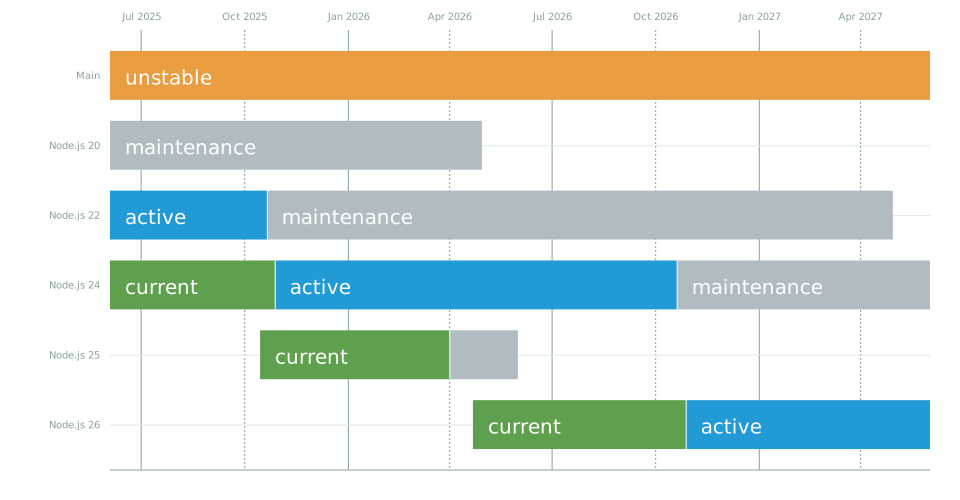 source: https://nodejs.dev
Q: Are the scripts deprecated?
A: The scripts are deprecated for the versions of Node.js that are currently outdated. While the packages for these versions still exist, we no longer provide support for them. Our support is exclusively dedicated to the active Node.js versions, which, as of today, are 18, 20, and 21. Users utilizing these versions can confidently use our scripts, but we encourage those using older versions to upgrade for continued support and the best experience.
Q: How can I configure the repository manually?
A: If you prefer to manually configure the repository, we have a detailed guide to assist you through the process. Please visit our Repository Manual Installation Guide for comprehensive instructions. This guide is designed to provide step-by-step directions to ensure a smooth and successful manual setup of the repository for your Node.js environment.
Q: How do I pin to specific versions of Node.js?
A: Please take a look at wiki
Q: Why is there no folder listing available when I visit the following URLs? https://deb.nodesource.com/node_XX.x/pool/main/n/
https://rpm.nodesource.com/pub_20.x/
A: This issue may arise because some users utilize the above URLs to download specific versions of Node.js or create mirrors of our repository.
For more information and possible solutions, please refer to the following resources:
| Adrian Estrada | GitHub/edsadr | Twitter/@edsadr |
|---|---|---|
| Jesus Paz | GitHub/JesusPaz | |
| Jefferson Rios | GitHub/riosje |
| Chris Lea | GitHub/chrislea | Twitter/@chrislea |
|---|---|---|
| Rod Vagg | GitHub/rvagg | Twitter/@rvagg |
| William Blankenship | GitHub/retrohacker | Twitter/@retrohack3r |
| Harry Truong | GitHub/harrytruong | |
| Matteo Brunati | GitHub/mattbrun | |
| Brian White | GitHub/mscdex | |
| Matt Lewandowsky | GitHub/lewellyn | |
| Jan-Hendrik Peters | GitHub/hennr | |
| Andris Reinman | GitHub/andris9 | |
| Carvilsi | GitHub/carvilsi | |
| Krasimir Trenchev | GitHub/Ava7 | |
| Phil Helm | GitHub/phelma | |
| 0xmohit | GitHub/0xmohit | |
| jdarling | GitHub/jdarling | |
| Prayag Verma | GitHub/pra85 | |
| Misha Brukman | GitHub/mbrukman | |
| Simon Lydell | GitHub/lydell | |
| Sebastian Blei | GitHub/iamsebastian | |
| Jorge Maldonado Ventura | NotABug/jorgesumle | |
| Mayank Metha | GitHub/mayankmetha | Twitter/@mayankmethad |
| Iván Iguarán | GitHub/igsu |
Contributions are welcomed from anyone wanting to improve this project!
This material is Copyright (c) NodeSource and licensed under the MIT license. All rights not explicitly granted in the MIT license are reserved. See the included LICENSE.md file for more details.
Supported with love by the NodeSource team
This project is not affiliated with Debian, Ubuntu, Red Hat, CentOS or Fedora.
Ubuntu is a registered trademark of Canonical Ltd.
Debian is a registered trademark owned by Software in the Public Interest, Inc.
Red Hat, CentOS and Fedora are trademarks of Red Hat, Inc.
Amazon Linux is a trademark of Amazon Web Services, Inc.
CloudLinux is a trademark of CloudLinux, Inc
