




dots.ocr is a powerful, multilingual document parser that unifies layout detection and content recognition within a single vision-language model while maintaining good reading order. Despite its compact 1.7B-parameter LLM foundation, it achieves state-of-the-art(SOTA) performance.
- Powerful Performance: dots.ocr achieves SOTA performance for text, tables, and reading order on OmniDocBench, while delivering formula recognition results comparable to much larger models like Doubao-1.5 and gemini2.5-pro.
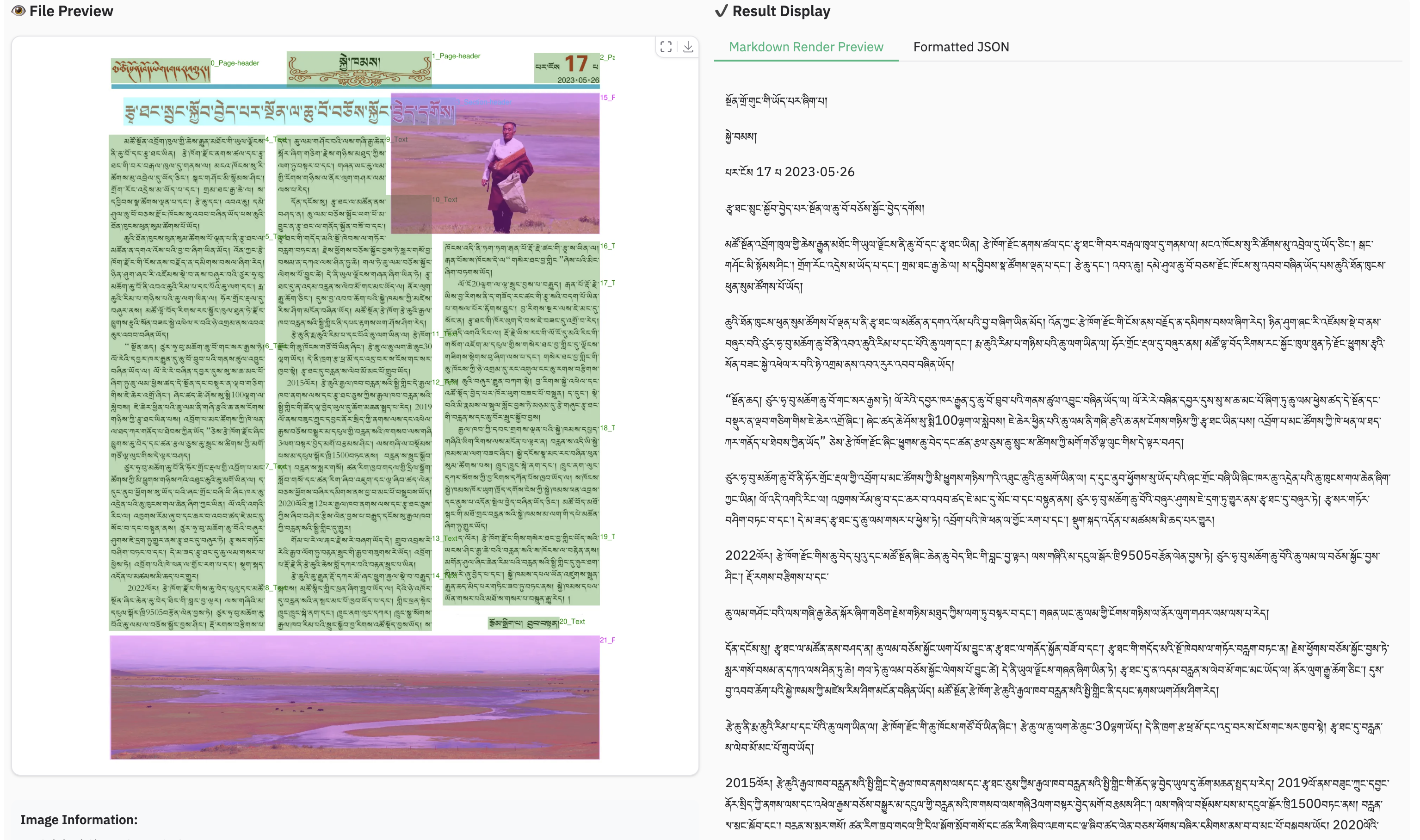
- Multilingual Support: dots.ocr demonstrates robust parsing capabilities for low-resource languages, achieving decisive advantages across both layout detection and content recognition on our in-house multilingual documents benchmark.
- Unified and Simple Architecture: By leveraging a single vision-language model, dots.ocr offers a significantly more streamlined architecture than conventional methods that rely on complex, multi-model pipelines. Switching between tasks is accomplished simply by altering the input prompt, proving that a VLM can achieve competitive detection results compared to traditional detection models like DocLayout-YOLO.
- Efficient and Fast Performance: Built upon a compact 1.7B LLM, dots.ocr provides faster inference speeds than many other high-performing models based on larger foundations.
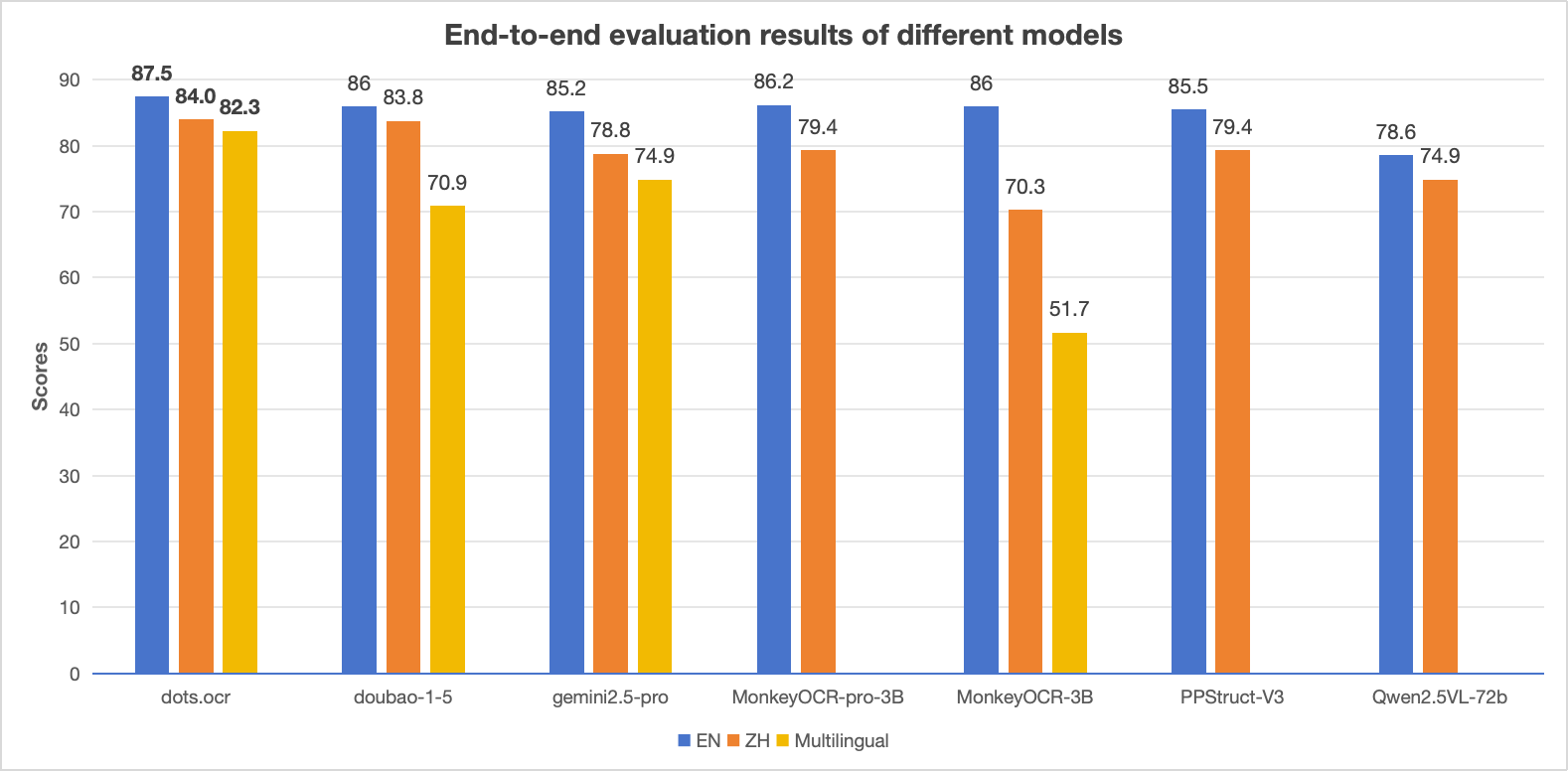
Notes:
- The EN, ZH metrics are the end2end evaluation results of OmniDocBench, and Multilingual metric is the end2end evaluation results of dots.ocr-bench.
2025.07.30🚀 We release dots.ocr, — a multilingual documents parsing model based on 1.7b llm, with SOTA performance.
| Model Type | Methods | OverallEdit↓ | TextEdit↓ | FormulaEdit↓ | TableTEDS↑ | TableEdit↓ | Read OrderEdit↓ | ||||||
|---|---|---|---|---|---|---|---|---|---|---|---|---|---|
| EN | ZH | EN | ZH | EN | ZH | EN | ZH | EN | ZH | EN | ZH | ||
| Pipeline Tools | MinerU | 0.150 | 0.357 | 0.061 | 0.215 | 0.278 | 0.577 | 78.6 | 62.1 | 0.180 | 0.344 | 0.079 | 0.292 |
| Marker | 0.336 | 0.556 | 0.080 | 0.315 | 0.530 | 0.883 | 67.6 | 49.2 | 0.619 | 0.685 | 0.114 | 0.340 | |
| Mathpix | 0.191 | 0.365 | 0.105 | 0.384 | 0.306 | 0.454 | 77.0 | 67.1 | 0.243 | 0.320 | 0.108 | 0.304 | |
| Docling | 0.589 | 0.909 | 0.416 | 0.987 | 0.999 | 1 | 61.3 | 25.0 | 0.627 | 0.810 | 0.313 | 0.837 | |
| Pix2Text | 0.320 | 0.528 | 0.138 | 0.356 | 0.276 | 0.611 | 73.6 | 66.2 | 0.584 | 0.645 | 0.281 | 0.499 | |
| Unstructured | 0.586 | 0.716 | 0.198 | 0.481 | 0.999 | 1 | 0 | 0.06 | 1 | 0.998 | 0.145 | 0.387 | |
| OpenParse | 0.646 | 0.814 | 0.681 | 0.974 | 0.996 | 1 | 64.8 | 27.5 | 0.284 | 0.639 | 0.595 | 0.641 | |
| PPStruct-V3 | 0.145 | 0.206 | 0.058 | 0.088 | 0.295 | 0.535 | - | - | 0.159 | 0.109 | 0.069 | 0.091 | |
| Expert VLMs | GOT-OCR | 0.287 | 0.411 | 0.189 | 0.315 | 0.360 | 0.528 | 53.2 | 47.2 | 0.459 | 0.520 | 0.141 | 0.280 |
| Nougat | 0.452 | 0.973 | 0.365 | 0.998 | 0.488 | 0.941 | 39.9 | 0 | 0.572 | 1.000 | 0.382 | 0.954 | |
| Mistral OCR | 0.268 | 0.439 | 0.072 | 0.325 | 0.318 | 0.495 | 75.8 | 63.6 | 0.600 | 0.650 | 0.083 | 0.284 | |
| OLMOCR-sglang | 0.326 | 0.469 | 0.097 | 0.293 | 0.455 | 0.655 | 68.1 | 61.3 | 0.608 | 0.652 | 0.145 | 0.277 | |
| SmolDocling-256M | 0.493 | 0.816 | 0.262 | 0.838 | 0.753 | 0.997 | 44.9 | 16.5 | 0.729 | 0.907 | 0.227 | 0.522 | |
| Dolphin | 0.206 | 0.306 | 0.107 | 0.197 | 0.447 | 0.580 | 77.3 | 67.2 | 0.180 | 0.285 | 0.091 | 0.162 | |
| MinerU 2 | 0.139 | 0.240 | 0.047 | 0.109 | 0.297 | 0.536 | 82.5 | 79.0 | 0.141 | 0.195 | 0.069< | 0.118 | |
| OCRFlux | 0.195 | 0.281 | 0.064 | 0.183 | 0.379 | 0.613 | 71.6 | 81.3 | 0.253 | 0.139 | 0.086 | 0.187 | |
| MonkeyOCR-pro-3B | 0.138 | 0.206 | 0.067 | 0.107 | 0.246 | 0.421 | 81.5 | 87.5 | 0.139 | 0.111 | 0.100 | 0.185 | |
| General VLMs | GPT4o | 0.233 | 0.399 | 0.144 | 0.409 | 0.425 | 0.606 | 72.0 | 62.9 | 0.234 | 0.329 | 0.128 | 0.251 |
| Qwen2-VL-72B | 0.252 | 0.327 | 0.096 | 0.218 | 0.404 | 0.487 | 76.8 | 76.4 | 0.387 | 0.408 | 0.119 | 0.193 | |
| Qwen2.5-VL-72B | 0.214 | 0.261 | 0.092 | 0.18 | 0.315 | 0.434 | 82.9 | 83.9 | 0.341 | 0.262 | 0.106 | 0.168 | |
| Gemini2.5-Pro | 0.148 | 0.212 | 0.055 | 0.168 | 0.356 | 0.439 | 85.8 | 86.4 | 0.13 | 0.119 | 0.049 | 0.121 | |
| doubao-1-5-thinking-vision-pro-250428 | 0.140 | 0.162 | 0.043 | 0.085 | 0.295 | 0.384 | 83.3 | 89.3 | 0.165 | 0.085 | 0.058 | 0.094 | |
| Expert VLMs | dots.ocr | 0.125 | 0.160 | 0.032 | 0.066 | 0.329 | 0.416 | 88.6 | 89.0 | 0.099 | 0.092 | 0.040 | 0.067 |
| Model Type | Models | Book | Slides | Financial Report | Textbook | Exam Paper | Magazine | Academic Papers | Notes | Newspaper | Overall |
|---|---|---|---|---|---|---|---|---|---|---|---|
| Pipeline Tools | MinerU | 0.055 | 0.124 | 0.033 | 0.102 | 0.159 | 0.072 | 0.025 | 0.984 | 0.171 | 0.206 |
| Marker | 0.074 | 0.340 | 0.089 | 0.319 | 0.452 | 0.153 | 0.059 | 0.651 | 0.192 | 0.274 | |
| Mathpix | 0.131 | 0.220 | 0.202 | 0.216 | 0.278 | 0.147 | 0.091 | 0.634 | 0.690 | 0.300 | |
| Expert VLMs | GOT-OCR | 0.111 | 0.222 | 0.067 | 0.132 | 0.204 | 0.198 | 0.179 | 0.388 | 0.771 | 0.267 |
| Nougat | 0.734 | 0.958 | 1.000 | 0.820 | 0.930 | 0.830 | 0.214 | 0.991 | 0.871 | 0.806 | |
| Dolphin | 0.091 | 0.131 | 0.057 | 0.146 | 0.231 | 0.121 | 0.074 | 0.363 | 0.307 | 0.177 | |
| OCRFlux | 0.068 | 0.125 | 0.092 | 0.102 | 0.119 | 0.083 | 0.047 | 0.223 | 0.536 | 0.149 | |
| MonkeyOCR-pro-3B | 0.084 | 0.129 | 0.060 | 0.090 | 0.107 | 0.073 | 0.050 | 0.171 | 0.107 | 0.100 | |
| General VLMs | GPT4o | 0.157 | 0.163 | 0.348 | 0.187 | 0.281 | 0.173 | 0.146 | 0.607 | 0.751 | 0.316 |
| Qwen2.5-VL-7B | 0.148 | 0.053 | 0.111 | 0.137 | 0.189 | 0.117 | 0.134 | 0.204 | 0.706 | 0.205 | |
| InternVL3-8B | 0.163 | 0.056 | 0.107 | 0.109 | 0.129 | 0.100 | 0.159 | 0.150 | 0.681 | 0.188 | |
| doubao-1-5-thinking-vision-pro-250428 | 0.048 | 0.048 | 0.024 | 0.062 | 0.085 | 0.051 | 0.039 | 0.096 | 0.181 | 0.073 | |
| Expert VLMs | dots.ocr | 0.031 | 0.047 | 0.011 | 0.082 | 0.079 | 0.028 | 0.029 | 0.109 | 0.056 | 0.055 |
Notes:
- The metrics are from MonkeyOCR, OmniDocBench, and our own internal evaluations.
- We delete the Page-header and Page-footer cells in the result markdown.
- We use tikz_preprocess pipeline to upsample the images to dpi 200.
This is an inhouse benchmark which contain 1493 pdf images with 100 languages.
| Methods | OverallEdit↓ | TextEdit↓ | FormulaEdit↓ | TableTEDS↑ | TableEdit↓ | Read OrderEdit↓ |
|---|---|---|---|---|---|---|
| MonkeyOCR-3B | 0.483 | 0.445 | 0.627 | 50.93 | 0.452 | 0.409 |
| doubao-1-5-thinking-vision-pro-250428 | 0.291 | 0.226 | 0.440 | 71.2 | 0.260 | 0.238 |
| doubao-1-6 | 0.299 | 0.270 | 0.417 | 71.0 | 0.258 | 0.253 |
| Gemini2.5-Pro | 0.251 | 0.163 | 0.402 | 77.1 | 0.236 | 0.202 |
| dots.ocr | 0.177 | 0.075 | 0.297 | 79.2 | 0.186 | 0.152 |
Notes:
- We use the same metric calculation pipeline of OmniDocBench.
- We delete the Page-header and Page-footer cells in the result markdown.
| Method | F1@IoU=.50:.05:.95↑ | F1@IoU=.50↑ | ||||||||
|---|---|---|---|---|---|---|---|---|---|---|
| Overall | Text | Formula | Table | Picture | Overall | Text | Formula | Table | Picture | |
| DocLayout-YOLO-DocStructBench | 0.733 | 0.694 | 0.480 | 0.803 | 0.619 | 0.806 | 0.779 | 0.620 | 0.858 | 0.678 |
| dots.ocr-parse all | 0.831 | 0.801 | 0.654 | 0.838 | 0.748 | 0.922 | 0.909 | 0.770 | 0.888 | 0.831 |
| dots.ocr-detection only | 0.845 | 0.816 | 0.716 | 0.875 | 0.765 | 0.930 | 0.917 | 0.832 | 0.918 | 0.843 |
Notes:
- prompt_layout_all_en for parse all, prompt_layout_only_en for detection only, please refer to prompts
| Model | ArXiv | Old Scans Math | Tables | Old Scans | Headers and Footers | Multi column | Long Tiny Text | Base | Overall |
|---|---|---|---|---|---|---|---|---|---|
| GOT OCR | 52.7 | 52.0 | 0.2 | 22.1 | 93.6 | 42.0 | 29.9 | 94.0 | 48.3 ± 1.1 |
| Marker | 76.0 | 57.9 | 57.6 | 27.8 | 84.9 | 72.9 | 84.6 | 99.1 | 70.1 ± 1.1 |
| MinerU | 75.4 | 47.4 | 60.9 | 17.3 | 96.6 | 59.0 | 39.1 | 96.6 | 61.5 ± 1.1 |
| Mistral OCR | 77.2 | 67.5 | 60.6 | 29.3 | 93.6 | 71.3 | 77.1 | 99.4 | 72.0 ± 1.1 |
| Nanonets OCR | 67.0 | 68.6 | 77.7 | 39.5 | 40.7 | 69.9 | 53.4 | 99.3 | 64.5 ± 1.1 |
| GPT-4o (No Anchor) | 51.5 | 75.5 | 69.1 | 40.9 | 94.2 | 68.9 | 54.1 | 96.7 | 68.9 ± 1.1 |
| GPT-4o (Anchored) | 53.5 | 74.5 | 70.0 | 40.7 | 93.8 | 69.3 | 60.6 | 96.8 | 69.9 ± 1.1 |
| Gemini Flash 2 (No Anchor) | 32.1 | 56.3 | 61.4 | 27.8 | 48.0 | 58.7 | 84.4 | 94.0 | 57.8 ± 1.1 |
| Gemini Flash 2 (Anchored) | 54.5 | 56.1 | 72.1 | 34.2 | 64.7 | 61.5 | 71.5 | 95.6 | 63.8 ± 1.2 |
| Qwen 2 VL (No Anchor) | 19.7 | 31.7 | 24.2 | 17.1 | 88.9 | 8.3 | 6.8 | 55.5 | 31.5 ± 0.9 |
| Qwen 2.5 VL (No Anchor) | 63.1 | 65.7 | 67.3 | 38.6 | 73.6 | 68.3 | 49.1 | 98.3 | 65.5 ± 1.2 |
| olmOCR v0.1.75 (No Anchor) | 71.5 | 71.4 | 71.4 | 42.8 | 94.1 | 77.7 | 71.0 | 97.8 | 74.7 ± 1.1 |
| olmOCR v0.1.75 (Anchored) | 74.9 | 71.2 | 71.0 | 42.2 | 94.5 | 78.3 | 73.3 | 98.3 | 75.5 ± 1.0 |
| MonkeyOCR-pro-3B | 83.8 | 68.8 | 74.6 | 36.1 | 91.2 | 76.6 | 80.1 | 95.3 | 75.8 ± 1.0 |
| dots.ocr | 82.1 | 64.2 | 88.3 | 40.9 | 94.1 | 82.4 | 81.2 | 99.5 | 79.1 ± 1.0 |
Note:
For quick deployment with our enhanced setup:
| Document | Purpose | For Who |
|---|---|---|
| QUICK_START.md | ⚡ One-minute startup | 🔥 Everyone |
| STARTUP_GUIDE.md | 📖 Complete startup guide | Detailed reference |
| WEB_GUIDE.md | 🌐 Web interface guide | Web users |
| INSTALL_GUIDE.md | 🛠️ Installation guide | First-time setup |
# Check service status
./check_status.sh

# Start persistent services (recommended)
./run_persistent.sh

# Access Web Interface: http://localhost:7860
# Access API: http://localhost:8000
conda create -n dots_ocr python=3.12
conda activate dots_ocr

git clone https://github.com/rednote-hilab/dots.ocr.git
cd dots.ocr

# Install pytorch, see https://pytorch.org/get-started/previous-versions/ for your cuda version
pip install torch==2.7.0 torchvision==0.22.0 torchaudio==2.7.0 --index-url https://download.pytorch.org/whl/cu128
pip install -e .
If you have trouble with the installation, try our Docker Image for an easier setup, and follow these steps:
git clone https://github.com/rednote-hilab/dots.ocr.git
cd dots.ocr
pip install -e .
💡Note: Please use a directory name without periods (e.g.,
DotsOCRinstead ofdots.ocr) for the model save path. This is a temporary workaround pending our integration with Transformers.
python3 tools/download_model.py

# with modelscope
python3 tools/download_model.py --type modelscope
We highly recommend using vllm for deployment and inference. All of our evaluations results are based on vllm version 0.9.1. The Docker Image is based on the official vllm image. You can also follow Dockerfile to build the deployment environment by yourself.
# You need to register model to vllm at first
python3 tools/download_model.py
export hf_model_path=./weights/DotsOCR  # Path to your downloaded model weights, Please use a directory name without periods (e.g., `DotsOCR` instead of `dots.ocr`) for the model save path. This is a temporary workaround pending our integration with Transformers.
export PYTHONPATH=$(dirname "$hf_model_path"):$PYTHONPATH
sed -i '/^from vllm\.entrypoints\.cli\.main import main$/a\
from DotsOCR import modeling_dots_ocr_vllm' `which vllm`  # If you downloaded model weights by yourself, please replace `DotsOCR` by your model saved directory name, and remember to use a directory name without periods (e.g., `DotsOCR` instead of `dots.ocr`)

# launch vllm server
CUDA_VISIBLE_DEVICES=0 vllm serve ${hf_model_path} --tensor-parallel-size 1 --gpu-memory-utilization 0.95  --chat-template-content-format string --served-model-name model --trust-remote-code

# If you get a ModuleNotFoundError: No module named 'DotsOCR', please check the note above on the saved model directory name.

# vllm api demo
python3 ./demo/demo_vllm.py --prompt_mode prompt_layout_all_en
python3 demo/demo_hf.py
Hugginface inference details
import torch
from transformers import AutoModelForCausalLM, AutoProcessor, AutoTokenizer
from qwen_vl_utils import process_vision_info
from dots_ocr.utils import dict_promptmode_to_prompt

model_path = "./weights/DotsOCR"
model = AutoModelForCausalLM.from_pretrained(
    model_path,
    attn_implementation="flash_attention_2",
    torch_dtype=torch.bfloat16,
    device_map="auto",
    trust_remote_code=True
)
processor = AutoProcessor.from_pretrained(model_path, trust_remote_code=True)

image_path = "demo/demo_image1.jpg"
prompt = """Please output the layout information from the PDF image, including each layout element's bbox, its category, and the corresponding text content within the bbox.

1. Bbox format: [x1, y1, x2, y2]

2. Layout Categories: The possible categories are ['Caption', 'Footnote', 'Formula', 'List-item', 'Page-footer', 'Page-header', 'Picture', 'Section-header', 'Table', 'Text', 'Title'].

3. Text Extraction & Formatting Rules:
    - Picture: For the 'Picture' category, the text field should be omitted.
    - Formula: Format its text as LaTeX.
    - Table: Format its text as HTML.
    - All Others (Text, Title, etc.): Format their text as Markdown.

4. Constraints:
    - The output text must be the original text from the image, with no translation.
    - All layout elements must be sorted according to human reading order.

5. Final Output: The entire output must be a single JSON object.
"""

messages = [
        {
            "role": "user",
            "content": [
                {
                    "type": "image",
                    "image": image_path
                },
                {"type": "text", "text": prompt}
            ]
        }
    ]

# Preparation for inference
text = processor.apply_chat_template(
    messages,
    tokenize=False,
    add_generation_prompt=True
)
image_inputs, video_inputs = process_vision_info(messages)
inputs = processor(
    text=[text],
    images=image_inputs,
    videos=video_inputs,
    padding=True,
    return_tensors="pt",
)

inputs = inputs.to("cuda")

# Inference: Generation of the output
generated_ids = model.generate(**inputs, max_new_tokens=24000)
generated_ids_trimmed = [
    out_ids[len(in_ids) :] for in_ids, out_ids in zip(inputs.input_ids, generated_ids)
]
output_text = processor.batch_decode(
    generated_ids_trimmed, skip_special_tokens=True, clean_up_tokenization_spaces=False
)
print(output_text)
Based on vLLM server, you can parse an image or a pdf file using the following commands:
# Parse all layout info, both detection and recognition
# Parse a single image
python3 dots_ocr/parser.py demo/demo_image1.jpg
# Parse a single PDF
python3 dots_ocr/parser.py demo/demo_pdf1.pdf  --num_thread 64  # try bigger num_threads for pdf with a large number of pages

# Layout detection only
python3 dots_ocr/parser.py demo/demo_image1.jpg --prompt prompt_layout_only_en

# Parse text only, except Page-header and Page-footer
python3 dots_ocr/parser.py demo/demo_image1.jpg --prompt prompt_ocr

# Parse layout info by bbox
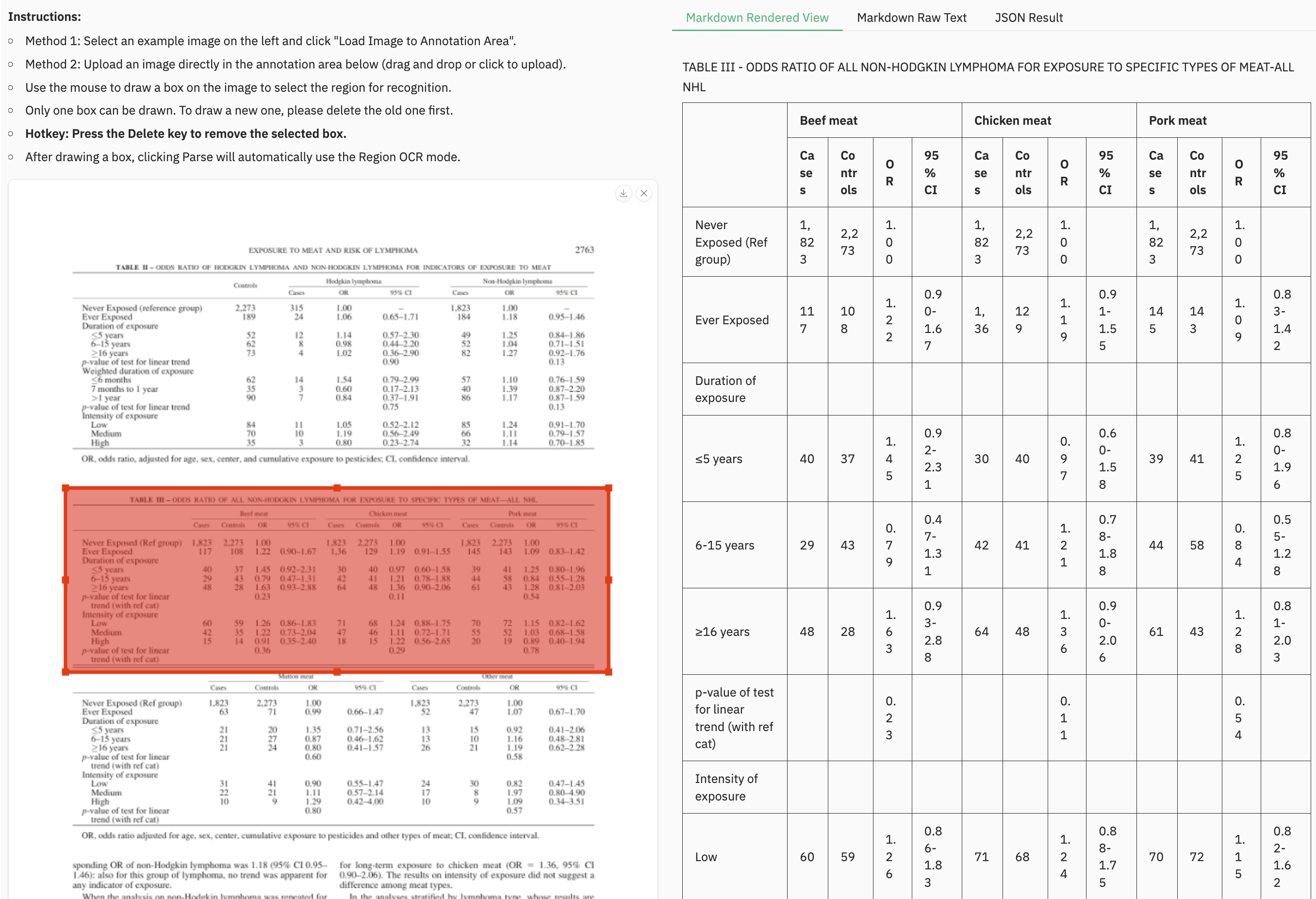
python3 dots_ocr/parser.py demo/demo_image1.jpg --prompt prompt_grounding_ocr --bbox 163 241 1536 705
Based on Transformers, you can parse an image or a pdf file using the same commands above, just add --use_hf true.
Notice: transformers is slower than vllm, if you want to use demo/* with transformers,just add
use_hf=TrueinDotsOCRParser(..,use_hf=True)
Output Results
- Structured Layout Data (
demo_image1.json): A JSON file containing the detected layout elements, including their bounding boxes, categories, and extracted text. - Processed Markdown File (
demo_image1.md): A Markdown file generated from the concatenated text of all detected cells.- An additional version,
demo_image1_nohf.md, is also provided, which excludes page headers and footers for compatibility with benchmarks like Omnidocbench and olmOCR-bench.
- An additional version,
- Layout Visualization (
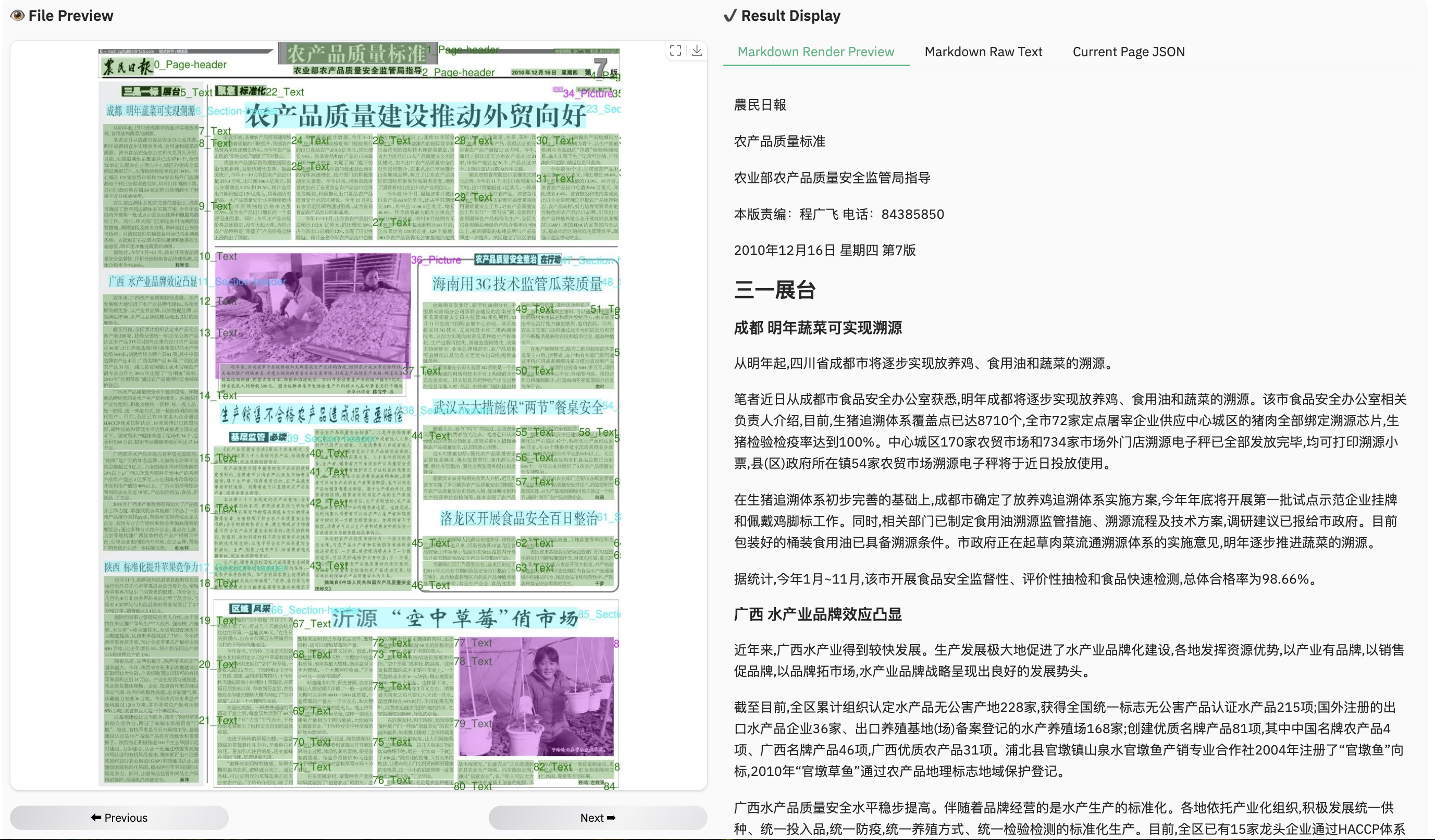
demo_image1.jpg): The original image with the detected layout bounding boxes drawn on it.
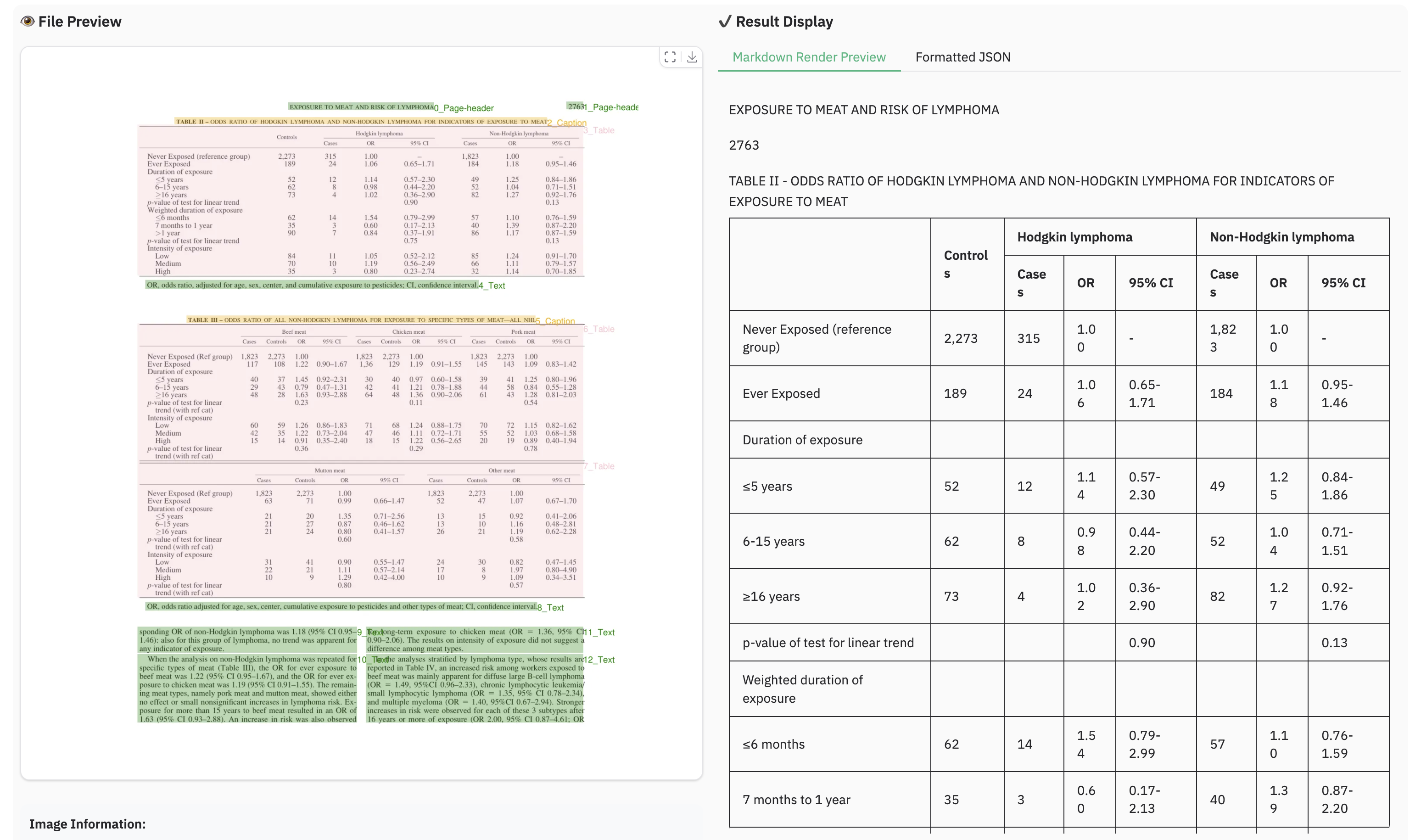
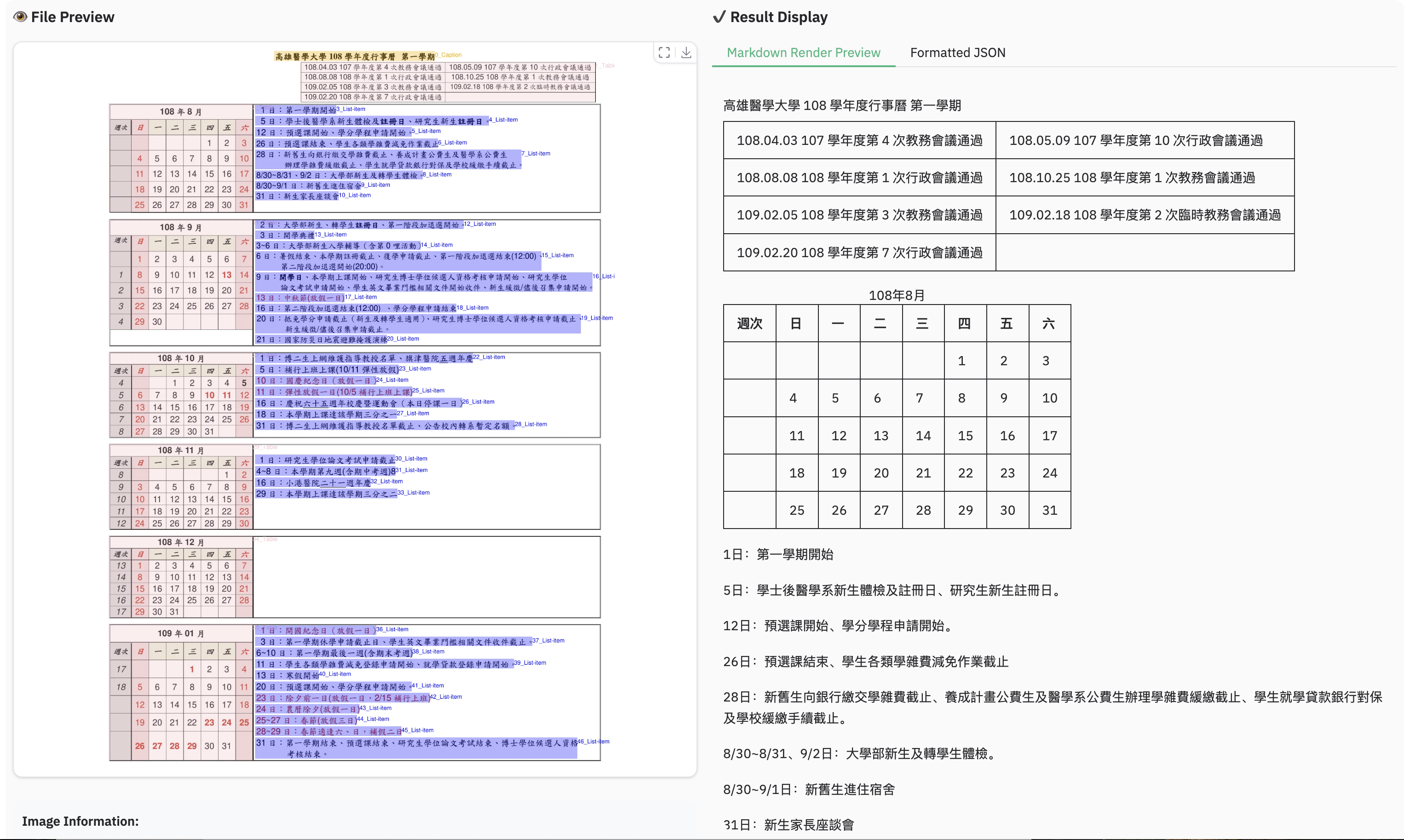
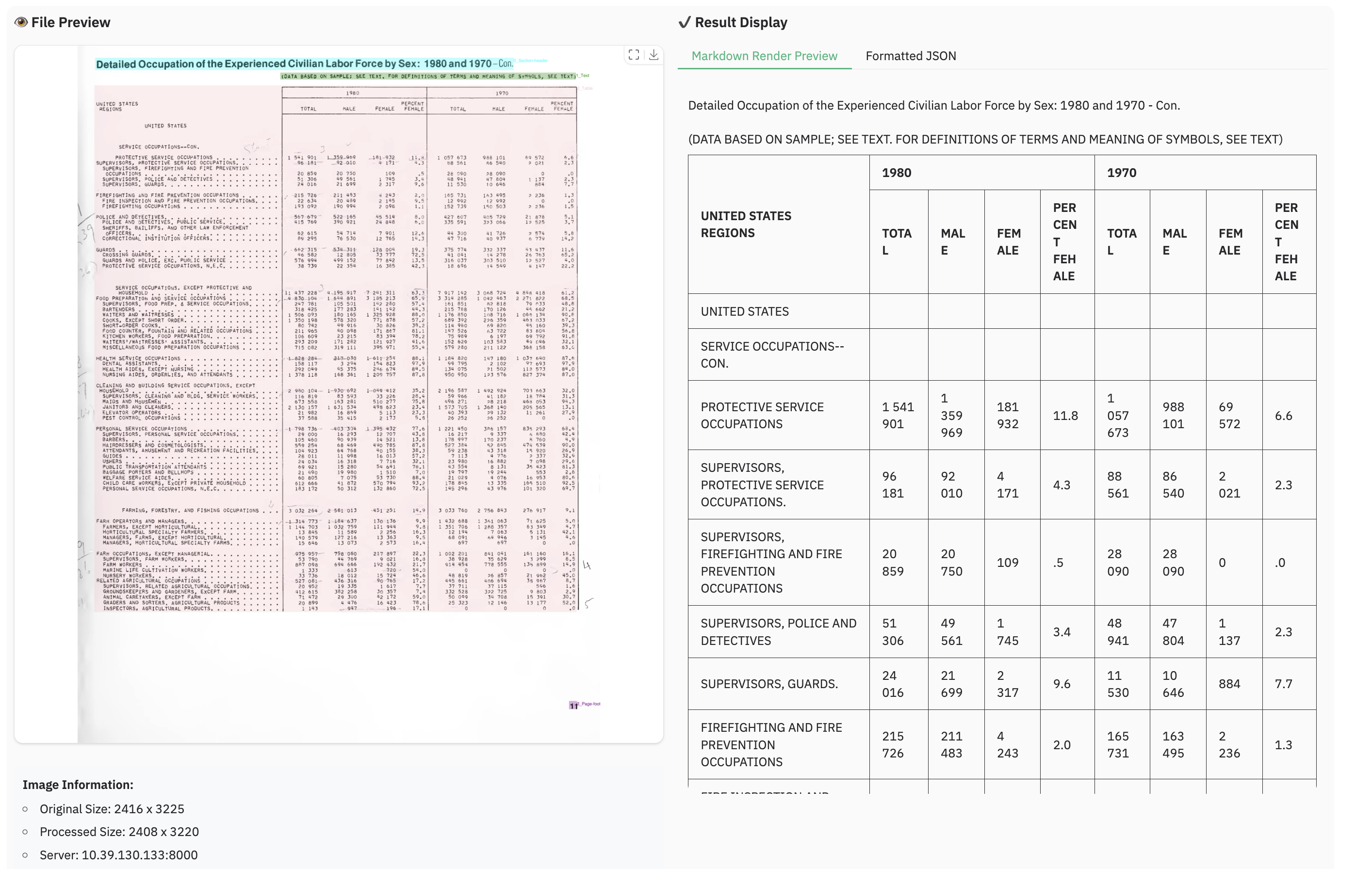
You can run the demo with the following command, or try directly at live demo
python demo/demo_gradio.py
We also provide a demo for grounding ocr:
python demo/demo_gradio_annotion.py
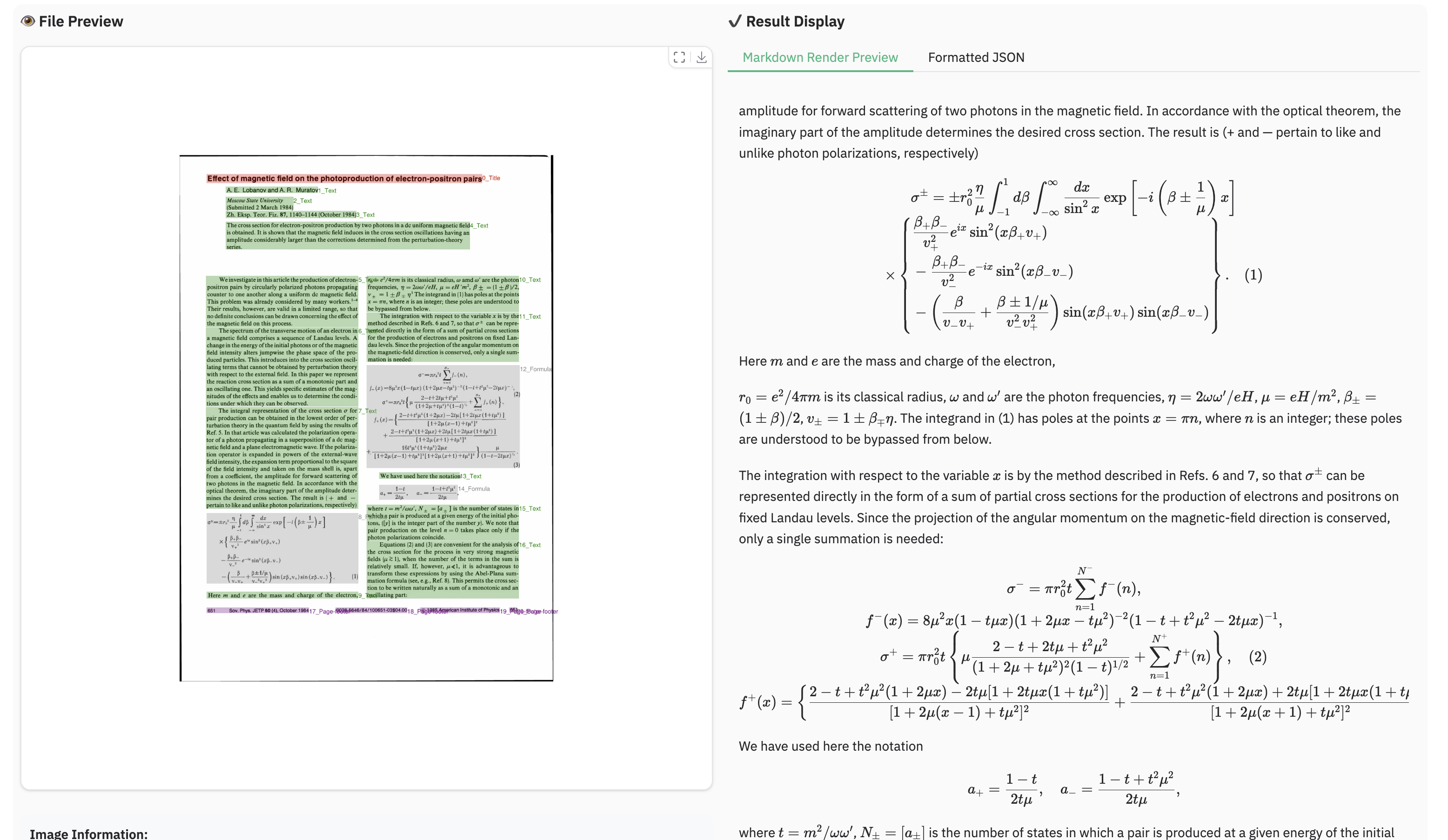
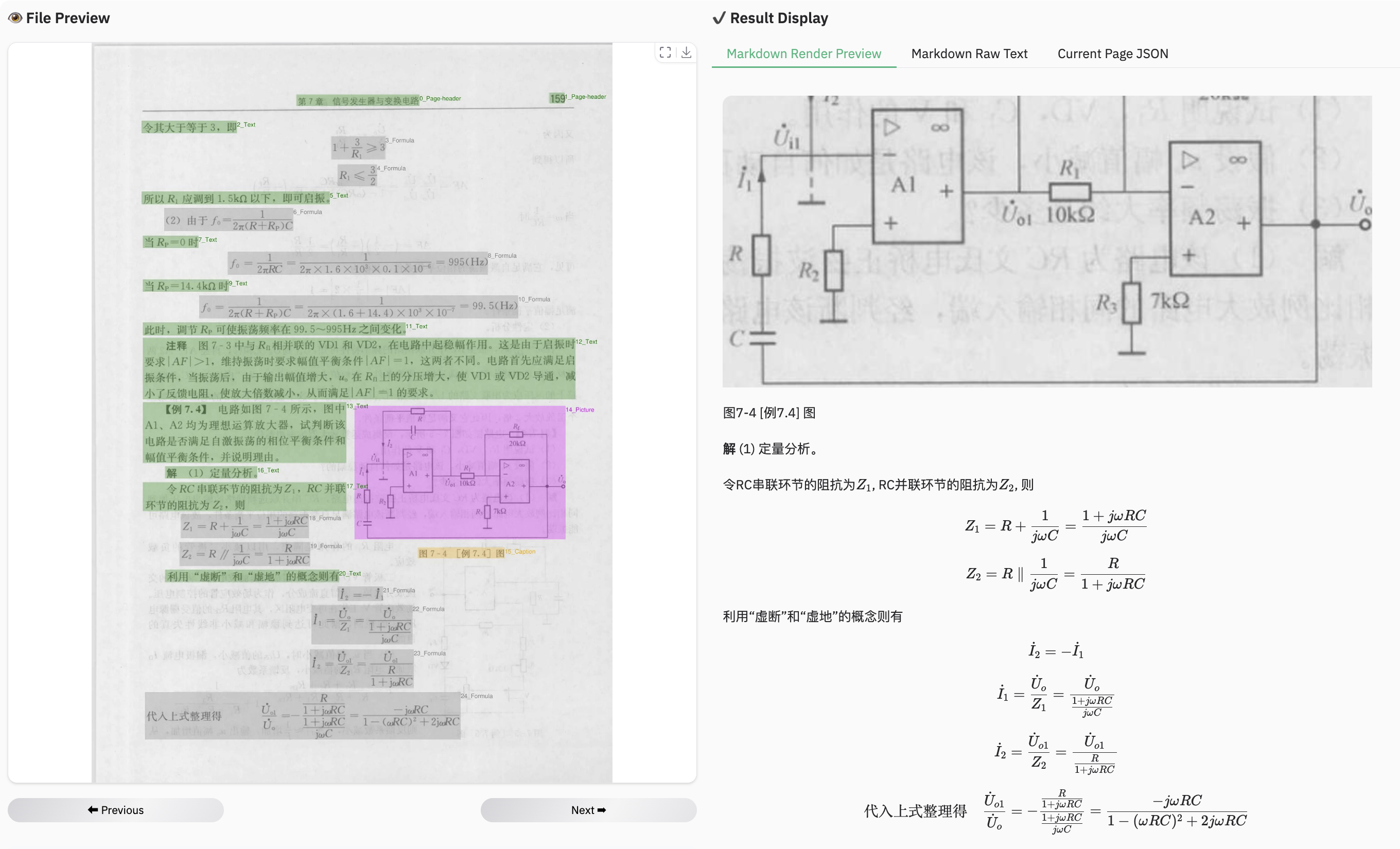
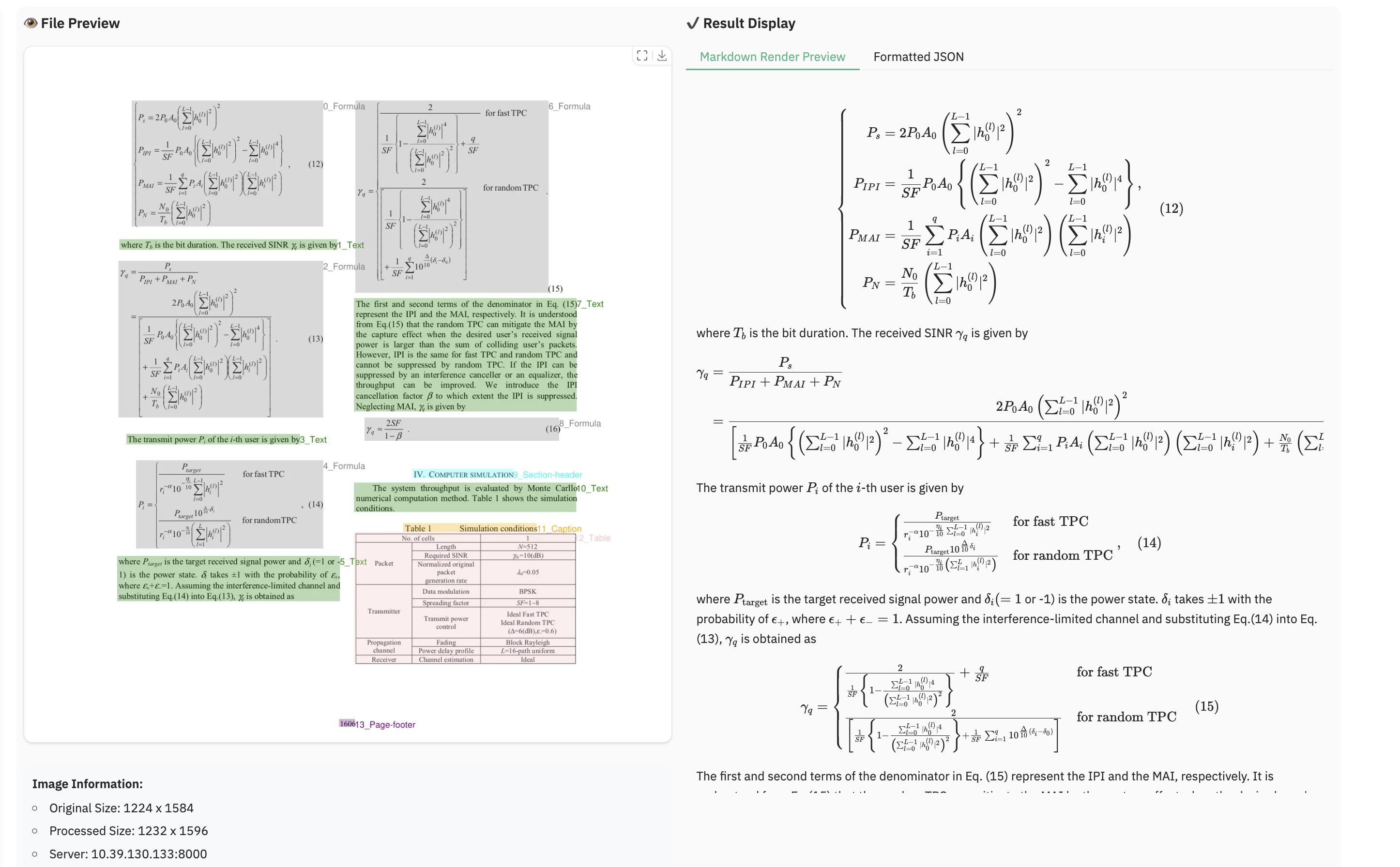
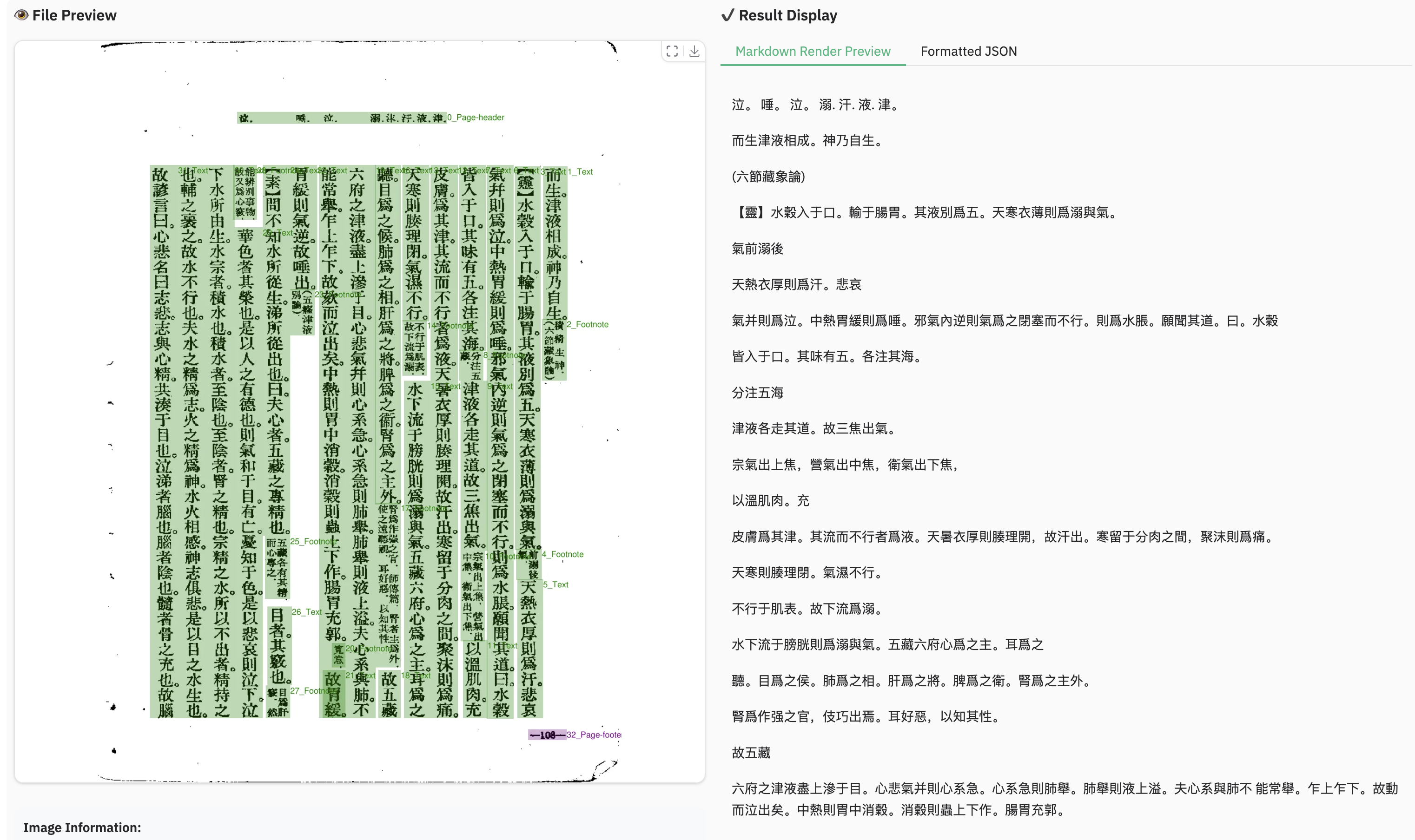
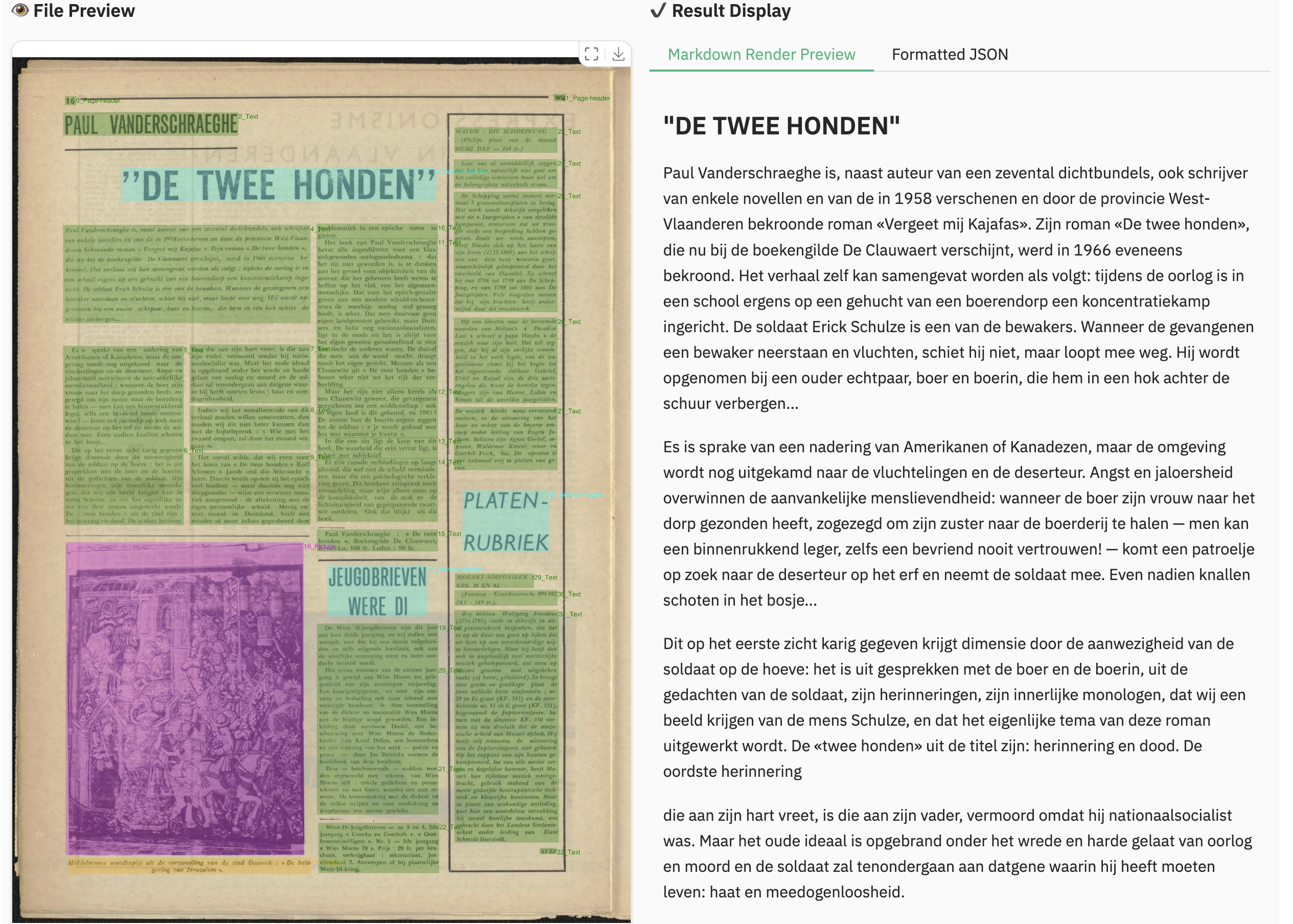
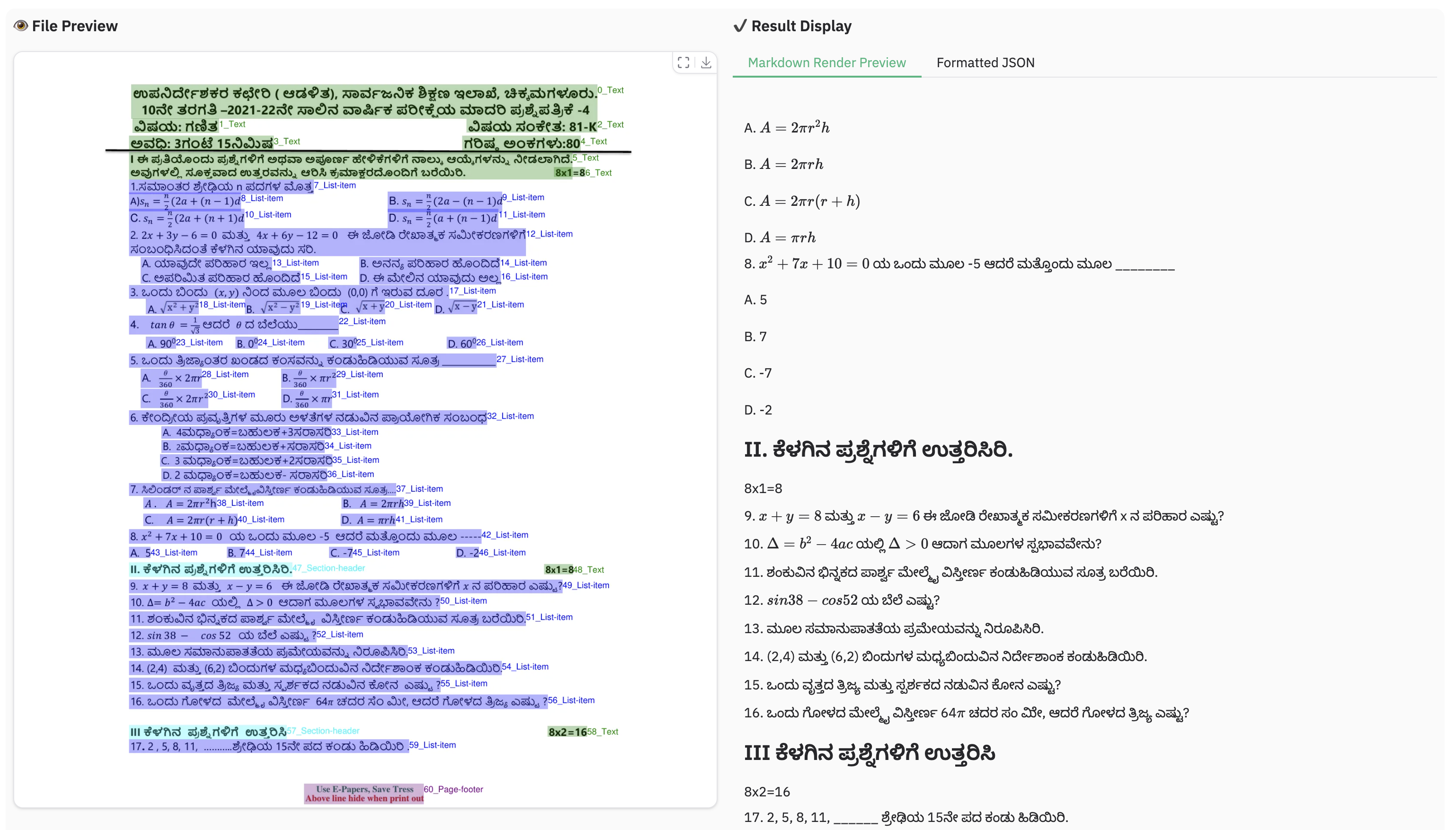
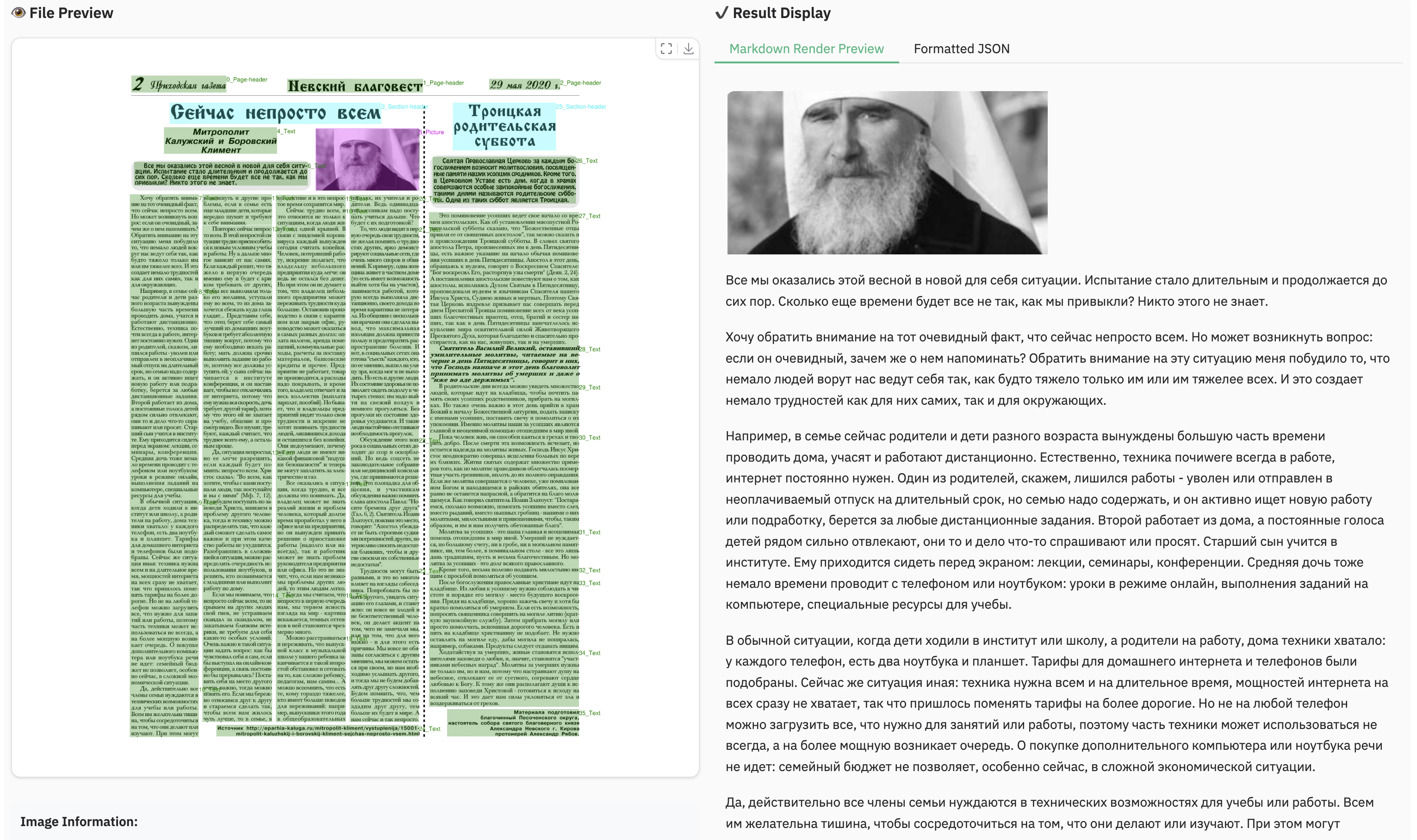
We would like to thank Qwen2.5-VL, aimv2, MonkeyOCR, OmniDocBench, PyMuPDF, for providing code and models.
We also thank DocLayNet, M6Doc, CDLA, D4LA for providing valuable datasets.
-
Complex Document Elements:
- Table&Formula: dots.ocr is not yet perfect for high-complexity tables and formula extraction.
- Picture: Pictures in documents are currently not parsed.
-
Parsing Failures: The model may fail to parse under certain conditions:
- When the character-to-pixel ratio is excessively high. Try enlarging the image or increasing the PDF parsing DPI (a setting of 200 is recommended). However, please note that the model performs optimally on images with a resolution under 11289600 pixels.
- Continuous special characters, such as ellipses (
...) and underscores (_), may cause the prediction output to repeat endlessly. In such scenarios, consider using alternative prompts likeprompt_layout_only_en,prompt_ocr, orprompt_grounding_ocr(details here).
-
Performance Bottleneck: Despite its 1.7B parameter LLM foundation, dots.ocr is not yet optimized for high-throughput processing of large PDF volumes.
We are committed to achieving more accurate table and formula parsing, as well as enhancing the model's OCR capabilities for broader generalization, all while aiming for a more powerful, more efficient model. Furthermore, we are actively considering the development of a more general-purpose perception model based on Vision-Language Models (VLMs), which would integrate general detection, image captioning, and OCR tasks into a unified framework. Parsing the content of the pictures in the documents is also a key priority for our future work. We believe that collaboration is the key to tackling these exciting challenges. If you are passionate about advancing the frontiers of document intelligence and are interested in contributing to these future endeavors, we would love to hear from you. Please reach out to us via email at: [yanqing4@xiaohongshu.com].
