





一键重装脚本 English

- 一键安装 Linux,支持 19 种常见发行版
- 一键安装 Windows,使用官方 ISO 安装而非自制镜像,
脚本会自动获取 ISO 链接、自动安装 Virtio 等常见驱动 - 支持任意方向重装,即
Linux to Linux、Linux to Windows、Windows to Windows、Windows to Linux - 无需填写 IP 参数,自动识别动静态,支持
/32、/128、网关不在子网范围内、纯 IPv6、双网卡 - 专门适配低配小鸡,比官方 netboot 需要更少的内存
- 全程用分区表 ID 识别硬盘,确保不会写错硬盘
- 支持 BIOS、EFI 引导,支持 ARM 服务器
- 不含自制包,所有资源均实时从镜像源获得
原系统可以是表格中的任意系统
目标系统的配置要求如下:
| 系统 | 版本 | 内存 | 硬盘 |
|---|---|---|---|
| 3.18, 3.19, 3.20, 3.21 | 256 MB | 1 GB | |
| 9, 10, 11, 12 | 256 MB | 1 ~ 1.5 GB ^ | |
| 滚动 | 256 MB | 1 ~ 1.5 GB ^ | |
 Ubuntu Ubuntu | 16.04 LTS - 24.04 LTS, 25.04 | 512 MB * | 2 GB |
 Anolis Anolis | 7, 8, 23 | 512 MB * | 5 GB |
 Rocky Rocky  Oracle Oracle | 8, 9 | 512 MB * | 5 GB |
| 8, 9, Stream 23 | 512 MB * | 5 GB | |
 CentOS Stream CentOS Stream | 9, 10 | 512 MB * | 5 GB |
| 41, 42 | 512 MB * | 5 GB | |
| 20.03 LTS - 24.03 LTS, 25.03 | 512 MB * | 5 GB | |
 openSUSE openSUSE | Leap 15.6, Tumbleweed (滚动) | 512 MB * | 5 GB |
| 24.11 | 512 MB | 5 GB | |
 Arch Arch | 滚动 | 512 MB | 5 GB |
 Gentoo Gentoo | 滚动 | 512 MB | 5 GB |
 安同 OS 安同 OS | 滚动 | 512 MB | 5 GB |
| 公测 | 512 MB | 8 GB | |
 Windows (DD) Windows (DD) | 任何 | 512 MB | 取决于镜像 |
| Windows (ISO) | Vista, 7, 8.x (Server 2008 - 2012 R2) | 512 MB | 25 GB |
| Windows (ISO) | 10, 11 (Server 2016 - 2025) | 1 GB | 25 GB |
* 表示使用云镜像安装,非传统网络安装
^ 表示需要 256 MB 内存 + 1.5 GB 硬盘,或 512 MB 内存 + 1 GB 硬盘
[!WARNING] ❌ 本脚本不支持 OpenVZ、LXC 虚拟机
 Linux)
国外服务器:
curl -O https://raw.githubusercontent.com/bin456789/reinstall/main/reinstall.sh || wget -O reinstall.sh $_
国内服务器:
curl -O https://cnb.cool/bin456789/reinstall/-/git/raw/main/reinstall.sh || wget -O reinstall.sh $_
[!IMPORTANT] 请先关闭
Windows Defender的实时保护功能。该功能会阻止certutil下载任何文件。
解决 Windows 7 下无法下载脚本
由于不支持 TLS 1.2、SHA-256、根证书没有更新等原因,Vista,7 和 Server 2008 (R2) 可能无法自动下载脚本,因此需要手动下载,具体操作如下:
用 IE 下载 (先在 IE 高级设置里启用 TLS 1.2),或者通过远程桌面,将这两个文件保存到同一个目录
使用时运行下载的 reinstall.bat
国外服务器:
certutil -urlcache -f -split https://raw.githubusercontent.com/bin456789/reinstall/main/reinstall.bat
国内服务器:
certutil -urlcache -f -split https://cnb.cool/bin456789/reinstall/-/git/raw/main/reinstall.bat
所有功能 都可在 Linux / Windows 下运行
- Linux 下运行
bash reinstall.sh ... - Windows 下先运行
cmd,再运行reinstall.bat ...- 如果参数中的链接包含特殊字符,要用
""将链接包起来,不能用''
- 如果参数中的链接包含特殊字符,要用
- 用户名
root默认密码123@@@ - 安装最新版可不输入版本号
- 最大化利用磁盘空间:不含 boot 分区(Fedora 例外),不含 swap 分区
- 自动根据机器类型选择不同的优化内核,例如
Cloud、HWE内核 - 安装 Red Hat 时需填写 https://access.redhat.com/downloads/content/rhel 得到的
qcow2镜像链接,也可以安装其它类 RHEL 系统,例如Alibaba Cloud Linux和TencentOS Server - 重装后如需修改 SSH 端口或者改成密钥登录,注意还要修改
/etc/ssh/sshd_config.d/里面的文件
bash reinstall.sh anolis      7|8|23
                  opencloudos 8|9|23
                  rocky       8|9
                  redhat      8|9   --img="http://xxx.com/xxx.qcow2"
                  oracle      8|9
                  almalinux   8|9
                  centos      9|10
                  fedora      41|42
                  nixos       24.11
                  debian      9|10|11|12
                  opensuse    15.6|tumbleweed
                  alpine      3.18|3.19|3.20|3.21
                  openeuler   20.03|22.03|24.03|25.03
                  ubuntu      16.04|18.04|20.04|22.04|24.04|25.04 [--minimal]
                  kali
                  arch
                  gentoo
                  aosc
                  fnos
--password PASSWORD设置密码--ssh-key KEY设置 SSH 登录公钥,支持以下格式。当使用公钥时,密码为空--ssh-key "ssh-rsa ..."--ssh-key "ssh-ed25519 ..."--ssh-key "ecdsa-sha2-nistp256/384/521 ..."--ssh-key http://path/to/public_key--ssh-key github:your_username--ssh-key gitlab:your_username--ssh-key /path/to/public_key--ssh-key C:\path\to\public_key
--ssh-port PORT修改 SSH 端口(安装期间观察日志用,也作用于新系统)--web-port PORT修改 Web 端口(安装期间观察日志用)--hold 2安装结束后不重启,此时可以 SSH 登录修改系统内容,系统挂载在/os(此功能不支持 Debian/Kali)
[!TIP] 安装 Debian/Kali 时,x86 可通过商家后台 VNC 查看安装进度,ARM 可通过串行控制台查看安装进度。
安装其它系统时,可通过多种方式(SSH、HTTP 80 端口、商家后台 VNC、串行控制台)查看安装进度。
即使安装过程出错,也能通过 SSH 运行/trans.sh alpine安装到 Alpine。
实验性功能
云镜像安装 Debian
- 适合于 CPU 较慢的机器
bash reinstall.sh debian --ci
ISO 安装 CentOS, AlmaLinux, Rocky, Fedora
- 仅支持内存大于 2G 且为动态 IP 的机器
- 密码
123@@@,SSH 端口22,不支持用参数修改
bash reinstall.sh centos --installer
ISO 安装 Ubuntu
- 仅支持内存大于 1G 且为动态 IP 的机器
- 密码
123@@@,SSH 端口22,不支持用参数修改
bash reinstall.sh ubuntu --installer
- 支持
rawvhd格式的镜像(未压缩,或者压缩成.gz.xz.zst.tar.tar.gz.tar.xz.tar.zst) - DD Windows 镜像时,会自动扩展系统盘,静态 IP 的机器会配置好 IP,可能首次开机几分钟后才生效
- DD Linux 镜像时,不会修改镜像的任何内容
bash reinstall.sh dd --img "https://example.com/xxx.xz"
--allow-ping允许被 Ping (仅限 DD Windows)--rdp-port PORT修改 RDP 端口 (仅限 DD Windows)--ssh-port PORT修改 SSH 端口(安装期间观察日志用)--web-port PORT修改 Web 端口(安装期间观察日志用)--hold 2DD 结束后不重启,此时可以 SSH 登录修改系统内容,Windows 系统会挂载在/os,Linux 系统不会自动挂载
[!TIP] 可通过多种方式(SSH、HTTP 80 端口、商家后台 VNC、串行控制台)查看安装进度。
即使安装过程出错,也能通过 SSH 运行/trans.sh alpine安装到 Alpine。
- 可用 ssh 连接,进行备份/恢复硬盘、手动 DD、修改分区、手动安装 Alpine/Arch/Gentoo 等操作
- 用户名
root默认密码123@@@ - 如果手动操作没有破坏原系统,再次重启将回到原系统
bash reinstall.sh alpine --hold=1
--password PASSWORD设置密码--ssh-port PORT修改 SSH 端口--ssh-key KEY设置 SSH 登录公钥,支持以下格式。当使用公钥时,密码为空--ssh-key "ssh-rsa ..."--ssh-key "ssh-ed25519 ..."--ssh-key "ecdsa-sha2-nistp256/384/521 ..."--ssh-key http://path/to/public_key--ssh-key github:your_username--ssh-key gitlab:your_username--ssh-key /path/to/public_key--ssh-key C:\path\to\public_key
 netboot.xyz
- 可使用商家后台 VNC 手动安装 更多系统
- 如果手动操作没有破坏原系统,再次重启将回到原系统
bash reinstall.sh netboot.xyz
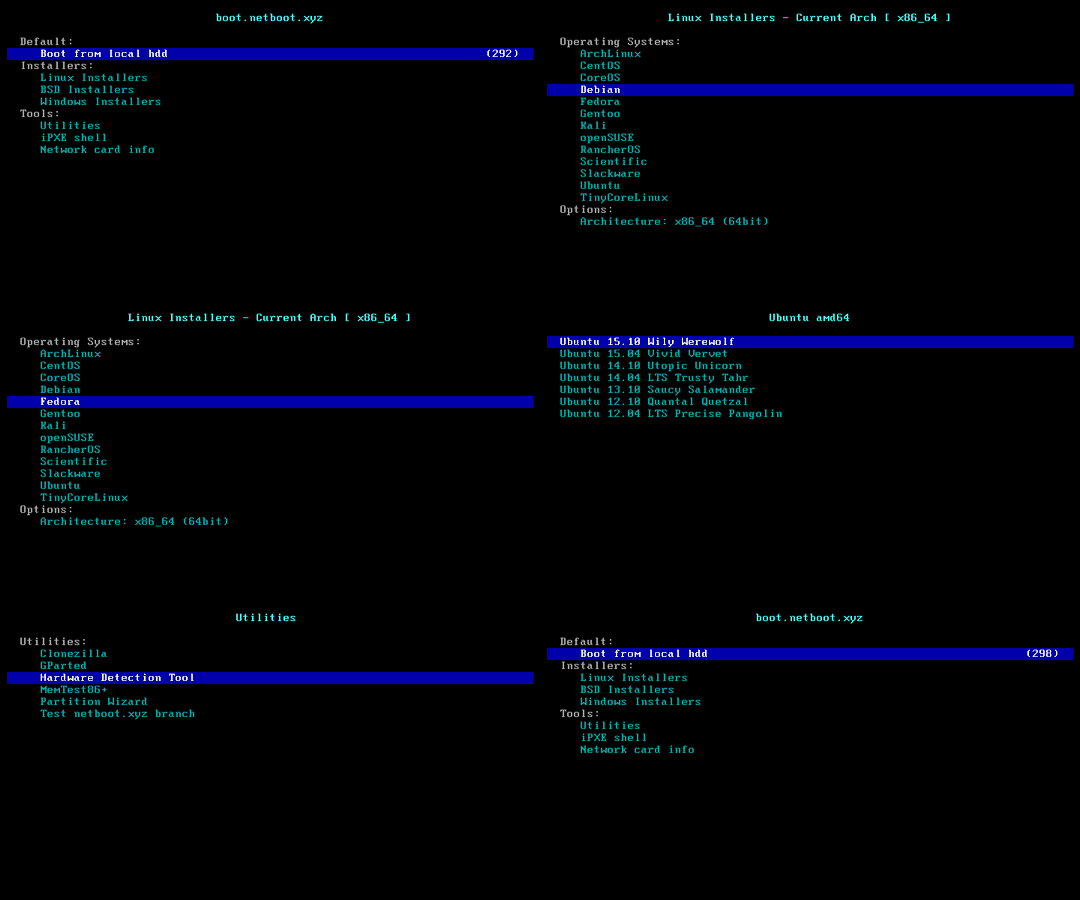
- 用户名
administrator默认密码123@@@ - 如果远程登录失败,可以尝试使用用户名
.\administrator - 静态机器会自动配置好 IP,可能首次开机几分钟后才生效
- 支持所有语言
- Windows (Vista ~ 11)
- Windows Server (2008 ~ 2025)
- Windows Server Essentials *
- Windows Server (Semi) Annual Channel *
- Hyper-V Server *
- Azure Stack HCI *
[!CAUTION] 目前该 ISO 仓库禁止了直链下载,因此该方法已失效
- 脚本会从 https://massgrave.dev/genuine-installation-media 查找 ISO,该网站专门提供官方 ISO 下载
- 上面带 * 的系统不支持自动查找 ISO
bash reinstall.sh windows \
     --image-name "Windows 11 Enterprise LTSC 2024" \
     --lang zh-cn
支持的语言
ar-sa
bg-bg
cs-cz
da-dk
de-de
el-gr
en-gb
en-us
es-es
es-mx
et-ee
fi-fi
fr-ca
fr-fr
he-il
hr-hr
hu-hu
it-it
ja-jp
ko-kr
lt-lt
lv-lv
nb-no
nl-nl
pl-pl
pt-pt
pt-br
ro-ro
ru-ru
sk-sk
sl-si
sr-latn-rs
sv-se
th-th
tr-tr
uk-ua
zh-cn
zh-hk
zh-tw
- 如果不知道
--image-name,可以随便填,在重启后连接 SSH,根据错误提示重新输入正确的值
bash reinstall.sh windows \
     --image-name "Windows 11 Enterprise LTSC 2024 Evaluation" \
     --iso "https://go.microsoft.com/fwlink/?linkid=2289029"
或者磁力链接
bash reinstall.sh windows \
     --image-name "Windows 11 Enterprise LTSC 2024" \
     --iso "magnet:?xt=urn:btih:7352bd2db48c3381dffa783763dc75aa4a6f1cff"
以下网站可找到 ISO 链接
- 正式版
- https://msdl.gravesoft.dev
- https://massgrave.dev/genuine-installation-media
- https://next.itellyou.cn
- https://www.xitongku.com
- https://www.microsoft.com/software-download/windows10 (需用非 Windows User-Agent 打开)
- https://www.microsoft.com/software-download/windows11
- https://www.microsoft.com/software-download/windows11arm64
- 评估版
- https://www.microsoft.com/evalcenter/download-windows-10-enterprise
- https://www.microsoft.com/evalcenter/download-windows-11-enterprise
- https://www.microsoft.com/evalcenter/download-windows-11-iot-enterprise-ltsc-eval
- https://www.microsoft.com/evalcenter/download-windows-server-2012-r2
- https://www.microsoft.com/evalcenter/download-windows-server-2016
- https://www.microsoft.com/evalcenter/download-windows-server-2019
- https://www.microsoft.com/evalcenter/download-windows-server-2022
- https://www.microsoft.com/evalcenter/download-windows-server-2025
- Insider 预览版
--password PASSWORD设置密码--allow-ping设置 Windows 防火墙允许被 Ping--rdp-port PORT更改 RDP 端口--ssh-port PORT修改 SSH 端口(安装期间观察日志用)--web-port PORT修改 Web 端口(安装期间观察日志用)--add-driver INF_OR_DIR添加额外驱动,填写 .inf 路径,或者 .inf 所在的文件夹- 需先下载驱动到本地
- 可多次设置该参数以添加不同的驱动
--hold 2在进入 Windows 官方安装程序之前,可以 SSH 登录修改硬盘内容,硬盘挂载在/os
- Virtio (Virtio, 阿里云, 腾讯云, GCP)
- XEN (
XEN(未签名), Citrix, AWS) - AWS (ENA 网卡, NVME 存储控制器)
- GCP (gVNIC 网卡, GGA 显卡)
- Azure (MANA 网卡)
- Intel (VMD 存储控制器, 网卡: 7, 8, 8.1, 10, 11, 2008 R2, 2012, 2012 R2, 2016, 2019, 2022, 2025)
通常一个 ISO 会包含多个系统版本,例如家庭版、专业版。映像名称 --image-name 就是用来指定要安装的版本,填写时不区分大小写
可以用 DISM、DISM++、Wimlib 等工具查询 ISO 包含的映像名称
常用的映像名称有:
Windows 7 Ultimate
Windows 11 Pro
Windows 11 Enterprise LTSC 2024
Windows Server 2025 SERVERDATACENTER
如何用 DISM++ 查询 ISO 包含的映像名称
打开文件菜单 > 打开映像文件,选择要安装的 iso,即可得到映像名称,所有映像名称都可以安装
[!WARNING] Vista (Server 2008) 和 32 位系统可能会缺少驱动
[!WARNING] 未开启 CSM 的 EFI 机器,无法安装 Windows 7 (Server 2008 R2)
Hyper-V (Azure) 需选择合适的虚拟机代系 https://learn.microsoft.com/windows-server/virtualization/hyper-v/plan/should-i-create-a-generation-1-or-2-virtual-machine-in-hyper-v
[!WARNING] Windows 10 LTSC 2021 中文版镜像
zh-cn_windows_10_enterprise_ltsc_2021_x64_dvd_033b7312.iso的wsappx进程会长期占用 CPU解决方法是更新系统补丁,或者手动安装
VCLibs库 https://www.google.com/search?q=ltsc+wsappx
大部分 ARM 机器都支持安装最新版 Windows 11
安装过程可能会黑屏,串行控制台可能会显示 ConvertPages: failed to find range,均不影响正常安装
| 兼容性 | 云服务商 | 实例类型 | 问题 |
|---|---|---|---|
| ✔️ | Azure | B2pts_v2 | |
| ✔️ | 阿里云 | g6r, c6r | |
| ✔️ | 阿里云 | g8y, c8y, r8y | 有几率重启时卡开机 Logo,强制重启即可 |
| ✔️ | AWS | T4g | |
| ✔️ | Scaleway | COPARM1 | |
| ✔️ | Gcore | ||
| ❔ | 甲骨文云 | A1.Flex | 不一定能安装成功,越新创建的实例越容易成功 安装后还需要手动加载显卡驱动 |
| ❌ | 谷歌云 | t2a | 缺少网卡驱动 |
甲骨文云加载显卡驱动
使用远程桌面登录到服务器,打开设备管理器,找到显卡,选择更新驱动,在列表中选择 Red Hat VirtIO GPU DOD controller 即可。不需要提前下载驱动。


- Fork 本仓库
- 修改
reinstall.sh和reinstall.bat开头的confhome和confhome_cn - 修改其它代码

感谢以下商家提供白嫖机器
